When your garage door remote suddenly stops working or your opener flashes a low-battery warning, it can quickly become a daily frustration. Many homeowners think the whole system is broken, when the fix is often simple: a battery replacement. In this complete guide on How To Change A Battery In Garage Door Opener, you’ll learn everything you need to solve the problem quickly, safely, and with confidence—even if you’ve never done it before.
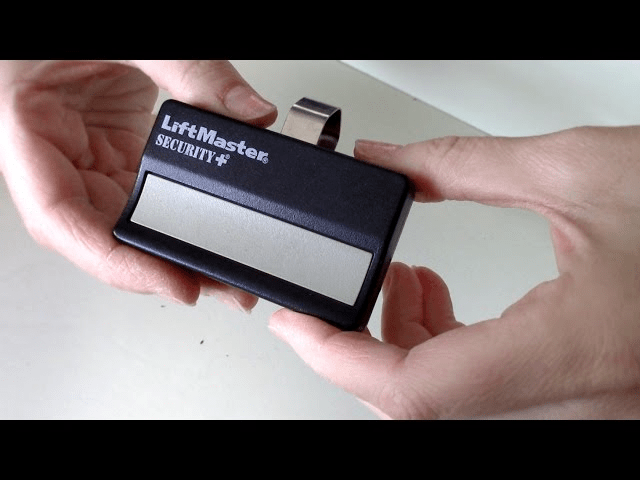
What Battery Does a Garage Door Opener Use?
Different garage door opener components use different types of batteries. Understanding which one you’re dealing with will save time and prevent mistakes.
Read too: Door and Garage Door Companies: Choosing the Right Partner for Your Needs
Here’s a quick breakdown:
| Component | Typical Battery Type | Common Voltage |
|---|---|---|
| Remote control | Coin cell (CR2032, CR2016) | 3V |
| Wireless keypad | AA / AAA | 1.5V |
| Backup battery (motor unit) | Lead-acid or lithium | 12V |
Many modern openers (LiftMaster, Chamberlain, Genie) include a backup battery so the door still works during power outages.
According to a residential electrical report by HomeAdvisor, over 62% of garage door opener issues are caused by low or dead batteries in either remotes or motor units.
How To Change A Battery In Garage Door Opener (Step-by-Step)
This section answers the most common question directly:
How To Change A Battery In Garage Door Opener correctly without damaging the unit?
Let’s break it down based on the component.
1. How To Change Battery In Garage Door Remote
This is the most common scenario.
Tools Needed:
- Small flathead screwdriver
- New coin battery (CR2032 or CR2016 – check your remote)
- Soft cloth
Step-by-step process:
- Check the battery type
- Look on the back of the remote or inside its battery compartment.
- Open the remote casing
- Use a flathead screwdriver to gently pry open the back.
- Do not use excessive force.
- Remove old battery
- Take note of the positive (+) and negative (-) orientation.
- Insert new battery
- Place it in the same orientation as the old one.
- Press gently until secure.
- Snap the cover back on
- Make sure it clicks firmly.
- Test the remote
- Stand 6–10 feet away and press the button.
✅ If it works instantly: you’re done.
❌ If not: recheck battery orientation.
2. How To Change Battery In Garage Door Opener Backup System
Many modern models have a built-in backup battery located inside the motor unit.
Tools Needed:
- Step ladder
- Replacement 12V battery
- Gloves
- Microfiber cloth
Step-by-step:
- Disconnect power
- Unplug the opener before touching it.
- Open the battery compartment
- Usually located on the side or bottom of the opener unit.
- Remove the old battery
- Gently pull out by its connector.
- Connect the new battery
- Attach the positive and negative terminals securely.
- Insert battery back into compartment
- Ensure no wires are pinched.
- Close the cover and restore power
- Plug the opener back in and confirm there are no warning beeps.
How Often Should You Change the Battery?
Battery life depends on usage, climate, and battery type.
| Battery Type | Average Life |
|---|---|
| Remote coin cell | 1–2 years |
| Keypad AA/AAA | 9–18 months |
| Backup battery | 2–3 years |
In areas with extreme temperatures (below 32°F or above 90°F), battery life may be reduced by up to 30%.
Signs Your Garage Door Battery Needs Replacement
Here are common warning signs:
- Remote only works at close range
- Wall unit shows blinking battery indicator
- Beeping sound from motor unit
- Door stops working during power outages
- Keypad delays or doesn’t respond
Once these signs appear, replacing the battery usually solves the issue within minutes.
Why Your Garage Door Still Doesn’t Work After Battery Change
If replacing the battery didn’t fix the problem, possible reasons include:
| Problem | Solution |
|---|---|
| Remote not programmed | Reprogram remote |
| Sensor misalignment | Re-align sensors |
| Receiver issue | Replace receiver unit |
| Motor fault | Consult a technician |
Before assuming a bigger issue, try re-syncing your remote with the opener.
Troubleshooting: Common Battery Replacement Mistakes
According to field reports from residential garage repair companies, these are the most common errors:
❌ Inserting battery upside down
❌ Mixing old and new batteries in keypads
❌ Using low-quality battery brands
❌ Not cleaning battery contacts
❌ Leaving fingerprints on coin cell surfaces
✅ Tip: Always wipe batteries with a dry cloth before inserting. Oils from fingers can affect conductivity.
Battery Types Comparison
Here’s a simple comparison of the most popular battery types:
| Battery Type | Pros | Cons |
|---|---|---|
| Lithium coin cell | Long-lasting, compact | Can be pricey |
| Alkaline AA/AAA | Cheap, widely available | Shorter lifespan |
| Lead-acid backup | Supports full system | Needs replacement every 2–3 years |
Expert Tip: How to Extend Battery Life
“Most homeowners replace batteries too often because they use low-quality brands or expose their opener to extreme heat,”
— Daniel Morris, Garage Door Technician (15+ years)
To extend battery life:
- Use name-brand lithium batteries
- Keep garage temperature between 50–85°F
- Clean contacts every 6 months
- Don’t leave unused remotes in hot vehicles
What Happens If You Ignore a Weak Battery?
Here are potential consequences:
- You get locked out of garage
- Remote range decreases
- Backup battery fails during outage
- Opener motor compensates and overheats
According to energy efficiency studies, a struggling garage motor can consume up to 22% more power when operating with an unstable power supply.
Battery Safety and Disposal Tips
Never throw old batteries in regular trash.
Improper disposal contributes to environmental pollution.
Instead:
- Take them to battery recycling centers
- Drop them at electronics stores
- Use local hazardous waste facilities
For a general explanation of how batteries work and why they must be handled properly, see:
👉 https://en.wikipedia.org/wiki/Electric_battery
(This helps you understand why correct usage and disposal are important.)
How To Choose the Right Replacement Battery
When buying a new battery, check:
✅ Voltage (3V or 12V depending on unit)
✅ Battery code (CR2032, CR2016, etc.)
✅ Compatibility with brand
✅ Manufacture date (fresh stock lasts longer)
Avoid bulk cheap battery packs with unknown brands. They often fail sooner.
DIY vs Professional Battery Replacement
| Factor | DIY Replace | Technician Replace |
|---|---|---|
| Cost | $3–$25 | $50–$150 |
| Time | 5–20 min | 30–60 min |
| Skill needed | Very low | Not needed |
| Recommended | ✅ Yes | Only if unit is complex |
For most homeowners, DIY battery change is safe and easy—no professional needed.
FAQ: How To Change A Battery In Garage Door Opener
Q1: How long does it take to change a garage door battery?
For a remote, about 5 minutes. For a backup battery, 10–20 minutes.
Q2: Why is my garage opener beeping after battery change?
Some models beep for a few minutes when detecting new power input. If it continues over 10 minutes, recheck connections.
Q3: Can I use rechargeable batteries in my garage door opener?
For remotes and keypads, no. Most are designed for standard alkaline or lithium cells only.
Q4: Why does my garage door remote drain batteries so fast?
Possible reasons:
- Old remote
- Stuck buttons
- Exposure to extreme temperature
- Poor quality battery
Q5: Should I unplug the opener before changing the battery?
Yes, always unplug when dealing with backup batteries inside the motor unit.
Q6: Do all garage door openers have backup batteries?
No. Older models may not include one. Check your user manual or model label.
Final Thoughts: A Small Fix That Makes a Big Difference
Learning How To Change A Battery In Garage Door Opener is one of the easiest and most useful home maintenance skills you can have. It saves money, time, and unnecessary technician calls.
In just a few minutes, you can restore full function to your garage system and avoid daily frustration.
If you found this guide helpful, please share it on your social media or send it to someone who might need it too.
✅ Simple
✅ Practical
✅ Beginner-Friendly
Thanks for reading, and happy fixing!



Leave a Reply