If you’re thinking, “My Garage Door Opener Doesn’t Have A Learn Button,” you’re probably trying to program a new remote and feeling stuck. Most modern openers have a clearly labeled “Learn” button—but older models don’t.
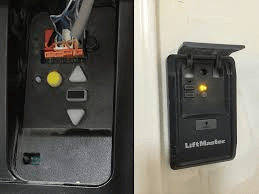
The good news? You can still program your remote. You just need to identify what type of system you have and follow the right method. Let’s break it down step-by-step.
Read too: Mastering Quantum Garage Door Opener Programming: A Comprehensive Guide
Why Doesn’t My Garage Door Opener Have A Learn Button?
When homeowners say “My Garage Door Opener Doesn’t Have A Learn Button,” the issue usually falls into one of two categories:
- You have an older dip switch system
- The Learn button is hidden or labeled differently
- The unit predates rolling code technology
Modern openers (manufactured after 1993) typically use rolling code security systems. Older units rely on physical dip switches to match the remote to the motor.
You can review the basic evolution of the garage door opener on Wikipedia for context.
According to industry data, approximately 20–25% of U.S. homes still use openers older than 15 years, meaning dip switch systems are still common.
Let’s determine which one you have.
How Do I Know If My Opener Uses Dip Switches?
Step 1: Open the Remote
Remove the battery cover on your remote.
If you see:
- 8–12 small white switches
- Tiny toggles labeled 1–8 or 1–12
You have a dip switch system.
Step 2: Open the Motor Unit
Unplug the opener for safety.
Remove the light cover on the motor housing and check inside. If you see matching dip switches, that confirms it.
How To Program A Dip Switch Garage Door Opener
If your system uses dip switches, programming is straightforward.
Step-by-Step Instructions:
- Turn off power to the opener.
- Open the motor housing.
- Locate the dip switch panel.
- Write down the exact switch positions (Up/Down pattern).
- Open your remote.
- Set the remote dip switches to match EXACTLY.
- Replace covers.
- Restore power.
- Test the remote.
✔ Matching patterns = successful programming.
💡 Example:
If motor switches are: Up, Down, Up, Up, Down, Down, Up, Down
The remote must mirror that exact pattern.
What If There Are No Dip Switches Either?
If there are no dip switches and no visible Learn button, consider:
- The Learn button may be under a label
- It may be inside the light compartment
- The unit may require a wired keypad program method
Common Learn Button Colors:
- Yellow
- Red
- Purple
- Green
Some manufacturers place the button near the antenna wire.
Can I Use A Universal Remote?
Yes — but compatibility matters.
Universal Remote Compatibility Chart
| System Type | Works With Universal Remote? | Notes |
|---|---|---|
| Dip Switch | Yes | Must manually match switches |
| Rolling Code (Learn Button) | Yes | Requires sync process |
| Very Old Fixed Code | Sometimes | May need specific model |
When buying a universal remote, check:
- Brand compatibility
- Frequency (e.g., 315 MHz or 390 MHz)
- Manufacture year range
Most universal remotes cost $25–$50, making them affordable replacements.
What Is Rolling Code Technology?
Rolling code technology changes the access code every time the remote is used. This prevents code grabbing.
Openers manufactured after 1993 typically use this security feature.
If your opener lacks rolling code, upgrading improves security significantly.
According to home security reports, outdated fixed-code openers are more vulnerable to unauthorized access.
How To Program Without A Learn Button (Alternative Method)
Some units allow programming using wall console buttons.
Generic Alternative Method:
- Press and hold the wall control button.
- While holding, press the remote button.
- Hold both for 5–10 seconds.
- Release and test.
Note: This only works on certain mid-generation models.
Should I Replace My Garage Door Opener?
If your unit:
- Is over 20 years old
- Lacks safety sensors
- Uses outdated fixed code
- Frequently malfunctions
Replacement may be safer long-term.
Replacement Cost Overview
| Item | Average Cost |
|---|---|
| Basic Chain-Drive | $300–$450 installed |
| Belt-Drive (Quiet) | $400–$650 installed |
| Smart Opener | $500–$800 installed |
Modern openers include:
- Smartphone control
- Battery backup
- Enhanced security encryption
- Quieter operation
Troubleshooting Checklist
Before assuming failure:
- Check power source
- Replace remote battery
- Inspect antenna wire
- Confirm frequency compatibility
Small oversights cause most programming failures.
FAQ Section
Why does my garage door opener not have a Learn button?
Older models use dip switch systems instead of Learn buttons. These require manual switch matching.
Can I add a Learn button to my opener?
No. Learn functionality is built into the circuit board. You cannot retrofit it.
How do I reset an old garage door opener?
Unplug the unit for 60 seconds. For dip switch models, change the switch pattern and match remotes again.
Are dip switch garage door openers safe?
They function properly but lack modern rolling code security. Consider upgrading if security is a concern.
Can I still buy remotes for old openers?
Yes. Universal remotes are widely available, but verify frequency and compatibility.
How long do garage door openers last?
Average lifespan is 10–15 years. With maintenance, some last 20+ years.
Conclusion
If you’re thinking, “My Garage Door Opener Doesn’t Have A Learn Button,” don’t panic. Most likely, you have a dip switch system or a hidden Learn feature.
Start by identifying your opener type. Match dip switches carefully or verify compatibility with a universal remote. If your unit is outdated, upgrading can improve security, convenience, and noise levels.
Solving this issue is easier than it seems — and now you know exactly what to do.
If this guide helped you, share it with someone struggling with the same garage door problem.



Leave a Reply