If you own a Chamberlain garage door opener, you already know the brand is recognized for its reliability, durability, and smart technology. However, when it comes to installation, programming, and troubleshooting, the Chamberlain Power Drive Heavy Duty Garage Door Opener Manual becomes your best friend. This manual provides clear step-by-step instructions to ensure your garage door opener works smoothly and lasts for years.
In this article, we’ll walk you through everything you need to know about using the manual, from installation basics to troubleshooting common problems. Whether you’re a first-time homeowner or a seasoned DIY enthusiast, this guide will help you maximize your opener’s performance.
Read too: How To Replace Garage Door Roller Like a Pro? Step-by-Step Guide
Why the Manual Is Essential
Many people set up appliances or devices without reading the manual—only to run into issues later. With the Chamberlain Power Drive system, the manual is critical because:
- It outlines safety instructions that protect you and your family.
- It provides installation diagrams to make assembly easier.
- It explains programming steps for remotes, keypads, and sensors.
- It includes troubleshooting tips for common problems.
- It details maintenance schedules to extend the opener’s lifespan.
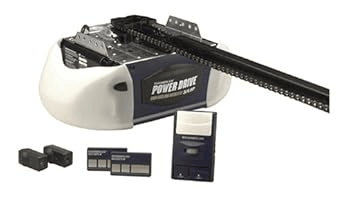
Having the Chamberlain Power Drive Heavy Duty Garage Door Opener Manual on hand is like having a personal technician ready to guide you.
Overview of the Chamberlain Power Drive System
The Chamberlain Power Drive series is designed for heavy-duty use, meaning it can handle larger and heavier garage doors with ease. Its features include:
- High-powered motor for lifting heavy garage doors.
- Durable chain or belt drive depending on the model.
- Safety sensors that prevent the door from closing on people or objects.
- Rolling code technology for secure remote operation.
- Optional smart features depending on the model.
The manual explains how each of these features should be properly set up and maintained.
Chamberlain Power Drive Heavy Duty Garage Door Opener Manual: Key Sections
When you open the manual, you’ll notice it is divided into multiple sections for convenience. Here are the most important ones:
1. Safety Guidelines
The manual emphasizes keeping children away from controls, never walking under a moving garage door, and ensuring the opener is installed correctly to avoid accidents.
2. Installation Instructions
It includes detailed diagrams showing how to assemble the rail, mount the motor unit, attach the chain or belt, and connect the door arm.
3. Electrical Setup
You’ll find information on wiring the safety sensors, connecting the wall control panel, and ensuring proper grounding.
4. Programming the Opener
The manual walks you through how to program remote controls, wireless keypads, and even vehicle-integrated buttons (like HomeLink).
5. Troubleshooting Guide
If your garage door won’t open, closes unexpectedly, or flashes an error code, the troubleshooting section provides quick fixes.
6. Maintenance Schedule
It outlines when to lubricate moving parts, check safety sensors, and inspect the chain or belt for wear.
Step-by-Step Setup Based on the Manual
To give you a clearer picture, here’s a simplified version of what the Chamberlain Power Drive Heavy Duty Garage Door Opener Manual covers for setup:
- Assemble the Rail and Motor Unit
- Lay the rail on the floor and attach it to the motor head.
- Secure the chain or belt drive according to instructions.
- Mount the Opener
- Attach the header bracket above the garage door.
- Lift the opener into place and secure it to ceiling brackets.
- Install Safety Sensors
- Place sensors on each side of the garage door about 6 inches from the floor.
- Align the sensors properly so the indicator lights show solid beams.
- Wire the Wall Control
- Connect wires from the wall-mounted button to the opener terminals.
- Test to ensure the control signals the motor correctly.
- Program the Remote Controls
- Press the “Learn” button on the opener.
- Press the button on your remote until the opener light flashes, indicating success.
- Test the System
- Check door movement for smooth operation.
- Ensure the auto-reverse safety system works by placing an object in the door’s path.
Troubleshooting Common Problems
Even with proper installation, issues may arise. The manual is packed with solutions for common scenarios, including:
- Garage door won’t close fully – Check sensor alignment.
- Door reverses immediately after touching floor – Adjust travel limits.
- Motor runs but the door doesn’t move – Inspect chain or belt tension.
- Remote control not working – Reprogram or replace batteries.
- Light flashes multiple times – Refer to error codes listed in the manual.
By following the manual’s troubleshooting section, you can often solve problems without calling a technician.
Maintenance Tips from the Manual
The Chamberlain Power Drive Heavy Duty Garage Door Opener Manual emphasizes routine maintenance to keep your system working smoothly:
- Lubricate moving parts (chain, hinges, rollers) every six months.
- Inspect safety sensors monthly for proper alignment.
- Check force settings to prevent unnecessary wear.
- Test auto-reverse monthly by placing a solid object in the door’s path.
- Replace backup batteries in remotes and keypads as needed.
Benefits of Using the Manual
Relying on the manual provides several benefits:
- Saves money by reducing unnecessary technician calls.
- Increases lifespan of your garage door opener through proper care.
- Improves safety by ensuring all features function correctly.
- Boosts convenience with accurate programming instructions for remotes and keypads.
Digital vs. Printed Manuals
If you’ve misplaced your printed manual, Chamberlain provides digital PDFs on their website. A digital version has advantages:
- Easily searchable by keywords.
- Can be stored on your smartphone for quick reference.
- Printable if you prefer physical copies.
Keeping both versions ensures you always have instructions at your fingertips.
Final Thoughts
Owning a garage door opener is convenient, but it comes with responsibility. By using the Chamberlain Power Drive Heavy Duty Garage Door Opener Manual, you ensure proper installation, safe operation, and long-term reliability.
Whether you’re setting it up for the first time, troubleshooting a malfunction, or maintaining your system, the manual is an invaluable resource. Think of it as a roadmap that helps you get the most out of your Chamberlain opener while keeping your family safe.


Leave a Reply