Have you ever been stuck outside your garage, juggling bags, or fumbling for your remote? The Genie 3-Button Keychain and Visor Garage Door Opener Remote offers a simple, secure, and compact solution for modern homeowners. Designed for both convenience and reliability, this remote ensures you never have to struggle with garage access again — whether you keep it on your visor or your keychain.
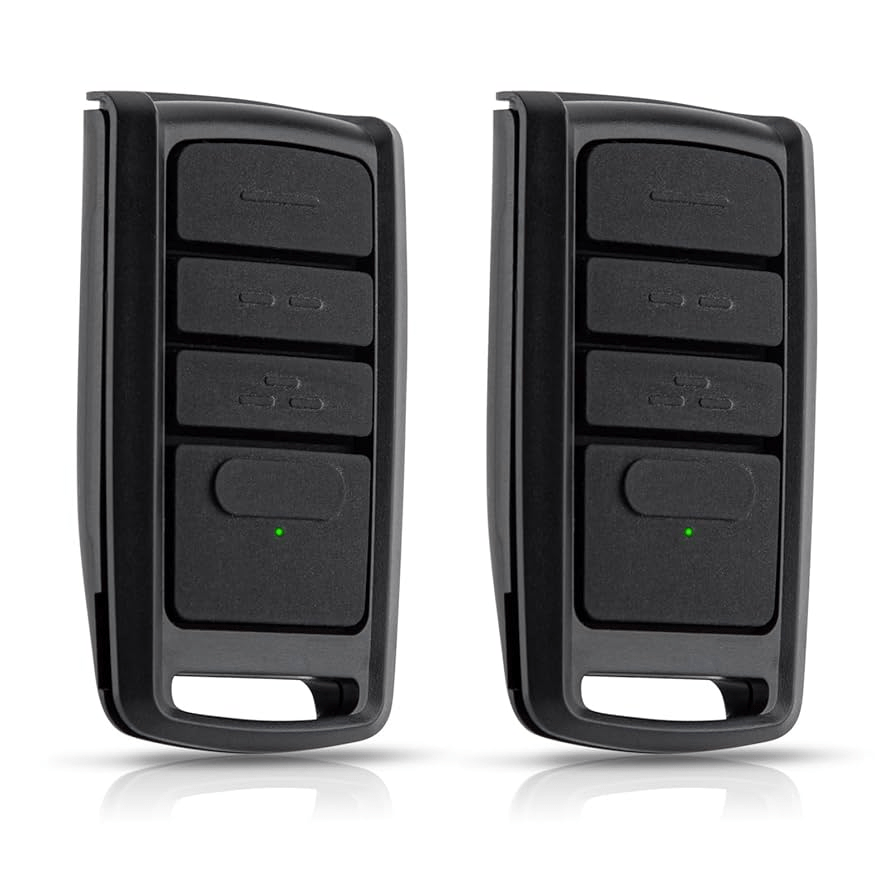
This article will walk you through everything you need to know about this versatile Genie remote — from its setup and features to troubleshooting and FAQs — so you can make the most of it in your smart home setup.
Read too: Door and Garage Door Companies: Choosing the Right Partner for Your Needs
What Is the Genie 3-Button Keychain and Visor Garage Door Opener Remote?
The Genie 3-Button Remote is a universal garage door opener designed to control up to three Genie garage door openers or Intellicode®-enabled devices. It’s small enough to fit on your keychain yet powerful enough to provide a consistent signal every time you press a button.
Key Features
- Three programmable buttons for multiple doors or devices
- Compact design with detachable visor clip for flexible use
- Intellicode® Security Technology — rolling code system prevents unauthorized access
- Battery-powered (CR2032 coin cell) for long-lasting operation
- Compatible with most Genie openers manufactured since 1995
The combination of portability, security, and compatibility makes this remote ideal for families, renters, and homeowners alike.
How to Program the Genie 3-Button Remote
Setting up your Genie remote is quick and requires no special tools. Follow these step-by-step instructions:
- Locate the “Learn” button on your Genie garage door opener unit (usually near the antenna wire or under the light lens).
- Press and release the “Learn” button. The indicator light will start blinking.
- Press and hold one of the buttons on your remote for 2–3 seconds.
- Wait for the garage light to flash or hear two clicks — this confirms successful pairing.
- Test the remote by pressing the programmed button to open or close your garage door.
If you’re pairing multiple devices, repeat the process with the other buttons.
Tip: Each of the three buttons can control a separate garage door opener or Genie accessory, such as a gate or light controller.
Compatibility: Will It Work With Your Garage Door?
The Genie 3-Button Keychain and Visor Remote works with most Genie openers that use Intellicode® I or II technology, including models made after 1995. It’s also compatible with select Overhead Door models (since Genie and Overhead Door are sister brands).
Here’s a quick comparison table:
| Genie Opener Model | Compatibility | Notes |
|---|---|---|
| Intellicode I (1995–2010) | ✅ | Works directly |
| Intellicode II (2011–Present) | ✅ | Works directly |
| Fixed code openers (Pre-1995) | ❌ | Not compatible |
| Overhead Door openers | ✅ | Check model compatibility |
For maximum accuracy, refer to your opener’s manual or the Genie compatibility chart on the official website.
Advantages and Disadvantages
| Pros | Cons |
|---|---|
| Compact and lightweight design | Limited to Genie-compatible systems |
| Controls up to 3 doors | Range can be affected by interference |
| Secure Intellicode® rolling code encryption | Battery replacement required periodically |
| Easy DIY programming | Lacks smartphone app integration |
Overall, the pros far outweigh the cons for most homeowners who need a simple, affordable, and secure remote solution.
Security Features You Can Trust
Security is a major concern for homeowners, and Genie doesn’t disappoint. The Intellicode® rolling code technology changes the access code each time the remote is used, preventing hackers or signal thieves from copying your garage code.
According to Wikipedia’s article on rolling code security, this dynamic code system drastically reduces the risk of unauthorized access compared to fixed-code remotes — making it a reliable option for safety-conscious families.
Battery Life and Maintenance
The Genie 3-Button remote uses a CR2032 coin cell battery, which typically lasts 2–3 years with regular use. To replace it:
- Open the battery compartment with a small screwdriver.
- Remove the old battery carefully.
- Insert a new CR2032 battery, positive side facing up.
- Snap the compartment closed.
Pro Tip: Always keep a spare battery in your car’s glove box for emergencies.
Troubleshooting Common Issues
Here are the most common problems users face and how to fix them:
- Remote not responding: Replace the battery or reprogram the remote.
- Short range: Check for radio interference (LED bulbs or Wi-Fi routers can affect signal).
- Multiple doors not working: Ensure each button is properly programmed to its respective door.
- Opener light flashing but door not moving: Check the garage’s safety sensors for blockage or misalignment.
Where to Buy
You can find the Genie 3-Button Keychain and Visor Garage Door Opener Remote at most major retailers, including Amazon, Home Depot, Lowe’s, and Genie’s official website. Prices typically range between $25–$35, depending on the package and seller.
For the best experience, purchase from authorized Genie dealers to ensure product authenticity and warranty coverage.
FAQ Section
1. Can I program this remote to work with non-Genie openers?
No, this model is specifically designed for Genie openers with Intellicode® technology. Other brands require their compatible remotes.
2. How far can the Genie remote work from the garage?
Typically, it operates within 150–200 feet, depending on obstructions and signal interference.
3. Can I mount it on my car’s sun visor?
Yes! The remote includes a detachable visor clip that makes mounting effortless and secure.
4. What if I lose my remote?
Simply erase all codes from your garage door opener and reprogram your remaining remotes. This ensures no lost remote can open your door.
5. Does this remote work with Genie wall consoles or smart systems?
It works with Genie wall consoles and some smart-enabled accessories, but not directly with Wi-Fi or app-controlled systems.
6. Is it weatherproof?
While the remote is durable, it’s not fully waterproof, so avoid exposing it to heavy rain or submersion.
Conclusion
The Genie 3-Button Keychain and Visor Garage Door Opener Remote delivers the perfect mix of security, convenience, and portability. Whether you clip it to your visor or attach it to your keychain, you’ll enjoy effortless access to your garage without sacrificing safety.
If you’re ready to simplify your daily routine, upgrade your garage experience today — and don’t forget to share this article with friends or family looking for a reliable garage access solution!


Leave a Reply