If your Genie Garage Door Opener Model ACSCTG Type 1 remote has stopped responding or feels sluggish, chances are it’s time to replace the battery. Many homeowners face this issue but aren’t sure which battery type to use or how to replace it safely.
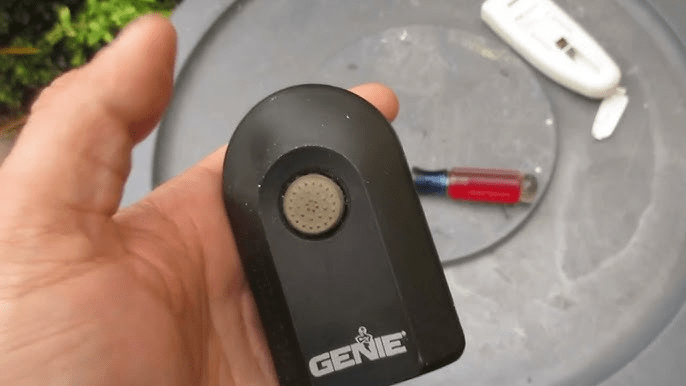
In this guide, we’ll walk you through everything you need to know about Genie ACSCTG Type 1 battery replacement — including compatible batteries, tools needed, and expert maintenance tips to extend your remote’s life.
Read too: How To Replace Garage Door Roller Like a Pro? Step-by-Step Guide
Let’s get your garage door opener working like new again.
What Battery Does the Genie ACSCTG Type 1 Use?
The Genie ACSCTG Type 1 remote control typically uses a 12-volt alkaline battery, specifically the A23 battery (also known as MN21 or 23AE).
| Specification | Detail |
|---|---|
| Battery Type | A23 12-volt alkaline |
| Typical Lifespan | 1–2 years (depending on use) |
| Common Brands | Duracell, Energizer, Maxell |
| Voltage Output | 12V DC |
| Model Compatibility | ACSCTG Type 1, Type 2, G3T, GIC, CM7600, and more |
💡 Expert Tip: Always check your user manual or inside the remote cover to confirm the correct battery type before purchasing replacements.
How to Replace the Battery in a Genie ACSCTG Type 1 Remote
Replacing the battery is a simple DIY task that takes under 5 minutes. Follow these steps carefully:
Step-by-Step Instructions
- Locate the Battery Compartment
Turn your Genie remote over. You’ll see a small slot or seam near the bottom edge — that’s where the battery compartment opens. - Open the Remote Case
Use a small flathead screwdriver or coin to gently pry open the remote cover. Avoid using sharp tools that might crack the plastic casing. - Remove the Old Battery
Take out the old A23 battery. If it’s corroded, wipe the compartment clean with a dry cotton swab — do not use water or liquid cleaner. - Insert the New Battery
Place the new 12V A23 battery into the compartment. Ensure the positive (+) side matches the marking inside the remote. - Close the Remote Case
Snap the cover back on securely until you hear a click. - Test Your Remote
Press the remote button while pointing at your garage door opener. The door should respond immediately.
If the light on your opener blinks but doesn’t activate, recheck the battery polarity and ensure your remote is properly synced with the opener.
Signs Your Genie Remote Battery Needs Replacement
Knowing the symptoms can save you from getting locked out or stranded. Here’s how to tell if your Genie remote battery is dying:
- Delayed response when pressing the button
- Dim indicator light or no light at all
- Reduced range (you have to be closer to the door)
- Intermittent operation — sometimes it works, sometimes it doesn’t
🧠 According to Genie technical documentation, the remote battery typically lasts up to 24 months, but frequent daily use or extreme temperatures can shorten its life.
Common Problems After Replacing the Battery
Sometimes, your remote might still not work even after inserting a new battery. Here’s what to check:
| Problem | Possible Cause | Fix |
|---|---|---|
| Remote light flashes, but door doesn’t move | Remote not synced | Reprogram the remote (see below) |
| No light, no function | Dead or reversed battery | Reinsert correctly or replace |
| Works intermittently | Poor contact or corrosion | Clean terminals with dry swab |
| Works on one door only | Multi-door setup | Reprogram for each opener |
How to Reprogram Your Genie Remote After Battery Change
If your opener still doesn’t respond, follow this reprogramming guide:
- Press and hold the “Learn” button on your Genie motor head until the indicator light starts blinking (about 3 seconds).
- Within 30 seconds, press the button on your remote that you want to program.
- The opener light will flash or click, confirming successful pairing.
- Test your remote to ensure proper operation.
That’s it! Your Genie remote is now synced and ready to go.
Battery Lifespan and Maintenance Tips
Want your Genie remote battery to last longer? Follow these expert-backed tips:
- Store your remote indoors – avoid leaving it in hot cars.
- Use premium batteries (Duracell, Energizer, Panasonic).
- Clean terminals yearly to prevent corrosion.
- Avoid mixing old and new batteries.
- Replace batteries every 18–24 months, even if it’s still working — to avoid sudden failure.
🧾 Fact: According to the U.S. Department of Energy, extreme temperatures above 100°F or below 32°F can cut battery life in half.
Cost of Genie Remote Battery Replacement
Replacing your remote battery is inexpensive compared to replacing the entire opener.
| Item | Average Cost (USD) |
|---|---|
| A23 Battery (Single Pack) | $2 – $5 |
| A23 Battery (4-Pack) | $6 – $10 |
| Replacement Remote (if damaged) | $25 – $45 |
| Professional Service (optional) | $50 – $75 |
Troubleshooting Advanced Issues
If replacing the battery doesn’t solve your problem, you may be dealing with remote or receiver failure.
Possible Causes
- Defective remote circuit board
- Blocked receiver antenna
- Electrical interference from Wi-Fi routers or LED lights
Solution:
- Move wireless devices away from the opener.
- Reset the opener unit.
- If problems persist, contact Genie customer support or a certified garage door technician.
For a deeper understanding of radio frequency interference, you can visit Wikipedia’s article on electromagnetic interference.
FAQ – Genie Garage Door Opener Model ACSCTG Type 1 Battery
1. What type of battery does the Genie ACSCTG Type 1 use?
It uses a 12V A23 alkaline battery, also labeled MN21 or 23AE.
2. How often should I replace the Genie remote battery?
On average, every 1–2 years, depending on usage and environment.
3. Can I use a rechargeable battery in my Genie remote?
No. Rechargeable batteries don’t supply the required 12V constant power output for Genie remotes.
4. My Genie remote stopped working after replacing the battery. What should I do?
Recheck polarity, ensure proper seating, and reprogram the remote with the opener.
5. How do I dispose of old A23 batteries safely?
Recycle them at local electronic waste centers or retail stores offering battery recycling programs.
6. Is there a universal remote compatible with Genie openers?
Yes — many universal remotes like Clicker or Chamberlain KLIK3U can pair with Genie models via the learn button.
Conclusion
Replacing the Genie Garage Door Opener Model ACSCTG Type 1 battery is quick, affordable, and easy to do yourself. All you need is a fresh 12V A23 battery, a few minutes, and simple tools.
By keeping your remote battery maintained and replacing it regularly, you’ll ensure consistent performance and avoid frustrating access issues.
Leave a Reply