If you’re trying to connect your garage door opener to a new remote, keypad, or smartphone app, you’ll likely need your garage door opener ID. Many homeowners get stuck wondering how do I find my garage door opener ID, especially when setting up smart features or troubleshooting connectivity issues.
Don’t worry — finding it is simple once you know where to look. This guide explains exactly where to locate your opener ID, what it looks like, and how to use it for syncing or registration. Whether you own a Chamberlain, LiftMaster, Craftsman, or Genie model, these steps will help you find your opener’s unique identification code with ease.
Read too: Mastering Quantum Garage Door Opener Programming: A Comprehensive Guide
What Is a Garage Door Opener ID and Why It Matters
Your Garage Door Opener ID (sometimes called a Device ID, Serial Number, or MyQ ID) is a unique alphanumeric code assigned to your opener’s main unit. It’s used to:
- Pair your opener with a remote control or keypad.
- Connect the unit to smart home apps like MyQ, Alexa, or Google Home.
- Register the product for warranty or support.
- Identify your model when ordering replacement parts or troubleshooting issues.
Without this ID, you won’t be able to link your opener to a smart device or verify product information.
Where to Find Your Garage Door Opener ID (Step-by-Step Guide)
Finding your garage door opener ID depends on your model and whether it’s a smart or non-smart system. Follow the steps below for each situation.
1. Check the Motor Unit (Main Powerhead)
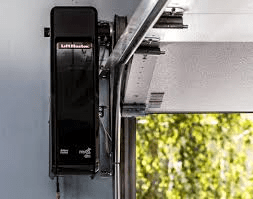
The motor unit, mounted on the ceiling of your garage, is the first place to check.
Steps:
- Turn off power to the opener for safety.
- Use a ladder to reach the opener’s housing.
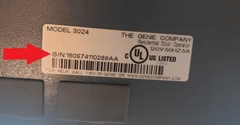
- Look on the sides, back, or bottom panel of the unit.
- Find a sticker or label that includes:
- Model number
- Serial number
- Device ID (often 10–12 digits long)
- Manufacturer details
Example:
You might see a label that reads:
Model: B970
Serial No: 041A7569
MyQ ID: 4A5D-7B2C-8F9H
The MyQ ID or Device ID is what you need to connect your opener to an app or remote.
2. Look at the Smart Control Panel (For Wi-Fi Enabled Models)
If your opener is Wi-Fi-enabled (like Chamberlain or LiftMaster MyQ models), you can often find the ID directly on the control panel.
Here’s how:
- Press the Menu button on the wall control panel.
- Navigate to Wi-Fi Setup or MyQ Settings.
- Select Device Info or View ID.
- Your Device ID or Serial Number will appear on the screen.
Write it down or take a photo for reference.
3. Check the MyQ or Smart Garage App
If you’ve previously connected your opener to a smartphone app, the Device ID may be saved there.
Steps:
- Open the MyQ app (or your brand’s app).
- Tap the Menu (☰) icon.
- Select Device Management or My Devices.
- Choose your opener model — the Device ID should appear under its name.
This is the easiest option if your opener is already registered.
4. Look at the Remote or Wall Button (Older Models)
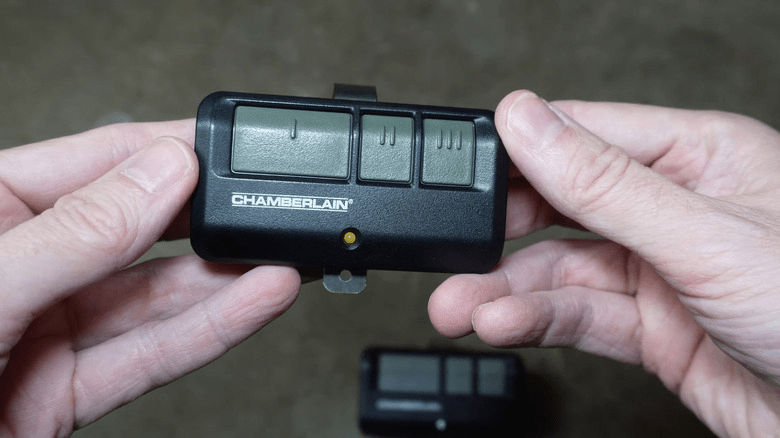
Some older models have a matching ID sticker on the wall-mounted control or inside the battery cover of the handheld remote.
To check:
- Remove the remote’s back panel and battery.
- Look for a white label with numbers and letters.
- If it matches your opener’s ID, you can use it to reprogram remotes or keypads.
5. Find It in the User Manual or Purchase Records
If your opener was professionally installed, the installer may have recorded the ID on your paperwork or user manual.
Check:
- The installation receipt or invoice.
- The owner’s manual (first few pages often list serial and ID).
- Any email registration confirmation if you registered online.
If you can’t find it physically, you can also contact Chamberlain or LiftMaster support with your model number—they can look it up.
Identifying Your Garage Door Opener Brand
Knowing your brand and model makes finding the ID much easier. Here’s where top manufacturers typically place it:
| Brand | Location of ID/Serial Number |
|---|---|
| Chamberlain | On the back panel near the light lens or under the plastic cover |
| LiftMaster | On the motor housing near the Learn button |
| Genie | Inside the light cover or motor head plate |
| Craftsman | Under the light bulb compartment or side panel |
| Overhead Door | Near the power cord or wall bracket |
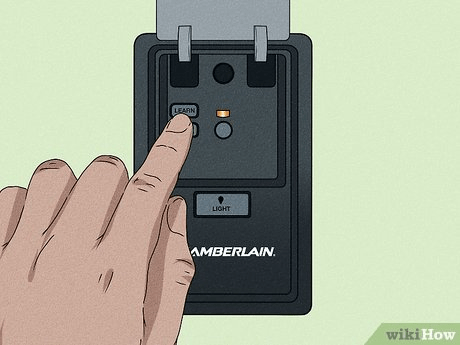
Tip: If your opener has a Learn Button, it’s usually located next to the serial or model number sticker.
Understanding the Difference: Model Number vs. Opener ID
Many homeowners confuse the model number with the device ID, but they serve different purposes:
| Feature | Model Number | Device/Opener ID |
|---|---|---|
| Purpose | Identifies product type | Links device to smart systems |
| Format | Short code (e.g., 875LM, B970) | Longer alphanumeric string |
| Used For | Ordering parts, manuals | App pairing, registration |
| Location | On sticker or plate | On sticker or digital display |
Always double-check which one your system requires — apps like MyQ or Aladdin Connect specifically ask for the Device ID.
What If the Label Is Damaged or Missing?
If your opener’s label is worn or missing, try these solutions:
- Check App History: If previously connected to Wi-Fi, the Device ID may still be saved in the app.
- Use the Learn Button: The color of the Learn Button (yellow, red, purple, orange) can identify the model range.
- Contact Manufacturer Support: Provide your unit’s model and approximate purchase year. Brands like Chamberlain can locate your Device ID via serial number records.
- Check Ceiling Unit Casing: Some newer models print the ID inside the light cover compartment.
Troubleshooting: Why Your Opener ID Won’t Work
If your garage door opener ID isn’t being accepted during setup:
- Double-check characters: O and 0, I and 1 are often misread.
- Ensure Wi-Fi signal strength: Weak connection may interrupt setup.
- Reset the opener: Hold the Learn button for 6 seconds to clear old connections.
- Update the MyQ App: Outdated versions may not recognize some IDs.
If all else fails, reset your network and re-pair your opener from scratch using the Wi-Fi Setup option on the control panel.
External Source for Reference
For a general overview of how automatic garage systems work, you can visit Wikipedia – Garage Door Opener.
FAQ: How Do I Find My Garage Door Opener ID
1. What is a Garage Door Opener ID used for?
It’s used to connect your garage door opener to a remote, keypad, or smart home system. It also helps in warranty registration or support requests.
2. Where is the Chamberlain MyQ Device ID located?
You’ll find it on the back panel of the opener, under the light lens, or inside the MyQ app under Device Info.
3. Can I find the ID without climbing a ladder?
Yes. If your opener is connected to the MyQ app, you can see the Device ID in your account’s device list.
4. Is the model number the same as the opener ID?
No. The model number identifies the type of unit, while the opener ID is a unique digital code for connectivity.
5. What if I can’t find the ID anywhere?
Contact the manufacturer’s customer service. They can verify your opener via serial number or remote model.
Conclusion
Now you know exactly how to find your garage door opener ID — whether from the motor housing, control panel, app, or paperwork. This small piece of information plays a big role in connecting your garage door system to smart home technology, ensuring seamless operation and easy access.
Next time you set up a remote or link your opener to MyQ, you’ll have everything you need at your fingertips.
If this article helped you, share it with neighbors or friends who might be setting up their own smart garage systems!
Leave a Reply