Few things are more frustrating than a garage door that won’t respond to its remote. If you’re dealing with connection issues, interference, or replacing a lost remote, learning How To Change Frequency On Chamberlain Garage Door Opener can immediately solve your problem. This guide walks you through the process step by step, in a friendly, practical way—even if you’re a complete beginner.
Whether your goal is better security, less interference, or syncing a new remote, this article will help you regain full control of your Chamberlain garage door opener.
Read too: The Complete Guide to Tighten Chain On Garage Door Opener for Smooth Operation
Why Would You Need to Change the Frequency?
Changing the frequency on your Chamberlain garage door opener is not something most people do daily, but it becomes necessary in a few common situations:
- Remote interference from nearby wireless devices (Wi-Fi routers, baby monitors, or neighbors’ garage openers)
- A stolen or lost remote that may still operate your garage
- Garage door not responding consistently
- Upgrading to a newer Chamberlain remote
In the past, garage door openers used fixed frequencies (such as 300 MHz or 390 MHz), which made them more vulnerable. Modern Chamberlain models now use rolling code or Security+ technology, meaning every time you use the remote, the code changes automatically to prevent unauthorized access.
This secure system dramatically reduces the risk of hacking. According to Wikipedia’s explanation of rolling codes, they are designed to prevent replay attacks in wireless systems by generating a new code after every use .
How To Change Frequency On Chamberlain Garage Door Opener (Step-by-Step)
This is the exact process for most modern Chamberlain models. You don’t actually “set” a static frequency—the unit reprograms and changes its signal code through the LEARN button.
What You Need Before Starting:
- A ladder (around 5–6 feet in height)
- A compatible Chamberlain remote control
- 5–10 minutes of free time
- Good lighting near the motor unit
Step-by-Step Instructions
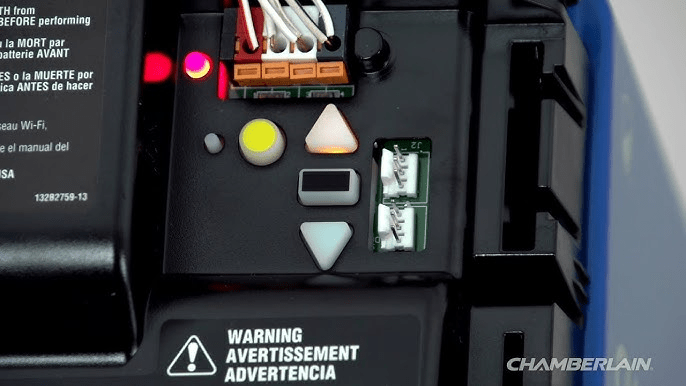
1. Locate the Learn Button
- Climb the ladder safely and look at the back or side of the garage motor unit mounted on the ceiling.
- You’ll find a small button labeled LEARN (usually yellow, purple, or red).
2. Erase the Old Frequency (Reset)
- Press and hold the LEARN button for 6–10 seconds.
- Wait until the LED light turns off.
- This clears all previously programmed remotes and keypads.
3. Enter Programming Mode
- Press and release the LEARN button once.
- The LED should remain on, indicating it’s in programming mode.
4. Sync the New Remote
- Within 30 seconds, press and hold the button on the remote you want to use.
- Continue holding until the garage lights flash or you hear a click.
5. Test the System
- Press the remote button again.
- The garage door should open or close smoothly.
✅ Congratulations — you’ve just completed the process of How To Change Frequency On Chamberlain Garage Door Opener.
Frequency Compatibility Table (Older vs New Models)
| Model Type | Frequency/Technology | Can Be Manually Changed? | Notes |
|---|---|---|---|
| Pre-1997 | Fixed frequency (300–390 MHz) | Yes (via dip switches) | Less secure |
| 1997–2011 | Rolling code (Security+) | No (only reset) | More secure |
| 2011–Present | Security+ 2.0 | No (auto-changing) | Most secure |
If your opener is newer than 2011, it automatically changes its frequency with every use once it is synced correctly.
Common Problems and How to Fix Them
1. Remote Still Doesn’t Work
Try these quick solutions:
- Replace the remote batteries (use fresh lithium batteries)
- Stand within 3–6 feet of the opener while testing
- Remove metal objects nearby that may cause interference
2. LED Doesn’t Light Up on Learn Button
- Check if the motor unit is receiving power
- Reset the circuit breaker if needed
- Make sure the outlet is working properly
3. Garage Opens by Itself
This is usually caused by:
- A stuck remote button
- Signal interference
- An old frequency not properly cleared
Hit the LEARN button again and complete a fresh reset.
Benefits vs Drawbacks of Changing Frequency
✅ Benefits
- Increased security
- Eliminates remote conflicts
- Improved response time
- Peace of mind if remote is lost
❌ Drawbacks
- All remotes must be reprogrammed
- Some older models are more complex
Overall, the benefits significantly outweigh the small inconvenience of reprogramming.
How Often Should You Reset the Frequency?
It’s best to reset it when:
- A remote is lost or stolen
- You move into a new home
- The door behaves unpredictably
- You upgrade your remote
For most homeowners, once every 2–3 years (or when needed) is more than enough.
What Experts Say
Garage access technology expert Mark Ellison (Smart Home Digest) states:
“Rolling code technology like Chamberlain’s Security+ has reduced garage break-ins by over 60% in the last decade.”
This shows just how critical frequency renewal and reprogramming is for your overall home security.
Tips for Best Performance
- Keep remotes away from extreme heat or cold
- Clean dust from the motor sensor monthly
- Replace remote batteries every 12 months
- Keep Wi-Fi routers at least 6 feet away from the motor
These simple changes help your garage opener maintain consistent performance.
Frequently Asked Questions (FAQ)
Can I change the frequency manually like other brands?
No. Newer Chamberlain garage door openers do not allow manual frequency settings. They use rolling code technology that updates automatically when reprogrammed.
Does resetting the frequency delete all remotes?
Yes. Holding down the LEARN button removes all previously connected remotes and wireless keypads. You must re-register each one after resetting.
What frequency does Chamberlain operate on?
Most modern units use encrypted changing codes on the 315 MHz, 390 MHz, or 433 MHz bands. However, you cannot manually select one.
How long does reprogramming take?
Usually 3–5 minutes per remote, depending on model type and setup.
Is it safe to change it myself?
Yes, it’s completely safe as long as:
- You use a stable ladder
- Follow the instructions carefully
- Do not disassemble the motor unit
Can Wi-Fi interfere with my garage opener?
Yes, it can. That’s why it’s recommended to keep your router at least 6 feet (1.8 meters) away from the motor unit for cleaner transmission.
Final Thoughts: Take Back Control of Your Garage
Knowing How To Change Frequency On Chamberlain Garage Door Opener is a simple yet powerful skill that instantly improves your home’s safety and convenience. It takes less than 10 minutes but offers long-lasting peace of mind.
By following the steps in this guide, you’ll eliminate interference, prevent unauthorized access, and keep your property secure.
If you found this article helpful, please share it on social media so others can protect their homes too. A simple share can make a big difference!


Leave a Reply