Pressing a button in your car and watching your garage door open feels incredibly convenient—until it suddenly doesn’t work or you’ve just bought a new vehicle. Many drivers search how to hook up garage door opener to car because the setup process isn’t always obvious. This guide explains everything clearly, from identifying your system to step-by-step programming, so you can get it working without frustration.
How Car Garage Door Openers Work (Simple Explanation)
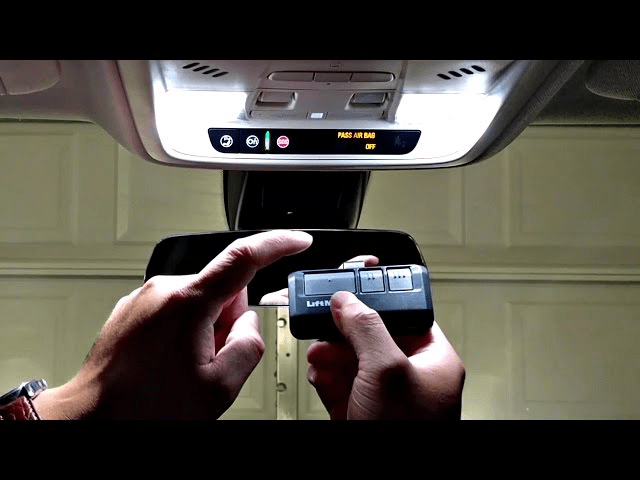
Most modern vehicles use a built-in transmitter system that replaces the handheld remote.
Read too: How to Perform a Chamberlain Garage Door Opener Code Change? Mastering Security
The most common system in the US is HomeLink, which is built into many cars, SUVs, and trucks. It communicates wirelessly with your garage door opener using rolling-code security.
For background on how garage door systems function in general, see this overview on Wikipedia.
What You Need Before You Start
Preparation makes the process much easier.
Required Items
- Your car (parked outside the garage)
- Your garage door opener motor unit
- Original handheld remote
- Ladder (to access the opener)
- Fresh batteries in the remote
⏱ Time required: 5–15 minutes in most cases
How To Hook Up Garage Door Opener To Car: Step-by-Step
Step 1: Identify Your Car’s Built-In Opener Buttons
Most cars have 1–3 programmable buttons located:
- On the overhead console
- On the sun visor
- Near the rearview mirror
These buttons replace your standard remote.
Step 2: Clear Previous Programming (Recommended)
If your car is used or previously programmed, clear it first.
How to Reset
- Turn ignition to ON (engine off)
- Press and hold two outer buttons together
- Hold for 20–30 seconds
- Release when the indicator light flashes rapidly
This resets all stored codes.
Step 3: Train the Car Using the Handheld Remote
This step pairs your car with the remote signal.
Steps
- Hold the handheld garage remote 2–3 inches from the car button
- Press and hold the desired car button
- Press and hold the remote button at the same time
- Watch for the indicator light to change (slow → fast flash)
- Release both buttons
✔ This means the car learned the remote’s signal.
Step 4: Sync the Car With the Garage Door Opener
Most modern openers use rolling-code security and require this extra step.
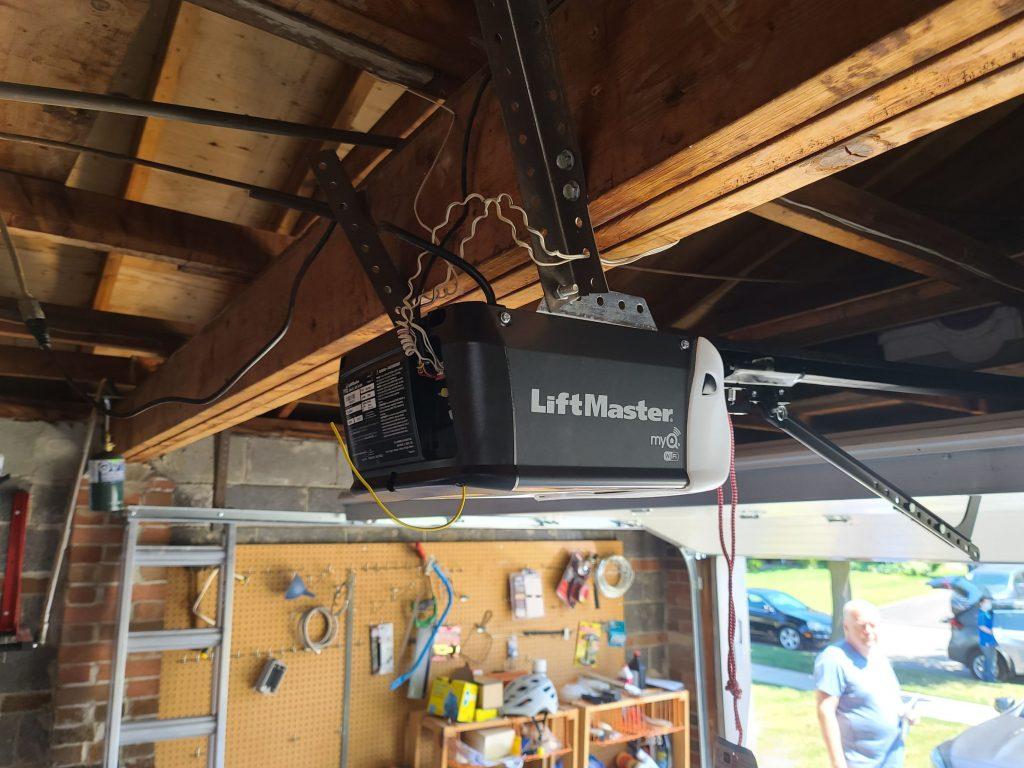
Find the “Learn” Button
- Located on the garage door opener motor
- Often colored yellow, purple, red, or green
- Usually near the antenna wire
Programming the Opener
- Press the Learn button once
- You now have 30 seconds
- Return to the car
- Press and hold the programmed car button for 2–3 seconds
- Release and repeat 2–3 times
🚪 The garage door should move—this confirms success.
If Your Garage Door Doesn’t Respond
Don’t worry—this is common.
Try These Fixes
- Repeat the Learn-button step
- Move the car closer to the garage
- Replace remote battery
- Hold the car button slightly longer (3–4 seconds)
Programming Older Garage Door Openers (No Learn Button)
If your opener was made before the mid-1990s:
- It may not use rolling codes
- Step 3 alone may complete programming
- No Learn button step is required
If it still doesn’t work, a universal compatibility bridge may be needed.
How To Hook Up Garage Door Opener To Car Without HomeLink
Some vehicles don’t have built-in systems.
Your Options
- Use a clip-on universal remote
- Install an aftermarket transmitter
- Use a smart garage controller with smartphone access
These options still provide convenient access.
Common Problems and Solutions
| Problem | Likely Cause | Solution |
|---|---|---|
| Light won’t flash | Wrong reset method | Retry reset |
| Door won’t open | Rolling code not synced | Press Learn button |
| Works sometimes | Weak signal | Replace batteries |
| No Learn button | Older opener | Use universal adapter |
| Button won’t program | Interference | Move car closer |
Safety Tips During Programming
- Keep people and pets away from the door
- Never stand under a moving door
- Do not press buttons repeatedly without pausing
- Ensure door path is clear
Garage doors are heavy and can cause injury if activated unexpectedly.
Advantages of Connecting Your Garage Door Opener to Your Car
Pros
- ✔ No loose remotes
- ✔ Cleaner interior
- ✔ Improved convenience
- ✔ Often more secure than old remotes
Cons
- ✖ Setup can be confusing first time
- ✖ Some older openers need adapters
How Many Cars Can Be Programmed to One Garage Door?
Most modern openers allow 5–7 remote devices, including:
- Cars
- Handheld remotes
- Wireless keypads
Check your opener manual for limits.
How To Reprogram After Power Outage
Good news: power outages do not erase car programming.
However, replacing the opener logic board may require reprogramming.
Step-by-Step Troubleshooting Checklist
- Confirm opener works with handheld remote
- Reset car buttons
- Reprogram using remote
- Press Learn button on opener
- Test multiple times
Following this order solves most issues.
FAQ: How To Hook Up Garage Door Opener To Car
Q1: Can I program my garage door opener to multiple cars?
Yes. Most openers support several vehicles at once.
Q2: Why does my car button blink but not open the door?
This usually means the rolling code step wasn’t completed.
Q3: Do I need Wi-Fi to connect my garage door opener to my car?
No. Programming uses radio signals, not Wi-Fi.
Q4: Will resetting my garage opener erase all car connections?
Yes. Clearing the opener memory removes all paired devices.
Q5: Is it safe to use a car’s built-in garage door opener?
Yes. Modern systems use encrypted rolling codes for security.
Conclusion
Knowing how to hook up garage door opener to car makes daily life easier and more convenient. Whether you’re programming a HomeLink system or syncing a universal remote, the process is usually quick once you follow the correct steps. With proper setup, your car becomes a reliable, secure garage remote you’ll use every day.
If this guide helped you get connected successfully, share it on social media so other drivers can enjoy the same convenience 🚗🚪✨


Leave a Reply