Need an extra remote for your spouse, teenager, or a second vehicle? If you’re wondering How To Program A Second Garage Door Opener Remote, you’re not alone. Adding another remote is one of the most common garage door tasks—and fortunately, it’s usually quick and simple.
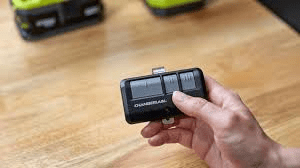
In this complete guide, you’ll learn step-by-step instructions, compatibility tips, troubleshooting solutions, and security best practices to ensure your second remote works perfectly.
Read too: Why Your Liftmaster Garage Door Won’t Stay Closed and How to Fix It? Troubleshooting Tips
How To Program A Second Garage Door Opener Remote (Quick Overview)


4
Most modern garage door openers use rolling code technology. Programming a second remote typically involves:
- Locating the Learn button on the motor unit.
- Pressing and releasing the Learn button.
- Pressing the button on the new remote within 30 seconds.
- Confirming by testing the door.
That’s the basic process. Now let’s go deeper to avoid common mistakes.
Do All Garage Door Openers Support Multiple Remotes?
Yes—most modern openers support multiple remotes.
Typical capacity:
- 5 to 10 remotes
- 1–2 keypads
- HomeLink vehicle systems
However, older models (pre-1996) may use fixed-code systems with limited memory.
For background on rolling code security systems used in modern openers, see:
https://en.wikipedia.org/wiki/Rolling_code
Rolling code technology ensures every button press generates a new secure signal.
Step-by-Step: How To Program A Second Garage Door Opener Remote
Follow these detailed instructions.
Step 1: Close the Garage Door
Before programming:
- Ensure the garage door is fully closed.
- Turn on garage lighting.
- Use a stable ladder if necessary.
Safety first.
Step 2: Locate the “Learn” Button
The Learn button is on the motor unit mounted to the ceiling.
It may be:
- Red
- Yellow
- Purple
- Orange
- Green
It’s usually located near the antenna wire.
Step 3: Press and Release the Learn Button
- Press the Learn button once.
- An LED light will illuminate.
- You now have 30 seconds to program the new remote.
Do not hold the button down unless you intend to erase memory.
Step 4: Press the Button on the Second Remote
- Press and hold the button on the new remote.
- Hold for 3–5 seconds.
- Watch for the garage light to blink or listen for a clicking sound.
- Release the button.
Test immediately.
If the door opens or closes, programming was successful.
How Long Does It Take?
Programming typically takes:
- 3–5 minutes
- No tools required
- No technical expertise needed
If it takes longer than 10 minutes, troubleshooting may be required.
Programming a Universal Second Remote
If you purchased a universal remote:
- Confirm compatibility with your opener brand.
- Follow the manufacturer’s pairing instructions.
- Use the Learn button method described above.
Universal remotes often include multi-brand compatibility modes.
What If Programming Doesn’t Work?
Here are the most common issues.
1. Dead Battery
Install a fresh battery (usually CR2032 or 12V depending on model).
Weak batteries are the #1 cause of programming failure.
2. Memory Is Full
Most openers store only a limited number of remotes.
To clear memory:
- Hold the Learn button for 6–10 seconds.
- LED will turn off.
- All remotes are erased.
You must reprogram all remotes afterward.
3. Standing Too Far Away
During programming, stand within:
- 3–5 feet of the motor unit
Signal strength matters.
4. Signal Interference
LED bulbs, Wi-Fi routers, or nearby electronics can interfere.
Try:
- Turning off nearby devices
- Replacing LED bulbs temporarily
Fixed Code vs Rolling Code Systems
Older openers may use DIP switches instead of rolling codes.
If your remote has tiny switches inside:
- Open the remote casing.
- Match switch positions inside the motor unit.
- Close casing and test.
However, upgrading to rolling code technology significantly improves security.
Security Tips When Adding a Second Remote
When programming a second remote:
✔ Clear codes if a previous remote was lost
✔ Avoid leaving remotes visible in vehicles
✔ Test remotes monthly
✔ Replace batteries annually
Garage security is important because your garage often provides access to your home.
When Should You Upgrade Instead of Adding a Remote?
Consider upgrading your opener if:
- It’s more than 20 years old
- It lacks rolling code technology
- It frequently loses programming
- Safety sensors malfunction
New garage door openers typically cost:
- $250–$600 installed
Modern units offer smartphone connectivity and improved encryption.
Comparison: Adding a Second Remote vs Using a Keypad
| Feature | Second Remote | Keypad |
|---|---|---|
| Portable | Yes | No |
| PIN Protection | No | Yes |
| Easy to Share | Yes | Yes |
| Risk if Lost | Moderate | Low |
Many homeowners use both for convenience.
FAQ: How To Program A Second Garage Door Opener Remote
1. Can I program multiple remotes at once?
No. Program each remote individually using the Learn button.
2. Will adding a second remote erase the first?
No. Pressing and releasing Learn adds remotes. Holding Learn erases all.
3. How many remotes can I add?
Most systems support 5–10 remotes.
4. Do I need to reset the opener first?
Only if memory is full or if you want to remove old remotes.
5. Does a power outage erase remotes?
Most modern openers retain memory during outages.
6. Can I use my car’s built-in buttons instead?
Yes. Many vehicles support HomeLink integration with rolling code systems.
Final Thoughts
Learning How To Program A Second Garage Door Opener Remote is easier than most homeowners expect. With just a few simple steps—locating the Learn button, syncing the new remote, and testing—you can add convenient access in minutes.
Modern garage door systems are designed for easy expansion. As long as you follow proper timing and replace batteries when needed, programming should be smooth and reliable.
If this guide helped you successfully add a second remote, share it on social media to help others simplify their garage setup.



Leave a Reply