Garage door openers have evolved into intelligent machines, and LiftMaster leads the way with smart technology and dependable performance. However, even the most reliable openers can experience technical failures — and one of the most common issues is a malfunctioning logic board. If you’re facing this situation, you might be asking: “How to replace logic board on LiftMaster garage door opener?”
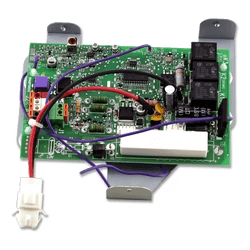
In this comprehensive guide, we’ll walk you through the full process of replacing the logic board step-by-step. From identifying the symptoms to installing a new board, you’ll find everything you need to get your LiftMaster opener working like new again — no need to call a technician unless you want to.
Read too: No Power to Genie Garage Door Opener – Resolving the Issue with Ease: Troubleshooting Guide
What Is a Logic Board on a LiftMaster Garage Door Opener?
The logic board is essentially the brain of your garage door opener. It controls all the electrical functions including:
- Remote and keypad signal reception
- Safety sensors
- Wall control panel input
- Timer-to-close functions
- Wi-Fi connectivity (on smart models)
- Motor operations
If your garage door opener isn’t responding to remotes or the wall switch, or the lights blink oddly, it’s often a sign of a faulty logic board.
Common Signs You Need to Replace the Logic Board
Before jumping into the process of how to replace logic board on LiftMaster garage door opener, it’s important to identify the symptoms that indicate a faulty board:
- Remote controls and keypads suddenly stop working
- Garage door won’t respond to the wall button
- Lights flash repeatedly when attempting to open or close
- Unusual clicking sounds from the opener
- Wi-Fi features fail and can’t reconnect
- Burnt smell or visible damage on the board (e.g., swollen capacitors)
Note: These symptoms may also be caused by a faulty transformer or sensor issue, so diagnosis should be done carefully.
Tools and Materials You’ll Need
Before learning how to replace logic board on LiftMaster garage door opener, gather the necessary tools:
- New compatible LiftMaster logic board (check your model number)
- Flathead screwdriver
- Phillips screwdriver
- Nut driver or socket set
- Ladder (6–8 ft)
- Work gloves
- Anti-static wristband (optional but recommended)
- Smartphone or camera (to document wire positions)
Safety First: Precautions Before You Begin
Any time you’re working with electronics or powered equipment, safety is crucial.
- Disconnect power to the garage door opener at the outlet or breaker panel.
- Wait for 5–10 minutes to let any residual current discharge.
- Use anti-static precautions to protect the new board from static electricity.
- Make sure the garage door is closed to prevent unexpected movement.
How To Replace Logic Board On Liftmaster Garage Door Opener — Step-by-Step Instructions
Now let’s dive into the actual process of how to replace logic board on LiftMaster garage door opener. This guide applies to most LiftMaster chain, belt, and screw drive openers, including models with smart features (like MyQ or Wi-Fi).
Step 1: Locate and Remove the Opener’s Cover
Use a ladder to access the main unit mounted on your garage ceiling.
- Most LiftMaster models have a light cover or rear panel that needs to be removed first.
- Use a Phillips screwdriver or nut driver to remove the screws securing the cover.
- Carefully take off the panel and set it aside.
You should now see the logic board mounted on the unit with wires connected.
Step 2: Photograph the Wire Connections
Before touching any wires, take a clear photo using your phone to document how each wire is connected to the logic board. This will make reassembly much easier.
You’ll likely see wires for:
- Safety sensors (white/black)
- Wall button
- Motor harness
- Light sockets
- Antenna or Wi-Fi module
Step 3: Disconnect the Wires and Remove the Old Logic Board
- Gently disconnect each wire by pulling on the connector or pressing release clips.
- Once all wires are removed, unscrew the logic board from the unit (usually 2–4 screws).
- Carefully slide the board out of its housing.
Inspect the old board for any burn marks, corrosion, or cracked components. This can confirm your diagnosis.
Step 4: Install the New Logic Board
Unbox your replacement logic board. Be sure it is:
- Compatible with your specific LiftMaster model number
- Matched with any Wi-Fi or MyQ features (if your model has them)
- Position the board into place and screw it into the opener’s frame.
- Reconnect all the wires using the photo you took earlier as a guide.
- Double-check all connections to ensure no wires are loose or in the wrong slot.
Step 5: Restore Power and Test the Opener
Once the board is securely installed:
- Reattach the rear panel or light cover.
- Plug the garage opener back into power.
- Wait 30–60 seconds for the system to reboot.
Now test your system:
- Wall button should operate the door
- Remote controls should respond
- Wi-Fi connection should reestablish if you have a smart model
You may need to reprogram your remote controls or reconnect to the MyQ app after the replacement.
Programming the New Logic Board (If Needed)
Depending on your model, you may need to:
- Reprogram remote controls (press “Learn” button on the opener, then remote)
- Reset timer-to-close or auto light settings
- Reconfigure safety sensors (if they were disturbed)
LiftMaster’s official website provides model-specific programming instructions for these features.
When to Call a Professional
Replacing the logic board is generally a DIY-friendly task for homeowners with basic tools. However, call a technician if:
- You’re unsure about diagnosing the issue correctly
- Wires appear damaged or burned
- You have a non-standard LiftMaster model
- The opener still doesn’t function after replacing the board
Professional installation usually takes less than an hour and ensures warranty compliance.
How Much Does It Cost to Replace a Logic Board?
The cost of replacing a logic board on a LiftMaster garage door opener varies depending on the model and features:
- Logic board only: $50–$130
- Labor (if professional): $100–$200
- Total (DIY): Often under $130
Buying directly from LiftMaster or authorized dealers ensures part authenticity and warranty coverage.
Tips to Extend the Life of Your New Logic Board
- Use a surge protector to prevent voltage spikes
- Keep the unit clean and dry (avoid water near opener housing)
- Perform regular maintenance on the door and tracks
- Replace light bulbs with garage-door-safe LED bulbs (some LED bulbs interfere with opener signals)
Final Thoughts
Understanding how to replace logic board on LiftMaster garage door opener empowers homeowners to tackle common opener issues without paying high repair fees. It’s a manageable process with the right tools, a bit of caution, and attention to detail.
If your opener has gone dark, stopped responding to remotes, or failed to connect to Wi-Fi, there’s a good chance the logic board is the culprit. Replacing it can bring your system back to life and even extend its lifespan for years to come.


Leave a Reply