If your garage keypad suddenly stops working, you’re not alone. Many homeowners search for How To Reset A Craftsman Garage Door Opener Keypad after battery changes, power outages, or forgotten PINs. Fortunately, resetting a Craftsman keypad is a simple process that most beginners can complete in under 10 minutes.
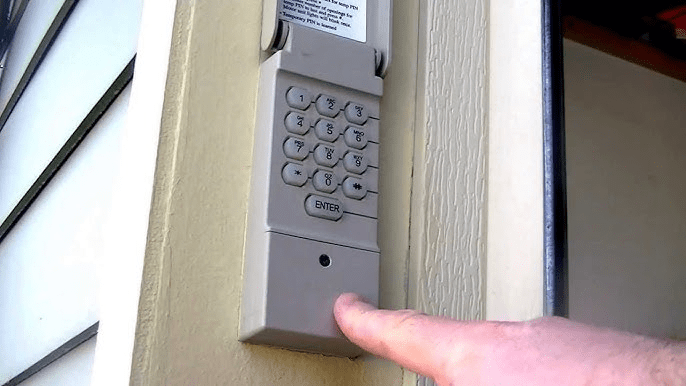
What Is a Craftsman Garage Door Opener Keypad?
A Craftsman garage door opener keypad is a wireless, exterior access device that allows you to open and close your garage door using a personal identification number (PIN). It eliminates the need for a remote and provides convenient access for family members.
Read too: Door and Garage Door Companies: Choosing the Right Partner for Your Needs
Key Features:
- Weather-resistant housing
- Battery-powered operation
- Compatible with most Craftsman openers made after 1993
- Enhanced home security through PIN access
Craftsman keypads are widely used in the U.S. due to their reliability and compatibility with Chamberlain-made systems.
Why Would You Need to Reset a Craftsman Garage Door Opener Keypad?
Resetting the keypad restores proper communication between the keypad and the opener motor.
Common Reasons Include:
- Forgotten or compromised PIN code
- Battery replacement
- Power surge or outage
- Moving into a new home
- Keypad responding inconsistently
According to garage door service professionals, more than half of keypad issues are resolved by a reset and reprogramming process, without replacing any hardware.
How Do You Know If Your Craftsman Keypad Needs a Reset?
Before resetting, look for these signs.
Symptoms to Watch For:
- Keypad lights up but door does not open
- Blinking LED after entering the PIN
- Door opens randomly or not at all
- Keypad stopped working after new batteries
If wall-mounted controls and remotes still work, the keypad likely just needs a reset.
Is It Safe to Reset a Craftsman Garage Door Opener Keypad?
Yes. Resetting is safe, non-invasive, and low-risk.
Safety Overview:
- No electrical wiring involved
- No tools required
- Does not affect motor or door alignment
You’re simply clearing the keypad’s memory and reprogramming access.
What You Need Before Resetting the Keypad
Preparation prevents errors.
Required Items:
- Fresh batteries (9V or AA, depending on model)
- Step ladder
- Notebook to record your new PIN
Battery Recommendations:
- Voltage: 9V alkaline or 1.5V AA
- Optimal operating temperature: 22–28°C (72–82°F)
Weak batteries are one of the most common causes of reset failure.
How To Reset A Craftsman Garage Door Opener Keypad (Step-by-Step Guide)
This method works for most Craftsman wireless keypads.
Step 1: Clear the Keypad Memory
- Press and hold the
*and#keys simultaneously - Hold for 5–10 seconds
- Release when the keypad light stops blinking
This clears all existing PIN codes.
Step 2: Locate the “Learn” Button on the Opener
Using a ladder, locate the opener motor mounted on the garage ceiling.
The Learn button is usually:
- Yellow, red, purple, or green
- Near the antenna wire or under the light cover
Do not press it yet.
Step 3: Activate Programming Mode
- Press the Learn button once
- An indicator light will turn on or blink
- You now have 30 seconds to complete the next step
Timing is critical.
Step 4: Enter a New PIN on the Keypad
Choose a secure 4–8 digit PIN.
PIN Security Tips:
- Avoid simple sequences (1234, 1111)
- Don’t reuse old codes
- Choose something easy to remember but hard to guess
Enter the PIN carefully.
Step 5: Sync the Keypad to the Opener
- Press the
ENTERkey - Wait for garage lights to flash or door to move
- This confirms successful pairing
Step 6: Test the Keypad
Close the garage door completely.
- Enter your new PIN
- Press
ENTER - Confirm the door opens smoothly
Test it 2–3 times to ensure consistency.
What If the Craftsman Keypad Still Doesn’t Work?
If resetting doesn’t solve the issue, try these steps.
Troubleshooting Checklist:
- Replace batteries again
- Stand closer to the garage door when programming
- Remove LED bulbs that cause radio interference
- Ensure keypad compatibility with your opener model
Interference from LED lights is a common but overlooked issue.
Craftsman Keypad Compatibility Overview
| Craftsman Opener Year | Keypad Support |
|---|---|
| Pre-1993 | Limited |
| 1993–2005 | Yes |
| 2006–Present | Yes |
Craftsman openers manufactured by Chamberlain support rolling-code technology for enhanced security.
Advantages vs Disadvantages of Resetting a Craftsman Keypad
✅ Advantages
- Restores secure access
- No professional service required
- Takes less than 10 minutes
- Prevents unauthorized entry
❌ Disadvantages
- Requires reprogramming after reset
- Battery-dependent operation
- Outdoor exposure can reduce lifespan
Resetting is still far more cost-effective than replacing the keypad.
Security Best Practices After Resetting
Once you understand How To Reset A Craftsman Garage Door Opener Keypad, follow these tips:
- Change your PIN every 6–12 months
- Never share your code unnecessarily
- Reset keypad when moving homes
- Remove access for old users
Security professionals agree that regular code updates significantly reduce break-in risks.
How Often Should You Reset a Craftsman Keypad?
Recommended reset scenarios:
- After a power outage
- When batteries are replaced
- If keypad becomes unresponsive
- After selling or buying a home
Routine resets improve reliability and security.
Why Craftsman Keypads Lose Programming Over Time
Technicians cite these causes:
- Battery voltage drops
- Static discharge
- Power surges
- Environmental exposure
Using premium batteries can extend keypad life by up to 30%.
Authoritative Reference
For a general overview of keypad-based access systems, visit:
👉 https://en.wikipedia.org/wiki/Keypad
FAQ: How To Reset A Craftsman Garage Door Opener Keypad
Q1: How long does it take to reset a Craftsman keypad?
Typically 5–10 minutes from start to finish.
Q2: Will resetting delete my old PIN?
Yes. All previous codes are erased.
Q3: Can I use the same PIN again?
Yes, but changing it is recommended for security.
Q4: Why does the keypad light blink but not open the door?
This usually indicates a programming or signal issue.
Q5: Do I need Wi-Fi to reset the keypad?
No. The process is fully offline.
Conclusion
Learning How To Reset A Craftsman Garage Door Opener Keypad allows you to quickly solve one of the most common garage access problems without calling a technician. With a few simple steps, you can restore secure, reliable entry and save both time and money.
If this guide helped you, share it on social media so other homeowners can reset their Craftsman keypad with confidence 🚪🔐
Leave a Reply