How To Set Travel Limits On Genie Garage Door Opener? Your Genie garage door opener is designed to provide seamless access and security to your home, but for it to work efficiently, setting the correct travel limits is crucial. Travel limits control how far your garage door opens and closes, preventing damage to the door or the opener mechanism.
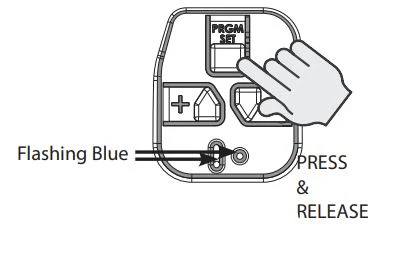
In this article, we’ll provide a detailed guide on how to set travel limits on Genie garage door opener, ensuring your system operates smoothly and safely. Whether you’re installing a new opener or troubleshooting an existing one, adjusting the travel limits is an essential step.
What Are Travel Limits and Why Are They Important?
Travel limits determine the maximum distance your garage door can open and close. These settings are critical for the following reasons:
- Preventing Damage: Ensures the door doesn’t crash into the floor or the opener motor housing.
- Enhancing Safety: Reduces the risk of accidents by stopping the door at the correct position.
- Improving Efficiency: Allows the opener to function smoothly without overexerting the motor.
- Customizing Operation: Accommodates unique garage configurations or door sizes.
Read too: Mastering the Art of Adjusting a Chamberlain Garage Door Opener for Smooth Operation and Safety
Tools You’ll Need
Before setting the travel limits, gather the following tools to ensure a smooth process:
- Ladder: To safely reach the motor unit.
- Owner’s Manual: For model-specific instructions.
- Screwdriver: To adjust physical limit screws, if applicable.
How To Set Travel Limits On Genie Garage Door Opener
Follow these steps to adjust the travel limits on your Genie garage door opener:
1: Locate the Adjustment Controls
- Travel limit controls are typically located on the side or bottom of the opener motor housing.
- Look for buttons or dials labeled “Open Travel” and “Close Travel.”
2: Prepare the Garage Door
- Ensure the garage door is fully closed before starting the adjustment process.
- Disconnect any remotes or keypads to prevent accidental activation during setup.
3: Adjust the Close Limit
- Press and hold the “Close Travel” button while watching the garage door.
- Release the button when the door reaches the desired closed position.
- Use a screwdriver if your model has a physical adjustment screw for this function.
4: Adjust the Open Limit
- Press and hold the “Open Travel” button to move the door upwards.
- Stop when the door reaches your preferred open position, ensuring it clears any obstructions like ceiling beams or storage racks.
5: Test the Settings
- Use a remote or wall-mounted control to operate the door.
- Observe its movement to confirm it stops at the correct open and closed positions.
6: Fine-Tune the Limits
- If the door doesn’t stop exactly where you want, repeat the adjustment process.
- Make small, incremental changes to avoid overshooting the desired positions.
7: Lock in the Settings
- Some Genie models require you to press a “Set” button to save the adjustments.
- Refer to your owner’s manual to confirm this step.
Tips for Setting Travel Limits
Setting travel limits can be straightforward if you keep these tips in mind:
- Work Methodically: Make one adjustment at a time, starting with the close limit.
- Keep Safety in Mind: Ensure no objects or people are in the door’s path during testing.
- Double-Check: Verify the door stops at the correct positions multiple times.
- Consult the Manual: Different Genie models may have unique steps or controls.
Troubleshooting Common Issues
Sometimes, the travel limits might not work as expected. Here’s how to address common problems:
The Door Doesn’t Fully Close or Open
- Solution: Recheck the limit settings and make finer adjustments.
The Door Reverses Unexpectedly
- Solution: Ensure the safety sensors are aligned and free of obstructions.
The Motor Keeps Running After the Door Stops
- Solution: Adjust the limits to prevent the motor from overextending.
Travel Limits Reset After a Power Outage
- Solution: Many Genie models retain settings even after power loss, but if yours doesn’t, reprogram the limits following the steps above.
How To Maintain Proper Operation
Proper maintenance of your Genie garage door opener is key to ensuring the travel limits remain accurate.
- Regular Lubrication: Keep the door tracks and rollers well-lubricated to reduce strain on the opener.
- Inspect the Door Balance: An imbalanced door can cause travel limit issues.
- Check for Obstructions: Clear any debris or objects from the door’s path.
- Test Limits Periodically: Ensure the travel limits are still correctly set, especially after heavy use or maintenance work.
Frequently Asked Questions
1. How often should I adjust the travel limits?
Adjust travel limits only when installing a new opener or if the door’s movement becomes inconsistent.
2. Can I set travel limits without an owner’s manual?
Yes, but having the manual makes the process easier and ensures you follow model-specific instructions.
3. What should I do if the travel limits won’t hold their settings?
This issue may indicate a problem with the opener’s memory or a mechanical fault. Consult a professional if troubleshooting doesn’t resolve the problem.
4. Is it safe to adjust the travel limits myself?
Yes, as long as you follow safety precautions and the manufacturer’s guidelines.
Conclusion
Learning how to set travel limits on Genie garage door opener is a vital skill for any homeowner. Correctly adjusted travel limits ensure smooth operation, prevent damage, and enhance the safety of your garage door system.
By following the steps and tips outlined in this guide, you can confidently set or adjust the travel limits on your Genie opener. Regular maintenance and occasional fine-tuning will keep your system running efficiently for years to come.
If you encounter persistent issues or feel uncertain about the process, don’t hesitate to seek professional assistance. Properly functioning travel limits not only protect your garage door but also give you peace of mind.


Leave a Reply