Syncing your car with your LiftMaster garage door opener not only adds convenience but also enhances your home’s security and accessibility. With today’s smart home features and built-in vehicle transmitters, understanding how to sync LiftMaster garage door opener with car has become a must-know for homeowners.
This comprehensive guide covers everything you need—from the tools required, vehicle compatibility, and step-by-step syncing instructions, to helpful troubleshooting tips if something goes wrong. Whether you’re driving a new car with HomeLink® technology or an older model with a universal remote, this article will walk you through each stage with clarity and confidence.
Read too: The Complete Guide to Tighten Chain On Garage Door Opener for Smooth Operation
Why Syncing Your Car to Your LiftMaster Opener Matters
Imagine arriving home in heavy rain or at night and being able to open your garage without fumbling for a remote. That’s the power of syncing your car with your garage door system. Here are a few key benefits:
- Hands-free operation
- Reduced clutter (no need for loose remotes)
- Enhanced safety through secure signal transmission
- Long-term convenience for families with multiple drivers
By learning how to sync LiftMaster garage door opener with car, you’ll unlock the full potential of your garage system.
What You Need Before Starting
Before diving into the syncing process, ensure you have the following:
- A compatible LiftMaster garage door opener (typically models made after 1993)
- Your vehicle manual or HomeLink® guide (if applicable)
- A ladder to access the garage door motor unit
- The garage door remote (in some syncing methods)
- Knowledge of your garage opener’s Learn button (color-coded for compatibility)
Most modern LiftMaster units use Security+ or Security+ 2.0 technology, which is compatible with HomeLink and Car2U systems.
How To Sync Liftmaster Garage Door Opener With Car – Step-by-Step Instructions
Now let’s explore how to sync LiftMaster garage door opener with car using the two most common vehicle systems: HomeLink and Car2U.
Syncing With HomeLink (Built-In Vehicle System)
Many vehicles from brands like Ford, Toyota, Honda, Chevrolet, and Mercedes-Benz include HomeLink, a built-in universal transmitter that replaces handheld remotes.
Step 1: Clear Previous Programming (If Necessary)
- Turn your vehicle to the ON position (engine off is fine).
- Press and hold the two outer HomeLink buttons for 10 seconds.
- Release once the indicator light changes from solid to blinking rapidly.
⚠️ This step erases old codes and preps the system.
Step 2: Train HomeLink Using Your Garage Remote
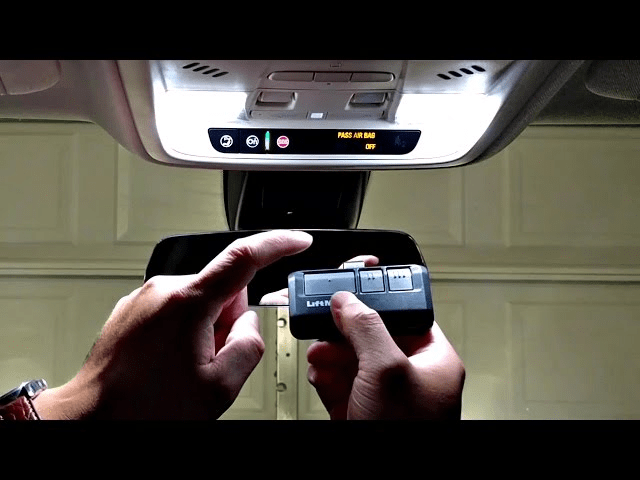
- Hold your LiftMaster garage remote close to the HomeLink buttons (1–3 inches away).
- Press and hold both the remote button and the HomeLink button you want to program.
- Keep holding until the indicator light on HomeLink switches from slow blink to rapid blink (may take up to 30 seconds).
This means HomeLink has learned the remote signal.
Step 3: Program With The LiftMaster Learn Button
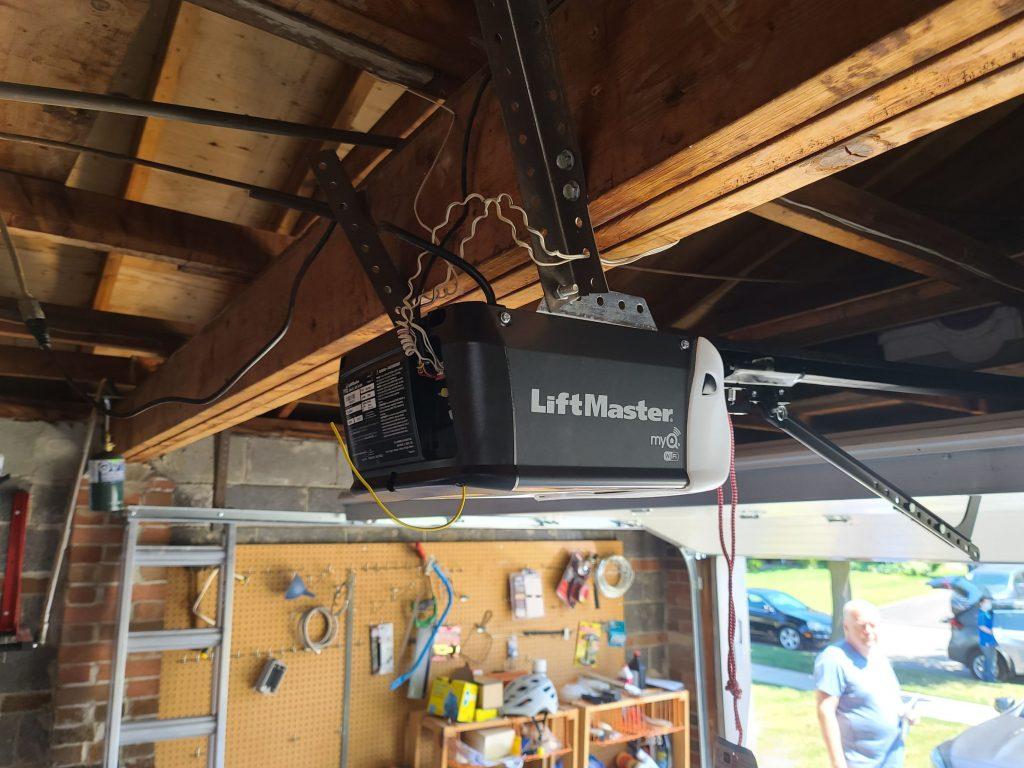
- On your LiftMaster garage door opener unit (mounted in your garage), press and release the Learn button.
- Learn button colors:
- Yellow: Security+ 2.0
- Purple: Security+
- Red/Orange: Older models
- Learn button colors:
- You now have 30 seconds to return to your vehicle.
- Press the programmed HomeLink button in the car for 2 seconds, then release. Repeat up to three times until the garage door responds.
That’s it! Your LiftMaster opener and HomeLink are now synced.
Syncing With Car2U (Ford, Chrysler, etc.)
For vehicles equipped with Car2U, the syncing process varies slightly.
- Press and hold the two outside Car2U buttons until the light turns solid.
- Hold your garage remote 1–3 inches from the Car2U buttons and press both the remote button and the Car2U button.
- Continue holding until the Car2U light blinks rapidly.
- On your garage opener, press and release the Learn button.
- Within 30 seconds, return to your car and press the Car2U button you programmed three times.
The garage door should now respond to the button press.
Troubleshooting Syncing Issues
Syncing your LiftMaster opener with your vehicle usually goes smoothly. However, here are common problems and how to solve them:
Problem 1: Garage Door Doesn’t Respond
- Double-check Learn button timing—you must press your vehicle button within 30 seconds of pressing Learn.
- Ensure you’re using the correct Learn button color protocol (Security+ 2.0 vs. older versions).
- Try clearing and reprogramming HomeLink from scratch.
Problem 2: HomeLink Won’t Learn Remote
- Make sure the remote battery is fresh and functional.
- Hold the remote closer or change its position (some need line-of-sight).
- Some newer Security+ 2.0 systems require a HomeLink repeater kit (available through Chamberlain or dealers).
Problem 3: Remote Works But Car Doesn’t
- This usually means the HomeLink programming worked, but you didn’t properly sync it to the garage opener using the Learn button.
- Re-do the Learn button step and follow with 2-3 button presses from the vehicle.
Re-Syncing After Power Loss or Battery Change
If you change your vehicle battery or experience a garage opener reset, you may need to re-sync:
- Reconnect the HomeLink or Car2U system using your remote.
- Repeat the Learn button process on the opener.
No need to clear the entire memory unless the sync fails repeatedly.
Syncing Smart Garage Openers With Car Apps
LiftMaster’s newer myQ® Smart Garage Door Openers don’t always require in-car buttons. You can sync via smartphone:
- Install the myQ® app on your device.
- Follow in-app instructions to add your garage door opener using Wi-Fi and the serial number.
- Create automation, schedules, and remote access through your phone.
While this isn’t “car syncing” in the traditional sense, it’s a convenient option for smart vehicle integration.
Tips to Ensure a Successful Sync
- Read your vehicle’s owner manual—each brand handles HomeLink slightly differently.
- Don’t hold the Learn button too long—a short press programs, a long press erases memory.
- Consider updating your vehicle firmware (some older cars need updates for new openers).
- Park your car within range of the opener—15 to 20 feet is ideal.
- Use a HomeLink Compatibility Bridge if needed for Security+ 2.0 openers and older vehicles.
When To Contact Support
If you’ve followed all the instructions and your system still won’t sync, it’s time to reach out:
- LiftMaster Support: For opener-related questions
- HomeLink Support: For in-car programming help
- Your vehicle dealership: For firmware or button troubleshooting
Conclusion
Learning how to sync LiftMaster garage door opener with car is a smart move for any homeowner. It improves safety, eliminates the need for extra remotes, and offers seamless access at the touch of a button.
Whether your vehicle uses HomeLink, Car2U, or even a smart integration like myQ, syncing your LiftMaster system is a straightforward task you can accomplish in minutes. With this step-by-step guide, you now have all the tools, knowledge, and confidence to get your garage door and car working together like a charm.


Leave a Reply