If your garage door opener is making unusual noises, not responding correctly, or simply needs routine maintenance, you may be wondering How To Take Cover Off Genie Garage Door Opener safely. This is a common and practical task for homeowners who want to inspect internal components, clean dust buildup, or diagnose minor issues before calling a professional.
This detailed guide explains exactly how to remove the cover from a Genie garage door opener, what tools you’ll need, what to watch out for, and how to do it safely—step by step. The instructions are designed for beginners while still being thorough enough to build real confidence.
Read too: Why Are My Garage Doors Opening By Themselves? Troubleshooting Guide
What Is a Genie Garage Door Opener?
A Genie garage door opener is a motorized system that automatically opens and closes your garage door using a chain drive, belt drive, or screw drive mechanism. Genie openers are widely installed in U.S. homes and are known for their durability and safety features from the Genie.
For general background on how garage door openers work, you can also refer to:
https://en.wikipedia.org/wiki/Garage_door_opener
Why Would You Need to Take the Cover Off a Genie Garage Door Opener?
Removing the cover does not mean fully disassembling the opener. In most cases, homeowners remove the cover for inspection and light maintenance.
Common reasons include:
- Diagnosing unusual grinding or humming noises
- Inspecting the drive gear or belt
- Cleaning dust, cobwebs, or debris
- Checking wiring connections
- Identifying burnt or damaged components
- Preparing for part replacement
Knowing how to safely remove the cover can save time and help you explain issues clearly if professional service is needed.
Is It Safe to Remove the Cover Yourself?
Yes—as long as you follow proper safety steps.
Removing the cover does not expose high-tension garage door springs. However, you are still working near electrical components and moving parts.
Key safety reminders:
- Always unplug the opener
- Never touch exposed wiring when powered
- Work slowly and methodically
- Use proper tools and a stable ladder
If you feel unsure at any point, stopping is always the safest choice.
Tools You’ll Need Before You Start
Gather all tools before climbing the ladder.
Basic tool checklist:
- Phillips screwdriver
- Flathead screwdriver
- Nut driver (1/4” or 5/16”, depending on model)
- Step ladder (rated for your weight)
- Small container for screws
- Flashlight or headlamp
Having the right tools prevents stripped screws and accidental damage.
Step 1: Disconnect Power Completely (Critical Step)
This is the most important safety step.
What to do:
- Locate the power cord above the opener
- Unplug it from the ceiling outlet
- Confirm the opener does not respond to remotes
Never rely solely on turning off a wall switch. Always unplug the unit.
Step 2: Disengage the Garage Door (Recommended)
Although not strictly required, disengaging the door adds safety.
How to do it:
- Pull the red emergency release cord
- Manually move the garage door to confirm it’s free
This ensures the opener won’t try to move the door during inspection.
Step 3: Identify Your Genie Opener Cover Type
Genie openers typically use plastic or metal covers, depending on model and age.
Common cover designs:
- Two-piece plastic shell
- Single wrap-around plastic housing
- Metal housing (older models)
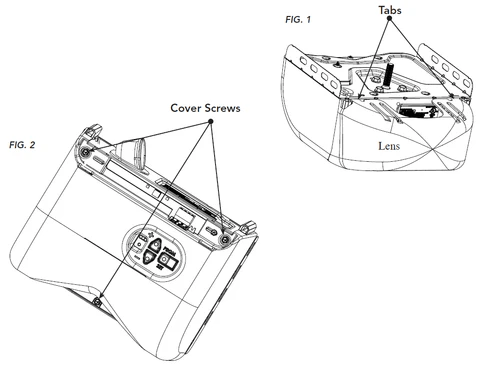
Most covers are held in place with 2–6 screws or snap tabs.
Step 4: Locate the Cover Screws or Fasteners
Look carefully along:
- The sides of the opener
- The bottom edge
- Near the light lens
Some Genie models hide screws behind the light cover.
Tip:
Use a flashlight and feel along edges if screws aren’t immediately visible.
Step 5: Remove the Light Cover (If Necessary)
On many Genie models, the light cover must come off first.
How to remove it:
- Gently press the sides of the lens
- Pull downward or slide it off
- Remove the bulb to avoid breakage
Set the lens and bulb aside safely.

4
Step 6: Unscrew the Main Opener Cover
Now you’re ready to remove the main housing.
Follow these steps:
- Use the correct screwdriver or nut driver
- Support the cover with one hand
- Remove screws one at a time
- Place screws in a container immediately
Important: Do not let the cover drop suddenly—it may crack or damage wiring.
Step 7: Carefully Lower or Slide Off the Cover
Depending on the model, the cover may:
- Drop straight down
- Slide backward
- Separate into two halves
Move slowly and watch for any wires connected to the cover (rare but possible).
What You’ll See After Removing the Cover
Once the cover is off, you’ll see the main internal components.
Typical internal parts include:
- Electric motor
- Drive gear and sprocket or belt
- Circuit board (logic board)
- Capacitor
- Wiring harness
- Limit switch assembly
This view allows for visual inspection only—no force is required.
What You Should Check Once the Cover Is Off
Visual inspection checklist:
- Burn marks on circuit board
- Loose or disconnected wires
- Excessive dust buildup
- Cracked plastic gears
- Oil or grease leakage
Rule of thumb: If it looks melted, burnt, or smells bad—stop and call a professional.
Common Problems You Can Spot With the Cover Off
Removing the cover often reveals obvious issues.
Examples:
- Stripped gear teeth (white plastic shavings present)
- Loose wire connectors
- Broken mounting brackets
- Insect nests or debris
Identifying these early can prevent total opener failure.
Cleaning While the Cover Is Off (Optional)
Light cleaning is safe and beneficial.
How to clean properly:
- Use a dry cloth or soft brush
- Gently remove dust and cobwebs
- Do not spray water or cleaner
- Avoid touching circuit board contacts
Never use compressed air too close—it can push debris deeper.
Mistakes to Avoid When Removing the Cover
Avoid these common DIY errors:
- Forgetting to unplug the unit
- Forcing plastic tabs
- Mixing screw sizes
- Touching exposed electrical contacts
- Overtightening screws during reassembly
Patience is more important than speed.
How to Put the Cover Back On Correctly
Reinstallation is the reverse process.
Best practices:
- Align the cover carefully
- Make sure no wires are pinched
- Hand-tighten screws first
- Tighten evenly—do not overtighten
- Reinstall the light bulb and lens
Plug the opener back in only after the cover is fully secured.
Testing After Reinstallation
Before reconnecting the door:
- Plug the opener back in
- Test wall button operation
- Listen for unusual sounds
- Re-engage the garage door
- Test open/close cycle
This ensures everything was reassembled correctly.
When Should You Stop and Call a Professional?
You should stop DIY work if:
- You see burnt wiring
- The circuit board is damaged
- The motor smells burnt
- You’re unsure how to reassemble
Professional service prevents further damage and safety risks.
FAQ: Genie Garage Door Opener Cover Removal
How To Take Cover Off Genie Garage Door Opener Safely?
Unplug the unit, remove the light cover if needed, unscrew the housing, and lower the cover carefully using proper tools.
Do I Need Special Tools to Remove the Cover?
No. Basic household tools like screwdrivers and a ladder are usually sufficient.
Will Removing the Cover Void My Warranty?
Yes. Opening the housing typically voids any remaining manufacturer warranty.
How Long Does It Take to Remove the Cover?
For most homeowners, 10–20 minutes is typical.
Can I Fix My Opener Just by Removing the Cover?
You can inspect and clean, but major repairs should be handled by professionals unless you’re experienced.
Conclusion
Learning how to take cover off Genie garage door opener gives homeowners a valuable skill for inspection, cleaning, and basic troubleshooting. When done safely and methodically, this simple task can help you catch small problems early, reduce repair costs, and better understand how your garage door system works.
Always prioritize safety, know your limits, and don’t hesitate to call a professional when needed.
If this guide helped you, share it on social media so other homeowners can confidently handle basic garage door opener maintenance the right way.


Leave a Reply