Many homeowners are frustrated when the garage door opener light stays on longer than expected—or never turns off at all. This can waste energy, create glare, or even disturb nearby rooms. In this complete guide, we’ll explain How To Turn Off Light On Garage Door Opener using simple, proven steps that work for most modern systems.
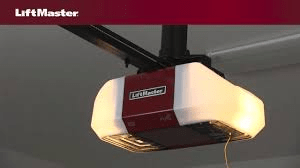
How To Turn Off Light On Garage Door Opener (Quick Answer)
In most cases, you can turn off the garage door opener light by:
- Pressing the Light button on the wall control
- Adjusting light settings on the opener unit
- Resetting the opener system
- Replacing faulty sensors or controls
Read too: Door and Garage Door Companies: Choosing the Right Partner for Your Needs
However, the exact method depends on how your garage door opener is designed, which we’ll break down clearly below.
Why Does the Garage Door Opener Light Stay On?
Garage door opener lights are designed for safety and convenience. Typically, the light:
- Turns on when the door opens or closes
- Stays on for 3–5 minutes
- Automatically shuts off
If it doesn’t, the most common reasons include:
- Motion sensor detecting movement
- Light button locked in “ON” mode
- Electrical surge or software glitch
- Faulty wall control or logic board
According to home electrical safety data, lighting-related issues are among the top 10 homeowner garage complaints due to modern automation features.
Check the Wall Control Panel First (Most Common Fix)

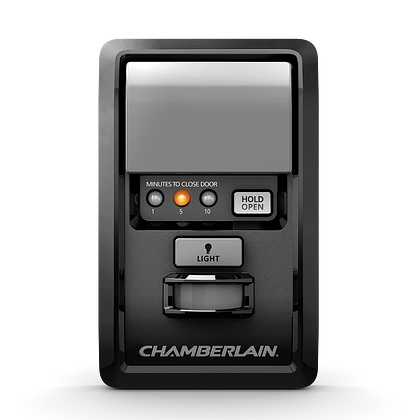

Step-by-Step Instructions
- Locate the wall-mounted control panel
- Look for a button labeled:
- “Light”
- Bulb icon
- Press and hold the button for 2–3 seconds
- Observe if the light turns off immediately
💡 Pro Tip:
Some wall controls have a lock feature. If enabled, the light may stay on until unlocked.
How To Turn Off Light Using the Opener Motor Unit
If the wall control doesn’t work, the setting may be on the opener itself.
Steps:
- Stand under the opener motor
- Locate the Light or Learn button
- Press once to toggle the light
- Wait 30 seconds to confirm behavior
Many newer models allow the light to be manually overridden directly at the unit.
Adjust Motion Sensor or Timer Settings
Some garage door openers include motion-activated lights.
Signs motion sensors are the issue:
- Light turns on when you walk by
- Light stays on for extended periods
- Light reactivates randomly
What to do:
- Reduce motion sensitivity (if adjustable)
- Clean sensor lenses using a dry cloth
- Reposition objects triggering motion
Reset the Garage Door Opener (Recommended)
A system reset can resolve software glitches.
Reset Steps (General Method):
- Unplug the opener from power
- Wait 60–90 seconds
- Plug it back in
- Test the door and light behavior
⚠️ Important:
Do not reset during storms or voltage fluctuations.
Replace the Light Bulb (Yes, It Matters)
Surprisingly, the wrong bulb can cause issues.
Use:
- LED bulbs rated for garage door openers
- Bulbs under 60–100 watts equivalent
Avoid:
- Cheap LEDs without interference shielding
- Oversized bulbs
Electrical interference from incompatible bulbs can prevent the light circuit from turning off properly.
Wiring and Electrical Issues to Check
If none of the above works, inspect:
- Loose wall control wires
- Pinched low-voltage wiring
- Moisture near terminals
According to information summarized by Wikipedia on garage door openers, electrical faults can disrupt control logic and lighting functions.
Source: https://en.wikipedia.org/wiki/Garage_door_opener
When the Light Won’t Turn Off at All (Advanced Causes)
Possible reasons:
- Defective logic board
- Stuck relay
- Damaged wall control panel
Cost estimate:
- Wall control replacement: $25–$60
- Logic board replacement: $80–$200
- Full opener replacement (if old): $300–$600
If your opener is over 10–12 years old, replacement may be more cost-effective.
Manual vs Automatic Light Control (Comparison)
| Feature | Manual Control | Automatic Control |
|---|---|---|
| Convenience | Medium | High |
| Energy efficiency | Depends on user | High |
| Motion activation | No | Yes |
| Override option | Yes | Limited |
Most homeowners prefer automatic lighting but with manual override capability.
Safety Tips When Working With Garage Door Openers
- Always disconnect power before wiring checks
- Never touch exposed terminals
- Use a ladder with stable footing
- Keep hands clear of moving parts
Garage door systems are under tension and can cause injury if mishandled.
FAQ – How To Turn Off Light On Garage Door Opener
Q1: How long should a garage door opener light stay on?
A: Typically 3–5 minutes, depending on manufacturer settings.
Q2: Can I permanently disable the opener light?
A: Some models allow disabling through settings, but many do not due to safety requirements.
Q3: Why does my garage light turn on by itself?
A: Motion sensors, electrical interference, or faulty wiring are the most common causes.
Q4: Does using LED bulbs cause problems?
A: Only if the LED is not rated for garage door openers. Use interference-free models.
Q5: Should I call a technician if the light won’t turn off?
A: Yes, especially if you suspect a logic board or wiring issue.
Conclusion
Understanding How To Turn Off Light On Garage Door Opener can save energy, reduce annoyance, and help you diagnose deeper issues early. Most problems are solved by checking the wall control, adjusting settings, or performing a simple reset. With the steps above, even beginners can troubleshoot safely and effectively.


Leave a Reply