If you’re trying to Program Chamberlain Garage Door Opener With Purple Learn Button, you’re likely setting up a new remote, keypad, or replacing an old transmitter. While the process is simple, missing one small step can prevent your garage door from responding.
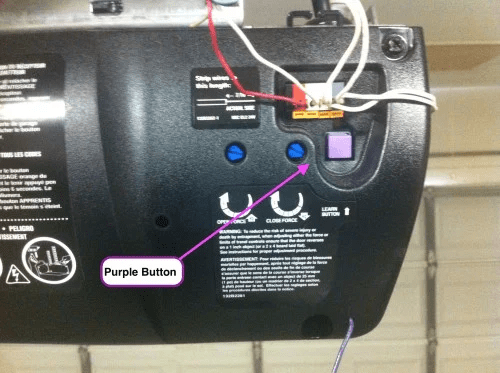
This complete guide walks you through programming, resetting, troubleshooting, and understanding how the purple learn button system works—so you can get your garage opener functioning properly in minutes.
Read too: Mastering the Art of Adjusting a Chamberlain Garage Door Opener for Smooth Operation and Safety
What Does the Purple Learn Button Mean?
If your opener has a purple learn button, it typically means your Chamberlain unit uses Security+ rolling code technology operating at 315 MHz (commonly manufactured between 2005–2011).
Rolling code technology changes the access code every time you use the remote, preventing signal interception.
For general information about how garage door openers operate, see:
https://en.wikipedia.org/wiki/Garage_door_opener
Identifying the button color is critical because programming steps vary slightly by model year.
How To Program Chamberlain Garage Door Opener With Purple Learn Button
This section directly answers your primary goal: Program Chamberlain Garage Door Opener With Purple Learn Button correctly and safely.
Before You Begin
You will need:
- Ladder
- Remote control with fresh CR2032 battery
- Access to motor unit
- 30–60 seconds of uninterrupted time
Important: Ensure the garage door is fully closed before starting.
Step-by-Step: Programming a Remote
Step 1: Locate the Purple Learn Button
Climb your ladder and find the Learn button on the back or side of the motor housing.
It will be:
- Purple in color
- Near an LED indicator light
Press and release the Learn button.
The LED will light up.
You now have 30 seconds to complete the next step.
Step 2: Press the Remote Button
Press and hold the button on your remote for 2–3 seconds.
Release.
If programming is successful:
- The opener light will blink
- You may hear a clicking sound
This confirms synchronization.
Step 3: Test the Remote
Press the remote again.
If the door moves, programming is complete.
If not, repeat the steps carefully.
How To Program a Chamberlain Keypad With Purple Learn Button
Many homeowners also need keypad setup.
Step-by-Step Keypad Programming
- Press and release the purple Learn button.
- Within 30 seconds, enter a 4-digit PIN on the keypad.
- Press and hold the ENTER button.
- Release when the opener light blinks.
Test the keypad by entering your PIN and pressing ENTER again.
How To Erase All Remote Codes
If you’re moving into a new home or replacing lost remotes, clearing old codes is important.
Reset Procedure
- Press and hold the purple Learn button.
- Hold for 6–10 seconds until LED turns off.
- Release button.
All programmed remotes and keypads are now erased.
You must reprogram each device individually.
Why Is My Remote Not Programming?
Common reasons include:
1. Dead Battery
Replace CR2032 battery.
Low batteries cause inconsistent pairing.
2. Timing Issue
You must press the remote within 30 seconds of pressing Learn.
If too slow, restart process.
3. Memory Full
Most Chamberlain openers store 5–10 remote codes.
Clear memory and reprogram if necessary.
4. Wrong Frequency Remote
Purple Learn button units require compatible 315 MHz Security+ remotes.
Verify model compatibility.
How Secure Is the Purple Learn Button System?
Chamberlain’s Security+ system uses rolling code encryption.
This means:
- Each button press generates a new code.
- Prevents code grabbing devices.
- Enhances residential security.
Compared to older fixed-code systems, this significantly reduces unauthorized access risk.
Purple Learn Button vs Other Colors
| Button Color | Frequency | Years |
|---|---|---|
| Purple | 315 MHz | 2005–2011 |
| Yellow | 390 MHz | 2011+ |
| Red/Orange | 390 MHz | Older |
| Green | 390 MHz | 1993–1997 |
Always confirm button color before purchasing replacement remotes.
Can You Program Multiple Remotes?
Yes.
Repeat programming steps for each remote individually.
Most openers allow:
- Up to 5–10 devices
- Combination of remotes and keypads
How Long Does Programming Take?
Total time:
- 2–5 minutes
No professional technician required in most cases.
Safety Tips When Programming
✔ Ensure ladder stability
✔ Keep fingers away from moving door
✔ Program with door fully closed
✔ Test safety reversal monthly
To test safety reversal:
- Place a 2×4 board on ground.
- Close door.
- Door should reverse upon contact.
What If the Learn Button LED Won’t Light?
Possible causes:
- No power to unit
- Tripped breaker
- Internal circuit board issue
Check:
- Power outlet
- GFCI reset
- Extension cord damage
If motor hums but LED doesn’t light, board may need service.
Maintenance Tips for Chamberlain Openers
Every 6 months:
✔ Lubricate chain or belt
✔ Tighten mounting bolts
✔ Clean photo-eye sensors
✔ Test manual release cord
Preventative maintenance extends lifespan to 15–20 years.
Should You Upgrade Instead?
Upgrade if:
- Opener is over 15 years old
- Lacks battery backup
- No WiFi compatibility
- Frequent breakdowns
Modern Chamberlain models include:
- Smartphone control
- MyQ app integration
- Quiet belt drive
However, purple learn button units remain reliable when maintained.
FAQ Section
1. How do I program Chamberlain garage door opener with purple learn button?
Press the purple Learn button, then press your remote within 30 seconds. The opener light will blink to confirm.
2. Why won’t my purple learn button remote sync?
Most commonly due to dead battery, timing delay, or incompatible remote.
3. How do I reset a Chamberlain purple learn button opener?
Hold the Learn button for 6–10 seconds until LED turns off to erase all codes.
4. Can I program multiple remotes?
Yes. Repeat the programming process for each remote individually.
5. Is the purple learn button system secure?
Yes. It uses rolling code encryption to prevent signal duplication.
6. How long do Chamberlain openers last?
With maintenance, 15–20 years is common.
Conclusion
To Program Chamberlain Garage Door Opener With Purple Learn Button, you simply need to:
- Locate the purple Learn button
- Press it
- Sync your remote within 30 seconds
The process takes only a few minutes and requires no special tools.
With Security+ rolling code technology, your system remains both convenient and secure.
If this guide helped you successfully program your opener, share it on social media to help other homeowners solve their garage access issues quickly and confidently.


Leave a Reply