In today’s connected world, smart home devices have become an integral part of our daily lives, offering convenience and security. One such device is the MyQ garage door opener, which allows you to control your garage door remotely using a smartphone app. However, like any technology, it can sometimes face connectivity issues, leaving you wondering why your MyQ garage door opener is offline. In this article, we’ll explore common reasons for MyQ garage door opener offline problems and provide troubleshooting steps to help you regain control of your garage door.
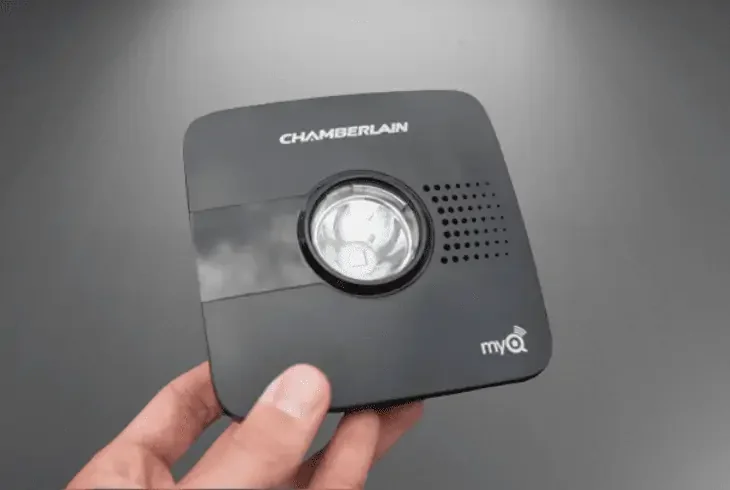
Understanding MyQ Garage Door Opener
Bringing Convenience to Your Garage
The MyQ garage door opener is a smart device that connects to your existing garage door opener system, allowing you to open, close, and monitor your garage door remotely via a smartphone app. This technology has revolutionized how we interact with our garage doors, offering convenience, security, and peace of mind.
Common Reasons for MyQ Garage Door Opener Offline
Identifying the Issue
Several factors can contribute to your MyQ garage door opener going offline. Here are some of the most common reasons:
1. Wi-Fi Connectivity Issues
If your MyQ garage door opener relies on a Wi-Fi connection to communicate with your smartphone app, a weak or unstable Wi-Fi signal can lead to offline problems. Interference from other electronic devices or the garage’s construction materials can impact the signal strength.
2. Power Outages
A power outage can disrupt the connection between your MyQ garage door opener and your home’s Wi-Fi network. Even brief outages can cause the device to go offline.
3. Wi-Fi Network Changes
If you’ve recently changed your Wi-Fi network name or password, your MyQ garage door opener may not be able to connect until you update the settings.
4. Software Updates
Sometimes, firmware or software updates can cause compatibility issues, resulting in connectivity problems. It’s essential to keep both the MyQ app and the garage door opener’s firmware up to date.
5. Signal Range
If your garage is located far from your Wi-Fi router, the signal may not reach the MyQ device reliably, causing it to go offline.
Troubleshooting MyQ Garage Door Opener Offline Issues
Regaining Control
Here are some troubleshooting steps to address MyQ garage door opener offline problems:
1. Check Your Wi-Fi Connection
Start by ensuring that your home Wi-Fi network is functioning correctly. Verify that other devices connected to the same network are online. If you suspect a Wi-Fi issue, consider relocating your router or using a Wi-Fi extender to improve coverage in the garage.
2. Power Cycle the MyQ Device
Unplug the MyQ garage door opener for about 30 seconds and then plug it back in. This power cycle can often resolve connectivity issues.
3. Update the MyQ App
Ensure that you are using the latest version of the MyQ app on your smartphone. Visit your app store to check for updates and install them if available.
4. Reconnect to Wi-Fi
If you’ve recently changed your Wi-Fi network name or password, reconfigure the MyQ device to connect to the updated network settings. Follow the device’s instructions for this process.
5. Check for Firmware Updates
Check if there are any firmware updates available for your MyQ garage door opener. Manufacturers often release updates to address connectivity issues and improve performance.
6. Review the Signal Range
If the MyQ device is too far from your Wi-Fi router, consider relocating the router or adding a Wi-Fi extender to extend the network’s reach.
7. Contact Customer Support
If the issue persists despite your troubleshooting efforts, contact MyQ customer support for assistance. They can provide further guidance and may recommend additional steps or even a device replacement if necessary.
Conclusion
The MyQ garage door opener offers unparalleled convenience in controlling your garage door remotely. However, occasional offline issues can be frustrating. By understanding the common reasons for MyQ garage door opener offline problems and following the troubleshooting steps outlined in this article, you can quickly regain control of your garage door and enjoy the benefits of smart home technology once again. Remember that maintaining a stable Wi-Fi network and keeping your devices up to date are essential for a seamless smart home experience.
Leave a Reply