In today’s world, almost everything can be controlled through a smartphone. From turning on lights to adjusting thermostats, mobile technology has given homeowners unprecedented convenience and control. One of the most common questions people ask when upgrading their home is: “Can I open a garage door with my phone?” The short answer is yes — and the process is easier than you might think.
This article will explain how smartphone garage door control works, the benefits of using it, the security measures you should know, and what options are available in the market. By the end, you’ll know whether smartphone-enabled garage access is the right choice for your home.
Read too: How To Replace Garage Door Roller Like a Pro? Step-by-Step Guide
What Does It Mean to Open a Garage Door with Your Phone?
When people ask, “Can I open a garage door with my phone?” they’re talking about using a smartphone app or smart home integration to remotely control their garage door. Instead of relying solely on a remote control or keypad, you can install a smart garage door opener that connects to your home Wi-Fi.
With a smart opener, you can:
- Open or close the garage from anywhere in the world.
- Receive alerts if the garage is left open.
- Share digital access with family, guests, or delivery drivers.
- Integrate your garage into a wider smart home system.
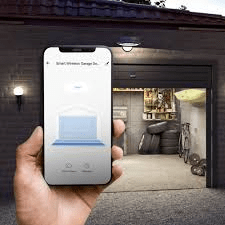
Essentially, your phone becomes a universal garage door remote, with added layers of control and security.
How Does Smartphone Garage Door Control Work?
Smartphone garage door technology works through a combination of Wi-Fi, Bluetooth, and cloud-based apps. Here’s how the process usually looks:
- Smart Garage Door Opener or Hub
You’ll need either a Wi-Fi-enabled garage door opener or an add-on device (often called a hub) that connects your existing opener to your home network. - Mobile Application
Manufacturers provide a companion app (such as MyQ, Aladdin Connect, or Nexx Garage) that lets you control the opener from your phone. - Wi-Fi or Data Connection
When you tap the button in the app, it sends a signal through your Wi-Fi or mobile data to the opener, triggering the motor to open or close. - Smart Home Integration
Many systems work with Amazon Alexa, Google Assistant, or Apple HomeKit, so you can even control your garage with a voice command.
So, if you’re still wondering, “Can I open a garage door with my phone without replacing my entire system?” — the answer is yes. Add-on hubs make it possible to upgrade older openers affordably.
Advantages of Opening Your Garage Door with a Phone
Upgrading to smartphone access isn’t just about convenience — it also improves safety and flexibility. Here are the top benefits:
1. Convenience
No more fumbling for remotes. Whether you’re jogging, biking, or driving, you can open your garage with just a few taps on your phone.
2. Remote Access
If a family member forgets their keys, you can open the garage for them from anywhere. You can also allow package deliveries directly into your garage when you’re not home.
3. Enhanced Security
Smart apps send notifications if the garage door is left open. Some even include camera integration, letting you see who’s entering or leaving.
4. Guest and Family Sharing
Instead of giving out physical remotes, you can grant access to others through the app — and revoke it at any time.
5. Smart Home Integration
Connecting your garage to platforms like Alexa or Google Home lets you include it in automation routines. For example, closing the garage automatically when you say, “Goodnight.”
Are There Security Concerns?
When discussing smartphone garage access, many homeowners ask, “Is it safe? Can I open a garage door with my phone without risking hacks?”
The truth is, smart garage door systems are generally secure when installed correctly. However, like any connected device, there are risks if you don’t take precautions.
Here are some best practices:
- Use Strong Passwords for your app and Wi-Fi network.
- Enable Two-Factor Authentication (2FA) whenever possible.
- Keep Apps and Firmware Updated to patch vulnerabilities.
- Check Access Logs regularly to ensure only authorized people are entering.
If you follow these steps, opening your garage with your phone can actually be safer than traditional remote controls, which can be lost or cloned.
Can I Open A Garage Door With My Phone Without Wi-Fi?
This is a common question. Some systems allow Bluetooth-only access, meaning your phone connects directly to the opener without using the internet. However, this limits control to short-range use.
If you want true remote control (like opening the door while you’re away from home), Wi-Fi is necessary. For maximum flexibility, choose a system that supports both Wi-Fi and Bluetooth.
Popular Smartphone Garage Door Systems
If you’re considering making the switch, here are some leading options on the market:
- Chamberlain MyQ
One of the most popular smart garage solutions. Easy to set up, affordable, and works with major smart home systems. - Nexx Garage
Offers both Wi-Fi and Bluetooth functionality. Known for strong security and easy guest sharing features. - Aladdin Connect
Comes with excellent real-time notifications and integrates well with Amazon Alexa. - Tailwind iQ3
Unique feature: automatically opens when it detects your car arriving (based on your phone’s location).
Step-by-Step: How to Set Up Smartphone Garage Door Access
If you’re ready to answer your own question — “Can I open a garage door with my phone today?” — here’s a simple setup guide:
- Check Compatibility
Make sure your existing garage door opener works with the smart system you choose. - Purchase a Smart Opener or Hub
Decide whether you want a full replacement or an add-on hub. - Install the Hardware
Most hubs attach easily to your existing opener with double-sided tape and simple wiring. - Download the App
Follow the app’s setup instructions to connect the device to your Wi-Fi. - Test Remote Access
Try opening and closing your garage from your driveway, then from another location. - Add Users and Integrations
Share access with family, and connect the opener to your preferred smart home assistant.
Future Trends: What’s Next for Smart Garage Doors?
As technology advances, garage door systems are becoming smarter and more integrated. Some upcoming trends include:
- AI-powered Security Monitoring — detecting unusual activity around your garage.
- Biometric Access — using fingerprint or facial recognition via your phone.
- Full Smart Home Ecosystems — garages syncing seamlessly with security cameras, lighting, and home alarms.
So, if you’re still on the fence about upgrading, know that the technology will only continue to improve.
Final Thoughts: Should You Use Your Phone to Open Your Garage?
So, “Can I open a garage door with my phone?” Absolutely. Not only is it possible, but it’s also practical, secure, and convenient. Whether you’re tired of carrying remotes, want more control over who accesses your garage, or just enjoy smart home technology, smartphone garage access is worth considering.
By choosing the right system and following security best practices, you can transform your garage into a smarter, safer, and more convenient entry point to your home.



Leave a Reply