Ever struggled with a garage door remote that stops working when you need it most? The Genie Gitr-3 3-Button Remote Control For Garage Door Opener offers a simple, reliable, and user-friendly solution for homeowners who want consistent performance every time. Whether you’re replacing an old remote or adding an extra one for convenience, this model delivers dependable functionality backed by Genie’s trusted quality.
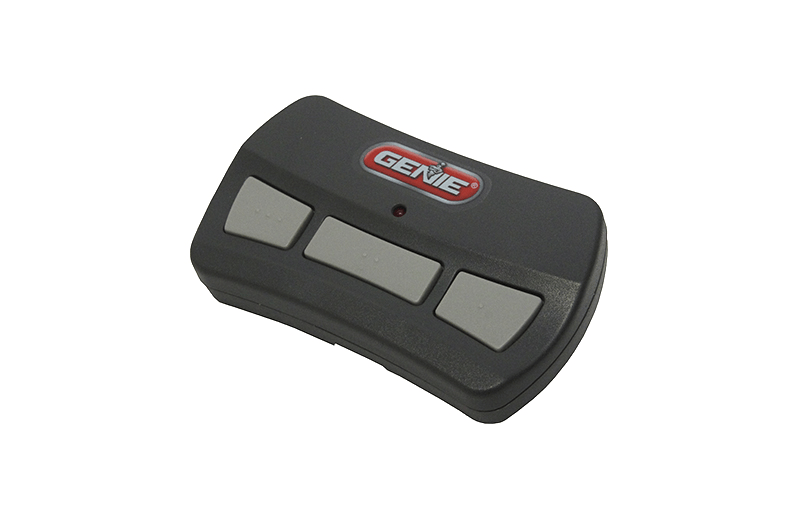
What Is the Genie Gitr-3 3-Button Remote Control?
The Genie Gitr-3 is a compact, wireless garage door remote control designed to operate up to three Genie openers from one device. It’s compatible with most Genie Intellicode openers manufactured since 1997, making it ideal for both older and modern systems.
Read too: How To Replace Garage Door Roller Like a Pro? Step-by-Step Guide
Key Features:
- Three-button design: Control up to 3 garage doors or gates.
- Intellicode security: Uses rolling code technology to prevent unauthorized access.
- Compact & durable: Fits easily on a keychain or clips to your car visor.
- Easy programming: No need for complex tools — setup takes less than a minute.
- Battery included: Comes ready to use straight out of the box.
According to Genie’s official data, the Gitr-3 model can work up to 150 feet away, offering better range and performance compared to older remotes.
How to Program the Genie Gitr-3 Remote: Step-by-Step Guide
Programming your Genie Gitr-3 remote is simple and takes just a few minutes. Here’s how you can do it yourself:
- Locate the “Learn” button on your Genie opener (usually red, purple, or black).
- Press and release the Learn button. A small LED light will begin to blink.
- Press and hold the desired button on your Gitr-3 remote until the garage door opener light flashes or you hear two clicks.
- Test the remote by pressing the programmed button again — the door should move.
That’s it! You’re now connected.
💡 Tip: For multiple openers, repeat the process with a different button for each unit.
Compatibility: Does It Work With My Garage Door Opener?
One of the strengths of the Genie Gitr-3 3-Button Remote Control For Garage Door Opener is its broad compatibility.
| Compatible Models | Year Range | Technology Type |
|---|---|---|
| Genie Intellicode I & II | 1997–Present | Rolling Code |
| Overhead Door Models | 1997–Present | Intellicode |
| Certain Universal Receivers | Varies | Smart-Link Compatible |
⚠️ Note: The Gitr-3 will not work with older fixed-code systems made before 1995. Always check your opener’s label for compatibility before purchase.
Why Choose the Genie Gitr-3 Over Other Remotes?
When comparing garage door remotes, the Gitr-3 stands out for reliability and simplicity.
Genie Gitr-3 vs Other Models
| Feature | Genie Gitr-3 | Generic Universal Remote |
|---|---|---|
| Setup Time | 1–2 minutes | 5–10 minutes |
| Range | Up to 150 ft | Up to 100 ft |
| Security | Intellicode rolling code | Fixed code (less secure) |
| Build Quality | Durable, ergonomic | Often plastic, less sturdy |
| Price Range | $$ | $ |
In short, while some cheaper remotes exist, the Gitr-3 offers superior build quality, security, and ease of use, making it the better long-term investment.
Common Issues and Troubleshooting Tips
Even with top-quality products, occasional issues can arise. Here’s how to handle the most common ones:
1. Remote not working:
Check the battery first (CR2032 coin cell). Replace if needed.
2. Limited range:
Metal doors or walls may cause signal interference — try reprogramming or repositioning your opener antenna.
3. Door opens randomly:
Ensure no one else has programmed their remote to your opener. Reset and reprogram your opener if necessary.
4. Light blinks but door doesn’t move:
Verify that your safety sensors are aligned and not obstructed.
For additional information, you can visit the Wikipedia page on garage door openers to understand how these systems work.
Expert Opinion: Why the Gitr-3 Is Still a Top Pick in 2025
According to home automation experts, the Genie Gitr-3 remains one of the best-selling remotes in North America due to its balance of price, compatibility, and reliability. Many tech reviewers note that it “just works,” without unnecessary smart features that complicate usability.
Moreover, with the growing emphasis on secure wireless transmission, Genie’s Intellicode technology continues to meet modern standards for encryption and access control.
Maintenance Tips to Extend Remote Life
- Replace the battery every 12–18 months.
- Keep the remote clean and dry.
- Avoid dropping it on hard surfaces.
- If unused for long periods, remove the battery to prevent leakage.
Following these habits can easily double your remote’s lifespan.
FAQ Section
1. Can I use the Genie Gitr-3 remote with a non-Genie opener?
Only if your opener supports Genie Intellicode or you use a compatible universal receiver. Otherwise, it won’t pair.
2. How far can the Gitr-3 remote work from?
Typically up to 150 feet, depending on the environment and interference.
3. Does it work with Genie’s newer smart openers?
Yes, most newer models maintain backward compatibility with Gitr-3 remotes.
4. How do I reset my Genie Gitr-3 remote?
Hold down all three buttons simultaneously for 10 seconds to clear all programmed settings.
5. Is the Gitr-3 remote weatherproof?
While durable, it’s not fully waterproof. Keep it indoors or in your vehicle to avoid moisture damage.
6. Can I get replacement parts?
Yes, Genie offers visor clips, batteries, and shells directly from their support site or major retailers.
Conclusion
The Genie Gitr-3 3-Button Remote Control For Garage Door Opener stands as a trusted, high-performance option for homeowners seeking dependable access control. With its easy setup, wide compatibility, and proven security technology, it’s an ideal replacement or upgrade for your garage system.
If you found this guide helpful, share it with friends or neighbors who might be searching for a reliable garage door remote solution!



Leave a Reply