Few things are as frustrating as pressing your garage door remote and nothing happens. You might be standing in your driveway, clicking repeatedly, wondering, “How do I fix my garage door opener remote?” Whether your remote suddenly stopped working, has weak range, or isn’t syncing with your opener, don’t worry — most problems are quick and inexpensive to fix.
In this guide, we’ll walk you through how to troubleshoot and repair your remote in easy steps. You’ll learn how to identify the cause, test your system, and get your garage door working again — without calling a technician (unless you really need to).
Read too: Mastering Quantum Garage Door Opener Programming: A Comprehensive Guide
Why Your Garage Door Remote Might Stop Working
Garage door remotes are reliable, but like any wireless device, they can fail for a variety of reasons. Common causes include:
- Dead or weak batteries
- Signal interference from nearby electronics
- Outdated programming or lost pairing
- Damaged buttons or circuits
- Blocked sensors or faulty opener logic board
According to a 2024 Home Improvement Survey, over 60% of remote issues stem from simple battery or programming problems — not hardware failure. That means most homeowners can fix the issue themselves in under 10 minutes.
Step-by-Step: How Do I Fix My Garage Door Opener Remote
Let’s go through each possible cause and how to fix it safely.
1. Check and Replace the Batteries
The most common fix is also the easiest.
Steps:
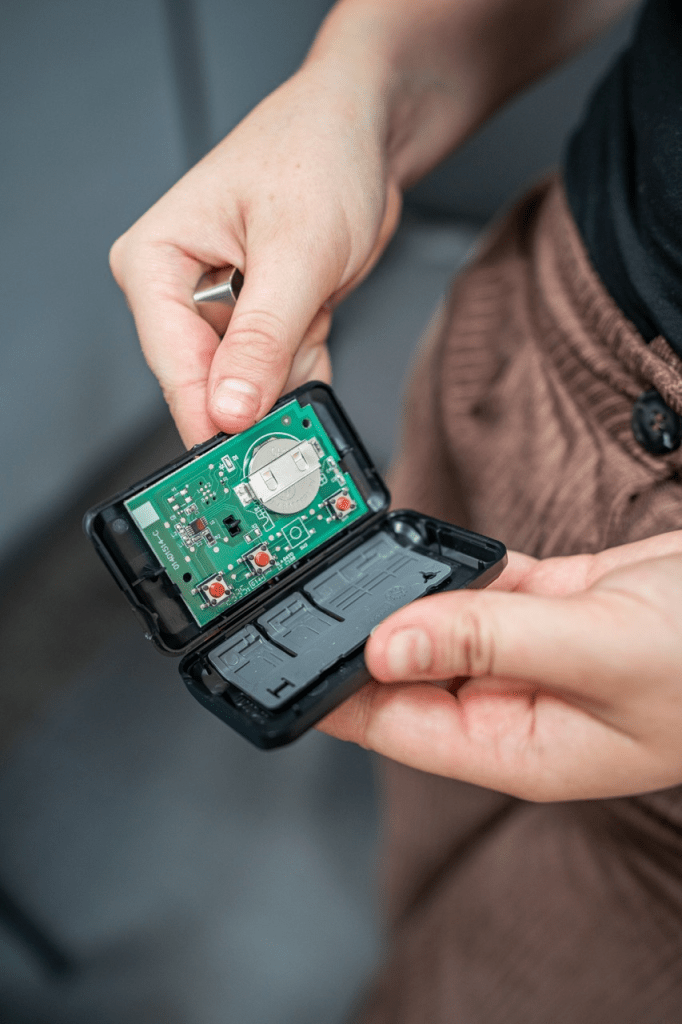
- Open the remote’s battery compartment (usually on the back).
- Remove the old battery — most remotes use CR2032 coin cells or A23 mini batteries.
- Insert a new battery, ensuring the positive (+) side faces the correct direction.
- Test the remote by standing within 10–15 feet of the garage door.
If your remote works again — great! If not, move on to the next step.
Tip: Even new batteries can fail if stored for long periods. Always check the expiration date.
2. Check for Signal Interference
Garage door remotes use 315 MHz or 390 MHz radio frequencies. Devices like LED lights, Wi-Fi routers, or even baby monitors can interfere.
Try this:
- Unplug nearby electronic devices (especially LED light bulbs or motion sensors).
- Test your remote again.
- If it now works, replace the interfering bulb or device with a garage-door-compatible model.
According to LiftMaster, LED light bulbs are one of the leading causes of short-range or non-responsive remotes.
3. Reprogram or Resync Your Remote
If you recently experienced a power outage or replaced your opener’s motherboard, your remote may need reprogramming.
Here’s how to reprogram it:
- Locate the “Learn” button on your garage door opener (usually behind the light lens).
- Press and release the button — a light should flash or blink.
- Within 30 seconds, press and hold your remote button until the opener light blinks again.
- Test the remote.
If it still doesn’t work, clear all previous codes and reprogram:
- Hold the Learn button for 6–10 seconds until the light turns off.
- This erases all remotes. Then, reprogram each one using the steps above.
Pro Tip: Label your remotes if you have multiple openers — it prevents mix-ups later.
4. Inspect the Remote for Physical Damage
If the casing is cracked or buttons are sticky, it might not send signals properly.
What to check:
- Buttons that feel “stuck” or don’t click cleanly.
- Battery contacts that are corroded or bent.
- Signs of moisture damage or rust.
Fix:
Clean the contacts with a cotton swab and rubbing alcohol, and gently bend them back into place. If you notice corrosion on the circuit board, replacing the remote is safer and more cost-effective.
5. Check the Wall Button and Safety Sensors
If the wall control also isn’t working, the issue might not be your remote at all — it could be the opener’s receiver or safety sensors.
Quick test:
- Press the wall button.
- If the door doesn’t move, check if the safety sensors at the bottom of the tracks are blinking.
- Clean the sensors with a soft cloth and ensure they face each other directly.
If your wall control works but your remote doesn’t, that confirms the issue lies in the remote or signal, not the opener motor.
6. Reset the Garage Door Opener
When all else fails, a system reset can resolve deeper connection issues.
To reset most Chamberlain/LiftMaster units:
- Unplug the opener from the power outlet.
- Wait 60 seconds.
- Plug it back in and press the Learn button to reconnect your remote.
For Genie or Craftsman models, refer to the manual — some require a sequence of button presses to clear memory.
7. Replace the Remote (If Necessary)
If your remote is older than 8–10 years, or you’ve replaced batteries and reprogrammed with no success, it may simply be worn out.
You can purchase a universal remote from Chamberlain, LiftMaster, or Genie for around $25–$40. Modern remotes offer longer range, rolling code encryption, and better signal security.
Common Fixes at a Glance
| Issue | Likely Cause | Solution |
|---|---|---|
| Remote not working | Dead battery | Replace battery |
| Door opens only with wall switch | Remote unprogrammed | Reprogram using Learn button |
| Short range | Signal interference | Remove or relocate LED bulbs |
| Remote works inconsistently | Dirty contacts | Clean internal components |
| Multiple remotes stop working | Faulty receiver board | Reset opener or call technician |
Expert Insight: When to Call a Professional
While most issues are DIY-friendly, some problems require professional service — especially if:
- Your opener makes a humming sound but doesn’t move.
- The Learn button light won’t respond.
- The circuit board is burnt or damaged.
Garage repair specialists have the tools to test signal receivers and replace boards safely. Attempting these repairs yourself could void your warranty or cause electrical hazards.
External Source for Reference
For an overview of how garage door opener systems work, visit Wikipedia – Garage Door Opener.
FAQ: How Do I Fix My Garage Door Opener Remote
1. Why won’t my garage door remote work even after replacing the batteries?
It could be a signal issue or the remote may have lost its programming. Try reprogramming it using the Learn button on your opener.
2. How do I reprogram my Chamberlain or LiftMaster remote?
Press and release the Learn button, then press and hold the remote button until the opener light blinks. That’s it — your remote is paired.
3. Can a weak Wi-Fi signal affect my garage door remote?
No. Traditional remotes use radio frequencies, not Wi-Fi. However, smart remotes or MyQ systems do rely on Wi-Fi for app control.
4. Why does my remote work only from inside the garage?
You may have signal interference or a damaged antenna on the opener. Inspect the antenna wire for breaks and make sure it hangs straight down.
5. How long should a garage door remote last?
Typically 8–10 years with regular battery replacement and care.
6. Can I use a universal remote for my old garage door opener?
Yes. Most universal remotes are compatible with modern rolling code and older dip-switch systems. Just make sure the frequency matches your opener.
Conclusion
Fixing your garage door opener remote doesn’t have to be stressful. In most cases, it’s as easy as replacing a battery, reprogramming your remote, or clearing signal interference. By following the steps above, you can restore full control of your garage in minutes — no technician required.
If your remote still doesn’t work after troubleshooting, replacing it with a new or universal model is usually the best long-term solution.
Found this guide helpful? Share it with friends or neighbors — you never know who might be clicking their remote in frustration right now!



Leave a Reply