Have you ever tried to replace your Genie garage door remote or parts, only to realize you don’t know what model you have? You’re not alone. Many homeowners ask, “How do I identify my Genie garage door opener?” because this information is essential when buying compatible remotes, keypads, or sensors.
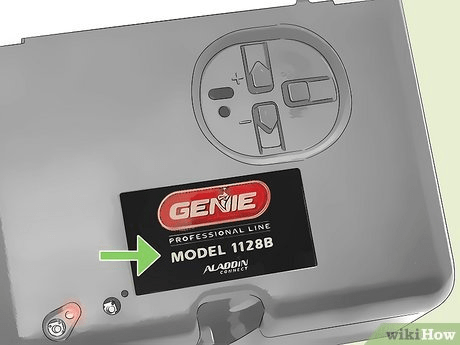
In this guide, you’ll learn exactly where to find your model number, how to read Genie’s labels, what each type of opener means, and how to use this information to order the right accessories or perform troubleshooting. Let’s make identifying your Genie opener quick and stress-free.
Read too: Mastering Quantum Garage Door Opener Programming: A Comprehensive Guide
How Do I Identify My Genie Garage Door Opener
Before you can program a new remote or buy parts, you need to know which Genie opener model you own. Here’s how to do it — step by step.
1. Locate the Model and Serial Number Label
Every Genie garage door opener has a label that includes:
- Model number
- Serial number
- Manufacturing date
- Power rating (e.g., ½ HP, ¾ HP)
Where to find it:
- On the powerhead unit: Look at the main motor housing, typically mounted to the garage ceiling.
- Check near the light lens cover: Some Genie openers place the label behind or under the bulb cover.
- Examine both sides: The label is often on the right or left side of the motor housing.
- On newer models: Look under the light cover panel or near the antenna wire.
Pro Tip: Use your smartphone flashlight or camera if the opener is mounted high — this saves you from climbing a ladder unnecessarily.
2. Understand Genie Model Number Formats
Genie model numbers often start with a combination of letters and numbers like:
- Chain or Belt Drive Models: 2028, 3024, 3055, 3120, 7155
- Screw Drive Models: 2562, ISD995, CM7600
- Older Models: GCG350L, H4000, or IS550
Each format identifies the type and age of your opener.
| Example Model | Type | Drive System | Frequency |
|---|---|---|---|
| Genie 7155 | Belt Drive | Quiet, DC Motor | 315/390 MHz |
| Genie 2028 | Chain Drive | Standard Power | 390 MHz |
| Genie IS550 | Screw Drive | Older Model | 390 MHz |
| Genie 3120L | Smart Opener | Wi-Fi Enabled | 315/390 MHz |
💡 Fun Fact: The “IS” prefix on older models stands for Intellicode Series, Genie’s proprietary rolling-code security system introduced in the 1990s.
3. Identify the Opener Type (Chain, Belt, or Screw Drive)
Knowing the drive type helps when ordering compatible parts.
| Drive Type | Description | Common Models |
|---|---|---|
| Chain Drive | Metal chain pulls the door. Durable and affordable but noisy. | 2028, 500 Series |
| Belt Drive | Rubber belt, smoother and quieter operation. | 3055, 7155, 3120 |
| Screw Drive | Uses a long threaded rod; fewer moving parts. | ISD995, CM7600 |
Most Genie openers display this info on the label or user manual.
4. Check the “Learn” or “Program” Button Color
This small button, located near the antenna wire or light cover, reveals which remote control frequency and Intellicode system your opener uses.
| Button Color | Frequency | Compatible Remotes |
|---|---|---|
| Red or Orange | 390 MHz | GIT-1, ACSCTG Type 1 |
| Purple | 315 MHz | G3T-R, GM3T |
| Green | 390 MHz | GT90, GIT-2 |
| Black | 390 MHz | Older fixed-code models |
Pressing the “Learn” button shouldn’t erase settings — just identify its color to match your remote later.
5. Use the Serial Number to Determine Age
Genie serial numbers often start with the year and week of manufacture. For example:
- 230515678 → Made in 2023, Week 05
- 190825412 → Made in 2019, Week 08
This helps confirm whether your opener supports modern remotes or older fixed-code types.
6. Look Up Your Model on Genie’s Official Database
Once you have the model number, go to the official Genie Company Product Support page.
Here you can:
- Download user manuals
- Find compatible remotes
- Watch video tutorials
- Check recall notices (for older models)
If your opener is discontinued, Genie often lists replacement model suggestions or universal remotes that still work.
7. Identify Your Remote and Keypad Compatibility
Genie remotes and keypads use Intellicode or fixed-code systems. Here’s a breakdown:
| System Type | Description | Remote Examples |
|---|---|---|
| Intellicode I (1995–2011) | Rolling-code security, single-frequency 390 MHz | ACSCTG Type 1 |
| Intellicode II (2011–Present) | Dual-frequency 315/390 MHz, improved encryption | G3T-R, GM3T |
| Fixed Code (Pre-1995) | DIP switch settings, older models | GT90, AT85 |
⚠️ Security Note: If your opener uses a fixed code remote, consider upgrading. These can be cloned easily, unlike Intellicode models with rolling encryption.
Common Genie Model Series and Features
| Series | Features | Popular Models |
|---|---|---|
| Chain Drive Series | Affordable, heavy-duty | 2028, 500, 600 |
| QuietLift Series | Low noise, smooth operation | 3055, 7155 |
| Smart Garage Series | Wi-Fi, Alexa & Google compatible | 3120, 7155-TKV |
| Screw Drive Series | Reliable, fewer parts | ISD995, CM7600 |
According to Genie’s internal data (2023), over 65% of U.S. installations now use belt-drive or smart-enabled openers due to lower maintenance and noise.
Troubleshooting: If You Can’t Find the Model Number
If the label has faded or worn off, try these methods:
- Check your owner’s manual or home paperwork – sometimes installers record model details there.
- Look on the remote itself – newer remotes list compatible model numbers on the back.
- Contact Genie support – provide your serial number or a photo of your opener.
- Compare with online images – Genie’s website and forums have visual guides.
In most cases, Genie customer service can identify your model within minutes if you provide the serial number or a clear photo.
External Resource
For more background on garage door opener technology and how frequencies work, see Wikipedia – Garage Door Opener.
FAQ: How Do I Identify My Genie Garage Door Opener
1. Where is the model number located on my Genie opener?
It’s usually on a label found on the powerhead (motor housing) or under the light cover. It lists both the model and serial numbers.
2. How do I know if my Genie opener is Intellicode or fixed code?
If it has a “Learn” or “Program” button, it’s Intellicode. Older fixed-code units use DIP switches inside the remote.
3. Can I use a universal remote with my Genie opener?
Yes — if it supports the same frequency and Intellicode system. Check the packaging for compatibility with Genie openers.
4. What if my model number label is missing?
Use your serial number, photos, or remote type to contact Genie support. They can identify your opener from this information.
5. How old is my Genie opener?
Look at the serial number’s first two digits — they often represent the manufacturing year. For example, “22xxxxxxx” means made in 2022.
6. Are older Genie openers still safe to use?
Yes, but older fixed-code models lack modern encryption. Consider upgrading to an Intellicode or smart model for better security.
Conclusion
Identifying your Genie garage door opener is easier than it seems — all you need is the model label, button color, or serial number. Once you know your opener’s type and frequency, you can confidently buy remotes, keypads, or parts that fit perfectly.
Whether you’re replacing an old remote or setting up a smart garage system, understanding your opener ensures safety, compatibility, and convenience.
If this guide helped you figure out your Genie model, share it with friends or neighbors who might need the same information — it could save them hours of confusion!



Leave a Reply