In today’s world, smart home technology has made life more convenient, and MyQ is one of the best solutions for controlling your garage door remotely. Whether you’re at work, on vacation, or just inside your home, the MyQ app allows you to open and close your garage door with just a tap on your smartphone. But how exactly do you set it up and use it?
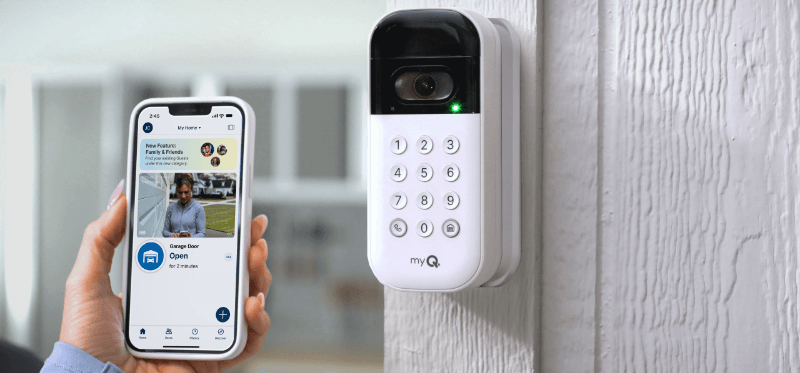
In this guide, we’ll walk you through the step-by-step process of opening your garage door with the MyQ app, its benefits, troubleshooting tips, and much more.
How Do I Open My Garage Door With MyQ App?
If you’re wondering, “How do I open my garage door with MyQ app?”, the process is straightforward. MyQ is a smart garage door opener system developed by Chamberlain Group. It lets you control your garage door using a Wi-Fi connection and a mobile app.
Read too: How to Perform a Chamberlain Garage Door Opener Code Change? Mastering Security
1: Check Compatibility
Before setting up MyQ, ensure your garage door opener is compatible. Most Chamberlain, LiftMaster, and Craftsman garage door openers are compatible with MyQ. If your opener isn’t MyQ-enabled, you may need the MyQ Smart Garage Hub, which works with many non-MyQ garage openers.
2: Download the MyQ App
To get started, download the MyQ app from:
- Google Play Store (for Android devices)
- Apple App Store (for iOS devices)
3: Create a MyQ Account
- Open the MyQ app.
- Click “Sign Up” if you don’t have an account.
- Enter your email address, create a password, and follow the prompts.
4: Connect MyQ to Wi-Fi
- Plug in your MyQ Smart Garage Hub or ensure your MyQ-compatible opener is powered on.
- Press the Wi-Fi setup button on the device.
- Go to your phone’s Wi-Fi settings and connect to the MyQ network.
- Return to the app and follow the setup instructions to connect MyQ to your home Wi-Fi.
5: Add Your Garage Door Opener
- In the MyQ app, tap “Add Device.”
- Select “Garage Door Opener.”
- Choose your brand (e.g., Chamberlain, LiftMaster, Craftsman).
- Follow the on-screen instructions to pair your opener with the app.
6: Open and Close Your Garage Door Using the MyQ App
Once setup is complete, you can open and close your garage door by:
- Opening the MyQ app.
- Tapping the garage door icon.
- Watching as your garage door opens or closes remotely.
Benefits of Using MyQ to Open Your Garage Door
Using MyQ for garage door control comes with several advantages, including:
1. Remote Access from Anywhere
You can open or close your garage door no matter where you are. This is useful if you:
- Forgot to close your garage door.
- Need to let in family members or delivery personnel.
2. Real-Time Notifications
MyQ sends alerts to your smartphone whenever your garage door opens or closes. You’ll know immediately if someone operates it, adding an extra layer of security.
3. Secure Access for Family and Guests
You can share MyQ access with trusted family members or guests, so they can enter without needing a physical key or remote control.
4. Integration with Smart Home Devices
MyQ works with Google Assistant, Amazon Alexa (with a subscription), and Apple HomeKit (via additional hardware), allowing voice control and automation.
5. Scheduled Close Feature
You can schedule your garage door to close at a specific time, ensuring it’s never left open overnight.
Troubleshooting: Why Can’t I Open My Garage Door with MyQ App?
If you experience issues when trying to open your garage door with the MyQ app, here are some common solutions:
1. Check Your Internet Connection
- Ensure your home Wi-Fi is working properly.
- The MyQ device should be within range of your router for a strong signal.
2. Verify MyQ Server Status
- Sometimes, MyQ servers may be down.
- Check the MyQ status page or their official social media for updates.
3. Restart Your MyQ Device
- Unplug the MyQ Smart Garage Hub for 30 seconds, then plug it back in.
- If using a MyQ-enabled garage door opener, reset it using the manufacturer’s instructions.
4. Reconnect MyQ to Wi-Fi
If the MyQ device lost its connection:
- Go to the MyQ app, remove the device, and set it up again following the initial steps.
5. Check for App Updates
- Make sure you’re using the latest version of the MyQ app from the App Store or Google Play.
FAQs About MyQ Garage Door Opener
1. Can I Open My Garage Door with MyQ Without Internet?
No, MyQ requires an active internet connection to function. However, you can still use your regular garage door remote as a backup.
2. Is There a Monthly Fee for MyQ?
The basic MyQ app features are free. However, if you want integration with Amazon Key or voice control with Alexa, a subscription may be required.
3. How Many People Can Use MyQ?
You can share MyQ access with multiple users by inviting them through the app.
4. Can I Open My Garage Door With MyQ If I’m Not at Home?
Yes! As long as your phone and MyQ device are connected to the internet, you can control your garage door remotely from anywhere.
5. Does MyQ Work With All Garage Door Openers?
Not all garage doors are MyQ-compatible. You may need the MyQ Smart Garage Hub for older or non-MyQ-enabled openers.
Final Thoughts
With the MyQ app, controlling your garage door has never been easier. Whether you’re letting in guests, checking security, or ensuring your door is closed while away, MyQ provides convenience, security, and peace of mind.
By following the steps above, you can easily set up MyQ and start using it to open and close your garage door remotely. If you encounter any issues, the troubleshooting tips should help you get back on track.
Are you ready to experience the convenience of smart garage door control? Download the MyQ app today and take full control of your garage door from anywhere!



Leave a Reply