If you own a Honda Odyssey, you might not know that your vehicle comes with a built-in garage door opener called HomeLink. This feature allows you to program and control your garage door directly from your car without needing a separate remote. But if you’ve never set it up before, you may be wondering: How do I program my Honda Odyssey garage door opener?
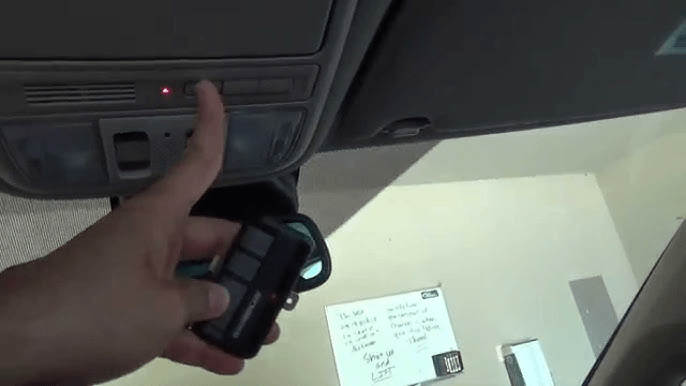
In this step-by-step guide, we’ll walk you through the programming process, troubleshooting tips, and additional settings to ensure you can easily open your garage door with your Honda Odyssey.
Read too: Why Are My Garage Doors Opening By Themselves? Troubleshooting Guide
Understanding the Honda Odyssey HomeLink System
The Honda Odyssey’s garage door opener is part of the HomeLink system, which can store up to three different garage door codes. This means you can program multiple doors or even control devices like security gates or home lighting systems.
HomeLink is compatible with most garage door openers, including rolling code and fixed code systems. However, some newer garage door openers may require additional steps, which we will cover later.
How Do I Program My Honda Odyssey Garage Door Opener?
Step 1: Locate the HomeLink Buttons
Inside your Honda Odyssey, the HomeLink buttons are usually located:
- On the overhead console, near the map lights.
- On the rearview mirror (for some models).
You will see three programmable buttons next to a small LED indicator light.
Step 2: Clear Previous HomeLink Settings (If Needed)
If you’re programming a used vehicle or need to reset old settings, follow these steps:
- Press and hold the outer two HomeLink buttons at the same time.
- Keep holding them for 10-20 seconds until the LED starts blinking rapidly.
- Release the buttons.
🔹 Note: This process erases all previously stored codes in HomeLink, so only do this if necessary.
Step 3: Put Your Garage Door Opener Remote in Programming Mode
To program your Honda Odyssey’s HomeLink system, you’ll need your existing garage door remote:
- Take your garage door remote and stand inside your vehicle.
- Hold the remote close to the HomeLink buttons (about 2-3 inches away).
Step 4: Program HomeLink with Your Garage Door Remote
- Press and hold the button on your garage door remote AND the HomeLink button you want to program at the same time.
- Keep holding until the LED light changes:
- Slow blinking to solid → The signal is learned successfully (for older openers).
- Slow blinking to rapid blinking → Rolling code detected (additional steps needed).
- Release both buttons.
Step 5: Test the HomeLink System
Press the programmed HomeLink button and see if the garage door opens or closes.
- If it works, you’re done!
- If not, your opener may use a rolling code system, which requires additional steps.
Programming a Rolling Code Garage Door Opener
Many modern garage door openers (like Genie, Chamberlain, LiftMaster, and Craftsman) use a rolling code system for extra security. If your garage door did not respond after Step 5, follow these additional steps:
Step 6: Locate the “Learn” or “Smart” Button on Your Garage Door Opener
- Go to your garage door opener motor unit (mounted on the ceiling of your garage).
- Find the “Learn” or “Smart” button:
- It is usually red, yellow, orange, purple, or green.
- Located near the antenna wire or under the light cover.
Step 7: Activate Learning Mode
- Press and release the Learn button on your garage door opener.
- You will have 30 seconds to complete the next step.
Step 8: Finalize Programming in Your Honda Odyssey
- Quickly go back to your Honda Odyssey.
- Press and hold the programmed HomeLink button for about 3 seconds.
- Release and repeat this step up to three times until the garage door responds.
🎉 Congratulations! Your Honda Odyssey garage door opener is now successfully programmed!
Troubleshooting Your Honda Odyssey Garage Door Opener
If your Honda Odyssey HomeLink system isn’t working properly, try these troubleshooting steps:
1. Replace the Garage Door Remote Batteries
Weak batteries in your garage door remote can cause signal issues. Replace them before attempting to program HomeLink.
2. Check for Signal Interference
- Avoid programming near power lines or wireless devices that could disrupt the signal.
- If your garage door opener has an antenna, make sure it is hanging down properly and not damaged.
3. Reattempt Rolling Code Programming
If your rolling code opener isn’t working, try Step 6-8 again. Some models require multiple attempts before the HomeLink system fully syncs.
4. Reset the HomeLink System
If nothing works, reset HomeLink (Step 2) and try again from the beginning.
5. Check for Compatibility Issues
Some newer garage door openers require a HomeLink Compatibility Bridge. If programming still fails, check with your garage door opener manufacturer.
Additional HomeLink Features in the Honda Odyssey
Besides garage doors, HomeLink can also control:
- Automatic security gates
- Exterior lighting systems
- Home alarm systems
If you have a smart home system, check if it supports HomeLink connectivity for added convenience.
FAQs About Programming a Honda Odyssey Garage Door Opener
1. Can I program multiple garage doors with my Honda Odyssey?
Yes! The Honda Odyssey HomeLink system can store up to three different garage door codes. Simply repeat the programming steps for each additional door.
2. Do I need Wi-Fi or an app to program HomeLink?
No, HomeLink works using radio frequency signals and does not require Wi-Fi or a smartphone app.
3. What if I buy a new garage door opener?
If you replace your garage door opener, you will need to reset and reprogram your HomeLink system with the new opener’s signal.
4. Can I use HomeLink with my community gate?
Yes, if your community gate system is HomeLink-compatible, you can program it just like a garage door opener.
Final Thoughts
Programming your Honda Odyssey garage door opener is an easy process when following the right steps. Whether you have a fixed-code or rolling-code system, you can quickly sync your garage door with HomeLink for seamless access.
If you experience any issues, checking battery levels, signal interference, and rolling code settings can usually fix the problem.
Now that you know how to program your Honda Odyssey garage door opener, you can enjoy the convenience of opening your garage with just a button press inside your vehicle!



Leave a Reply