If you’re trying to figure out how to add users to MyQ garage door opener, you’re not alone. Many homeowners want to give family members, friends, or renters access without handing out a physical remote. Thankfully, MyQ makes this process simple, safe, and customizable.
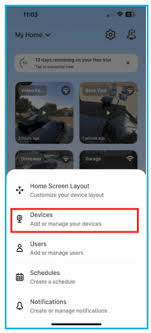
In this guide, I’ll walk you through the entire setup step-by-step so you can share access quickly and confidently—without risking your home’s security.
Read too: Door and Garage Door Companies: Choosing the Right Partner for Your Needs
How To Add Users To MyQ Garage Door Opener (Step-by-Step)
This section answers the most common People Also Ask question: “How do I add someone to MyQ?”
MyQ allows you to add users by sending them an invitation through the MyQ app. Once they accept, they gain digital access just like a remote.
1. Open the MyQ App and Log In
Before adding users, make sure:
- You’re signed in with the primary MyQ account
- Your MyQ opener is connected to Wi-Fi
- Firmware is up to date
To check your device status:
Menu → Device Management → Select Opener
A stable Wi-Fi connection ensures new users can access the system without interruptions.
2. Navigate to the “Users” Menu
Once inside the app:
- Tap the Menu (☰) icon.
- Select “Users.”
- Choose “Add User.”
This area lets you manage invitations, resend access, or remove users anytime.
3. Enter the New User’s Email Address
MyQ access works via email invitations.
Type the email of the person you’re adding—family member, roommate, babysitter, or Airbnb guest.
Important:
Use the email address linked to their MyQ account. If they don’t have one, the app will guide them through creating it.
4. Choose Their Access Level
MyQ provides flexible permission settings:
Standard User (Recommended)
They can open/close the garage door, view status, and receive alerts.
Guest Access (Time-Restricted)
Ideal for:
- Short-term visitors
- Tenants
- Service providers
You can set:
- Access dates
- Specific times of day
- Optional expiration
Homeowner Co-Admin (Advanced)
Gives full control including automation and notifications.
Use this only for trusted adults.
5. Send the Invitation
Tap “Send Invitation.”
The user will receive an email with a link to accept and log in.
If they don’t see it, remind them to check:
- Spam
- Promotions tab
- Other folders
Once they accept, the MyQ app will show their access as Active.
6. Test User Access
After the new user accepts:
- Have them open their MyQ app
- Test the “Open” and “Close” buttons
- Check push notifications
Ensuring proper setup now prevents troubleshooting later.
Why Add Users to MyQ Garage Door Opener?
This section answers another PAA-style question:
“Why should I add users to MyQ?”
Adding users gives you:
1. More Control Than Physical Remotes
You can revoke access instantly without collecting remotes.
2. Real-Time Activity Logs
See who opened or closed the door and at what time.
3. Safer Access For Guests
Perfect for:
- Cleaners
- Dog walkers
- Contractors
- Delivery workers
4. Smart Home Integration
With MyQ, you can automate routines such as:
- Closing the garage at bedtime
- Sending alerts when kids come home
For general background on garage door openers, mechanisms, and safety systems, refer to authoritative sources like Wikipedia.
MyQ User Roles Explained (Comparison Table)
| User Type | Access Rights | Best For | Restrictions |
|---|---|---|---|
| Owner | Full control & automations | Homeowner | None |
| Co-Owner | Near-full access | Spouse/Partner | Can edit settings |
| Standard User | Open/close, alerts | Kids, family | No automations |
| Guest Access | Limited by time/date | Service providers | Expires automatically |
This clarity helps homeowners choose the right access level for each person.
Common Issues When Adding Users to MyQ
This section answers user searches like:
“Why can’t I add someone to MyQ?”
“Why isn’t MyQ sharing working?”
1. Invitation Not Received
Possible reasons:
- Wrong email address
- Invitation sent to spam
- User already added under another account
Fix: Resend the invitation.
2. User Doesn’t Have a MyQ Account
New users must create an account to accept the invite.
Fix:
Tell them to install the MyQ App and create an account using the same email you invited.
3. Wi-Fi Issues on the Primary Hub
If your opener is offline, you can’t add users.
Fixes:
- Power-cycle the opener
- Reconnect Wi-Fi
- Ensure router is within range
4. Guest Access Restrictions
Some users accidentally set:
- Wrong time windows
- Access that hasn’t yet started
- Expiration dates too soon
Fix: Edit the access schedule.
5. MyQ App Bug or Outdated Version
Old app versions may fail to process user invitations.
Fix:
Update the app in the App Store or Google Play.
How To Remove or Edit Users in MyQ
Sometimes you may want to edit or remove a user—for example, a former roommate or a short-term guest.
To Remove a User:
- Open Users in the app.
- Tap on the user’s name.
- Select Remove User.
- Confirm.
To Edit Access:
- Go to Users.
- Tap the user you want to update.
- Adjust their schedule or permissions.
- Save changes.
Changes apply instantly, improving safety and control.
How To Add Users for Airbnb or Rental Properties
Many hosts use MyQ to give guests temporary access.
Recommended setup:
- Use Guest Access
- Set access for check-in and check-out times
- Enable notifications for open/close events
- Immediately remove users after checkout
This method removes the need for keypads or physical remotes.
Advanced Options: Automations & Shared Access
MyQ allows several automation features:
1. Auto-Close
Automatically close after:
- 5 minutes
- 10 minutes
- 15 minutes
- Custom times
2. Geofencing (via IFTTT or Apple Shortcuts)
Automatically open/close based on your location.
3. Smart Alerts
You can receive:
- Door left open notifications
- Activity logs
- Access attempts
Adding users does not interfere with these automations.
Step-by-Step: How to Add Users Through MyQ Smart Garage Hub
If you’re using a MyQ Smart Garage Hub instead of a built-in MyQ opener, the steps differ slightly.
- Open MyQ App
- Tap Smart Garage Hub
- Go to Users
- Tap Add User
- Enter user’s email
- Choose permissions
- Send invite
Hubs can support multiple users simultaneously without affecting opener performance.
Tips for Secure MyQ Access Sharing
To keep your home secure while sharing access:
✔ Use Guest Access For People You Don’t Know Well
Never give full control to service professionals.
✔ Require Each User to Have Their Own MyQ Account
Do NOT share your login.
✔ Enable Activity Notifications
This lets you monitor access in real time.
✔ Update Wi-Fi Passwords Annually
Improves security and reduces unauthorized access risks.
✔ Remove Former Users Immediately
Especially important for renters and ex-roommates.
FAQ (Frequently Asked Questions)
Q1: How many users can MyQ have?
Most MyQ systems allow many shared users, but Guest Access may vary depending on subscription and model.
Q2: Is adding users to MyQ free?
Yes. Standard user sharing is 100% free. Some advanced integrations (like Amazon Key) may require additional setup.
Q3: Can two phones control the same MyQ garage?
Absolutely. As long as you invite the second phone’s user, both can control the opener.
Q4: Can I share MyQ without giving full access?
Yes. Use Guest Access to limit hours, dates, and permissions.
Q5: Why can’t my user open the garage after accepting the invite?
Possible reasons include:
- Their app isn’t updated
- They haven’t accepted the email link
- The device is offline
- Their access window has not begun
Q6: What happens when I remove a user?
Their access is instantly revoked, and they can no longer open or close your garage door.
Conclusion
Adding users to your MyQ garage door opener is one of the easiest ways to share secure, flexible access with family, guests, or renters. With simple app-based control, customizable permissions, and real-time alerts, MyQ makes managing home access safer than traditional remotes.



Leave a Reply