If your Genie Garage Door Opener Remote Battery ACSCTG Type 1 has stopped working, don’t worry — you’re not alone. Many homeowners face the same issue when their garage remote suddenly becomes unresponsive or works intermittently.
Replacing the battery in this remote is simple, affordable, and takes less than five minutes — once you know the right steps. In this guide, we’ll walk you through how to replace the Genie ACSCTG Type 1 remote battery, identify compatible battery types, and troubleshoot common post-replacement issues.
Read too: How To Replace Garage Door Roller Like a Pro? Step-by-Step Guide
Understanding the Genie ACSCTG Type 1 Remote
Before replacing the battery, it helps to know a bit about your remote model.
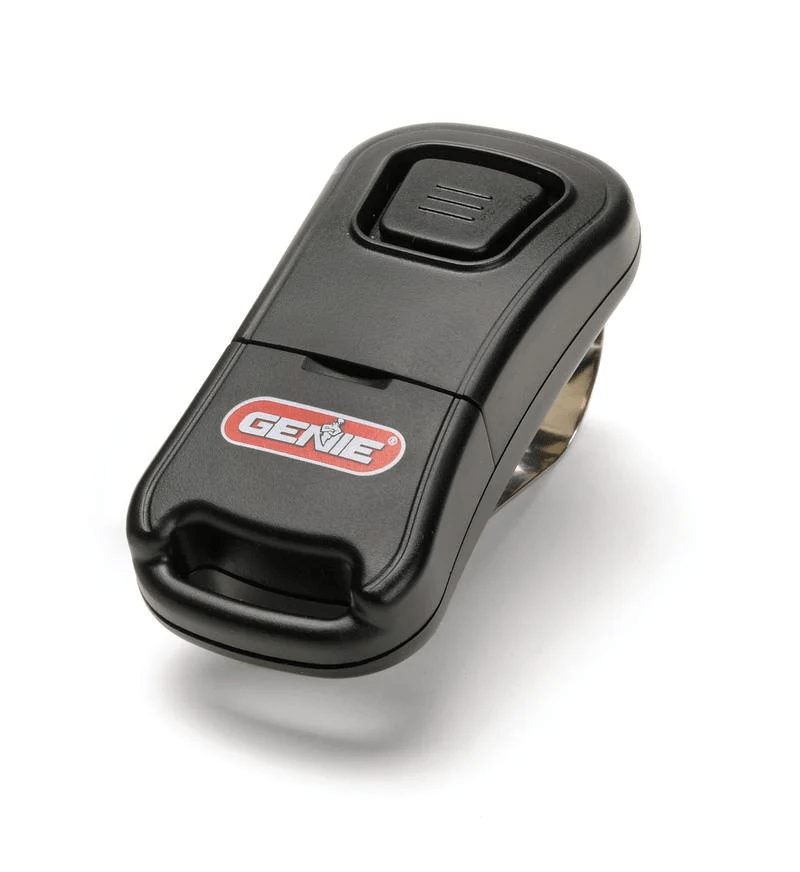
The Genie ACSCTG Type 1 remote is a three-button garage door opener transmitter compatible with several Genie models from the late 1990s to early 2000s. It operates on a 390 MHz frequency and features an internal coin cell battery that powers the transmitter signal.
Key features:
- Compact, durable black housing
- LED indicator light for signal confirmation
- Three programmable buttons for multiple door control
- Works with Genie Intellicode systems
Because of its reliability and simplicity, many homeowners still use this model today — making battery replacement knowledge essential.
What Type of Battery Does the Genie ACSCTG Type 1 Use?
The Genie ACSCTG Type 1 remote typically uses a CR2032 lithium coin cell battery — the same type found in car remotes and key fobs.
However, depending on the remote’s production year, some versions use CR2025 instead. Both are 3-volt lithium cells, but CR2032 has a slightly higher capacity, offering longer life.
| Battery Type | Voltage | Diameter | Thickness | Average Lifespan |
|---|---|---|---|---|
| CR2032 | 3V | 20mm | 3.2mm | 2–3 years |
| CR2025 | 3V | 20mm | 2.5mm | 1.5–2 years |
💡 Tip: Always check your remote’s old battery before purchasing — the number (2032 or 2025) is printed directly on the cell.
How to Replace Genie Garage Door Opener Remote Battery ACSCTG Type 1
Here’s a simple step-by-step guide to replace the battery safely and correctly:
1. Gather Tools and Materials
You’ll need:
- A small flathead screwdriver
- A new CR2032 or CR2025 battery
- A clean, dry workspace
2. Open the Remote Casing
- Locate the small notch or seam along the edge of the remote.
- Insert the flathead screwdriver gently into the notch.
- Twist slightly to pop the two halves apart. ⚠️ Be careful not to crack the plastic casing — it’s durable but can become brittle over time.
3. Remove the Old Battery
- Locate the coin cell battery seated in the compartment.
- Use the screwdriver tip to gently lift it out from the holder.
- Take note of the polarity (+ side facing up) before removal.
4. Insert the New Battery
- Place the new CR2032 battery into the slot with the positive (+) side facing up.
- Press gently until it clicks into place.
- Ensure there’s no loose connection or corrosion inside the holder.
5. Reassemble and Test
- Align both halves of the remote casing and snap them together.
- Press any button — the LED indicator should light up instantly.
- Test it by standing 10–15 feet from your garage door and pressing the Open/Close button.
If the door responds smoothly, you’ve successfully completed the replacement!
Troubleshooting After Battery Replacement
If your remote still doesn’t work after replacing the battery, check the following:
1. Check Battery Orientation
Make sure the positive (+) side of the battery faces the correct direction. Installing it backward prevents current flow.
2. Inspect for Corrosion
If you notice white residue on the metal contacts, clean them using a cotton swab and isopropyl alcohol. Allow to dry before reinserting the battery.
3. Reprogram the Remote
Occasionally, the remote may lose its programming after battery removal.
To reprogram:
- Press and hold the Learn button on your Genie opener until the LED blinks.
- Within 30 seconds, press the remote button you want to program.
- Wait for a confirmation light or motor click.
Your remote should now operate normally.
4. Replace the Remote
If all else fails, the remote’s internal circuit board might be faulty.
Genuine Genie replacement remotes cost around $25–$40 and are available online or at hardware stores.
Battery Life and Maintenance Tips
To extend your new battery’s lifespan and keep your remote performing like new:
- Avoid extreme heat or cold. Batteries degrade faster in temperatures below 32°F or above 100°F.
- Use quality brands like Energizer, Duracell, or Panasonic.
- Remove the battery if you won’t use the remote for months.
- Test the LED light every few months to ensure proper operation.
🧠 Fun fact: According to Wikipedia, lithium coin cells have a shelf life of up to 10 years when stored properly.
Pros and Cons of CR2032 Battery for Genie Remote
| Pros | Cons |
|---|---|
| Long-lasting power (2–3 years typical use) | Slightly more expensive than CR2025 |
| Widely available | Can lose charge in extreme cold |
| Easy to replace | Small size can be misplaced easily |
| Reliable for Genie ACSCTG remotes | Needs careful polarity alignment |
When to Replace Your Genie Remote Battery
You’ll know it’s time to replace when:
- The LED light becomes dim or unresponsive.
- The remote only works at close range.
- You need to press buttons multiple times before the door moves.
- The door fails to respond even with a fresh battery (indicating reprogramming or remote issue).
Replacing early prevents complete power loss and avoids reprogramming hassles later.
FAQ: Genie Garage Door Opener Remote Battery ACSCTG Type 1
1. What battery does a Genie ACSCTG Type 1 remote use?
It uses a CR2032 lithium coin cell battery, though some models may use CR2025. Always check your existing battery before purchasing.
2. How long does the battery last?
Typically 2–3 years, depending on usage frequency and environmental factors.
3. Why isn’t my Genie remote working after I replaced the battery?
Double-check battery polarity, clean contact points, and reprogram the remote if necessary.
4. Can I use rechargeable batteries in my Genie remote?
No. Rechargeable lithium-ion cells have different voltage outputs and can damage the remote circuitry.
5. Where can I buy a replacement battery?
CR2032 batteries are available at Walmart, Home Depot, Amazon, and most hardware stores for under $5.
6. Do I need to reprogram my Genie opener after changing the battery?
Not usually, but sometimes yes. If the remote doesn’t respond, follow the reprogramming steps listed above.
Conclusion
Replacing your Genie Garage Door Opener Remote Battery ACSCTG Type 1 is one of the easiest DIY tasks you can do. With just a few minutes and a $3 battery, you can restore full remote functionality and avoid the frustration of being locked out or stuck inside your garage.
Keep spare CR2032 batteries on hand and check your remote every few months for consistent performance.



Leave a Reply