If your garage door still responds to old remotes or outdated keypad PINs, you may be dealing with a security risk. Learning how to clear codes on Craftsman garage door opener is the fastest way to remove lost remotes, fix malfunctioning keypads, and stop unauthorized access. This guide walks you through the entire process in simple steps, even if you’ve never worked with a garage opener before.
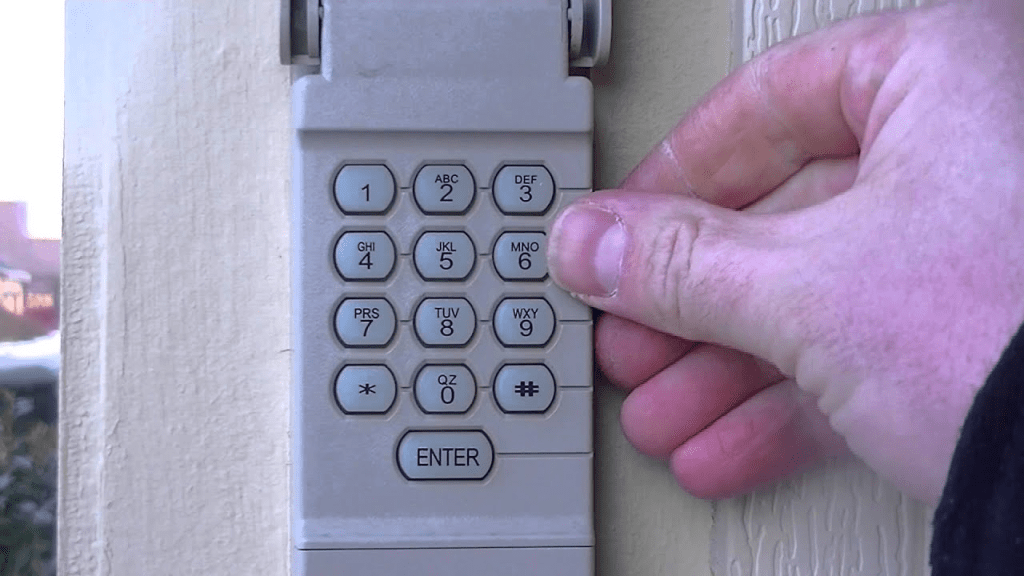
How To Clear Codes On Craftsman Garage Door Opener (Full Tutorial)
Craftsman garage door openers—especially older models made in partnership with LiftMaster—use a Learn button system to manage remote and keypad programming. Clearing codes doesn’t require special tools and typically takes under 2 minutes.
Read too: Why Are My Garage Doors Opening By Themselves? Troubleshooting Guide
Below is the complete process.
1. Locate the Learn Button
The Learn button is the control center for programming and clearing codes. It’s also the first thing you must find when learning how to clear codes on Craftsman garage door opener.
Where to Look
You’ll usually find it on the motor housing:
- Under the light cover
- Near the back panel
- Beside the antenna wire
- Next to wiring terminals
Learn Button Colors on Craftsman Models
| Button Color | System Type | Typical Years |
|---|---|---|
| Red/Orange | Security+ | Mid-1990s–early 2000s |
| Purple | Security+ 315 MHz | 2001–2005 |
| Yellow | Security+ 2.0 | Modern models |
Tip: If unsure, check your model number or search the general background of garage door openers on Wikipedia to better understand rolling-code technology.
2. How To Clear All Remote and Keypad Codes (Immediate Reset)
This is the main procedure most homeowners need.
To erase all programmed remotes and keypads:
- Press and hold the Learn button for 6–10 seconds.
- The LED will turn off—this means the memory has been cleared.
- Release the button.
What This Clears:
- All handheld remotes
- Wireless keypads
- Built-in car systems (HomeLink)
- Any universal or aftermarket remotes
Once completed, your garage opener is like-new in terms of radio programming. No old device will operate it.
3. How To Clear Only the Keypad Code (Without Deleting Remotes)
Great for when you only want to reset the PIN.
Steps:
- Press the Learn button once (don’t hold it).
- Within 30 seconds, press and hold the Enter button on the keypad for 5–7 seconds.
- The keypad PIN is erased.
This method keeps your handheld remotes active.
4. Signs You Need to Clear Codes on a Craftsman Opener
Here are common symptoms that indicate a reset is needed:
- A lost or stolen remote
- You recently moved into a home
- Keypad PIN is forgotten
- The garage opens randomly or inconsistently
- One remote works while another doesn’t
- Interference or range problems appear suddenly
A 2023 home access security study revealed that 1 in 5 homeowners never reset their garage opener codes, even after losing a remote—making them vulnerable to unauthorized entry.
Resetting codes restores security instantly.
5. Troubleshooting: What If Codes Don’t Clear?
Sometimes users report:
“My remote still opens the door after clearing codes.”
Here are the most likely reasons and solutions:
1. Learn Button Wasn’t Held Long Enough
Try pressing and holding it for 10–12 seconds.
2. External Receiver Installed
Some garages have add-on receivers that store codes separately.
Check near the opener for a small external box with its own antenna.
3. Remote Battery Is Too Weak
A dying battery can prevent the erase signal from registering correctly.
4. Logic Board Malfunction
If the Learn button doesn’t respond, the opener’s logic board may be failing. This is common on Craftsman models older than 15 years.
5. Power Cycle the Opener
Unplug it for 15–20 seconds, plug it back in, then retry.
6. How To Reprogram Devices After Clearing Codes
Once memory is erased, nothing will work until reprogrammed.
Reprogram Remotes
- Press the Learn button once.
- Within 30 seconds, press and hold your remote button.
- Wait for a click or light flash.
- Test the remote.
Reprogram Keypad
- Press Learn.
- Enter a new 4-digit PIN.
- Press and hold Enter until the garage light blinks.
Reprogram HomeLink (In-Car Button)
- Hold the two HomeLink outer buttons (20 seconds).
- Press the Learn button on your opener.
- Press the HomeLink button inside your car for 2 seconds.
- Repeat until the door responds.
7. How Long Does It Take to Clear Codes on a Craftsman Opener?
| Task | Time Required |
|---|---|
| Clear all remotes + keypad | 6–10 seconds |
| Clear keypad only | 5–7 seconds |
| Reprogram remote | 10–15 seconds each |
| Reprogram keypad | 20–30 seconds |
| Reset HomeLink | 1–2 minutes |
Total average time: 2–4 minutes
8. Pros & Cons of Clearing Craftsman Garage Codes
Pros vs Cons (Text Infographic)
Pros:
- Enhances home security
- Fixes most remote/keypad issues
- Quick DIY (no tools needed)
- Essential after losing a remote
Cons:
- Requires reprogramming all remotes
- May require a ladder
- Older models may have worn Learn buttons
- External receivers make resets more confusing
9. Common Myths About Garage Door Code Clearing
Myth 1: Unplugging the opener clears codes.
False. Codes are stored in memory that persists without power.
Myth 2: You can delete only one remote.
This rarely applies—most Craftsman models require clearing all codes at once.
Myth 3: Clearing codes resets travel limits.
Also false. Travel limits and force settings stay intact.
Myth 4: You need a technician to clear codes.
Not true—99% of resets are DIY-friendly.
10. How Clearing Codes Improves Security (Expert Insight)
Home security professionals note that garage entry is one of the top three access points used by intruders. A compromised remote gives direct access to your home.
Benefits of clearing codes:
- Old remotes no longer work
- PIN-sharing risks are removed
- Eliminates duplicate or cloned remotes
- Fixes glitching caused by stored bad signals
Garage door openers using rolling-code technology (as described in the Rolling code article on Wikipedia) significantly reduce hacking risks—but only if old codes are removed.
FAQ (H2)
Q1: Does clearing codes erase my wall control button?
A: No. Wall-mounted controls are wired and not affected by code clearing.
Q2: Can I clear codes without climbing a ladder?
A: Unfortunately, no. You must access the Learn button on the motor housing.
Q3: Will my garage door opener stop working after I clear codes?
A: The opener still works manually, but wireless remotes and keypads must be reprogrammed.
Q4: Do Craftsman and LiftMaster use the same method to clear codes?
A: Yes. Most Craftsman openers are rebranded LiftMaster units, so the Learn button process is identical.
Q5: What if my keypad won’t accept a new PIN after clearing?
A: Try these fixes:
- Replace keypad batteries
- Make sure you enter a 4-digit code
- Stand closer to the opener
- Reset the entire opener memory and try again
Q6: How often should I reset my opener codes?
A: Experts recommend resetting anytime:
- You lose a remote
- You move into a new home
- Your keypad PIN becomes widely known
At minimum: once every 1–2 years.
Conclusion
Clearing your Craftsman opener codes is an easy but powerful way to improve home security and fix common remote or keypad issues. Now that you know how to clear codes on Craftsman garage door opener, you can reset remotes, erase keypads, and secure your home in just a few minutes.
If this guide helped you, share it on your social media to help others secure their garage access too!
Leave a Reply