If you own a BMW X3, connecting it to your garage door opener can make everyday life much easier. Many drivers struggle with how to connect BMW X3 to garage door opener, unsure of the programming steps. This guide will take you through the process step by step, ensuring a smooth, secure, and reliable connection.
Why Connect Your BMW X3 To Your Garage Door Opener?
Integrating your BMW X3 with your garage system has several benefits:
- Convenience: Open your garage without leaving the driver’s seat.
- Security: Only programmed vehicles can access the garage.
- Efficiency: Eliminates the need for extra remotes or key fobs.
Read too: The Complete Guide to Tighten Chain On Garage Door Opener for Smooth Operation
According to a Wikipedia article on garage door openers, vehicle integration is increasingly common for modern smart homes, improving safety and reducing remote clutter.
Step-by-Step Guide: How To Connect BMW X3 To Garage Door Opener
Follow these steps carefully for a successful HomeLink setup in your BMW X3.
Step 1: Locate the HomeLink Buttons
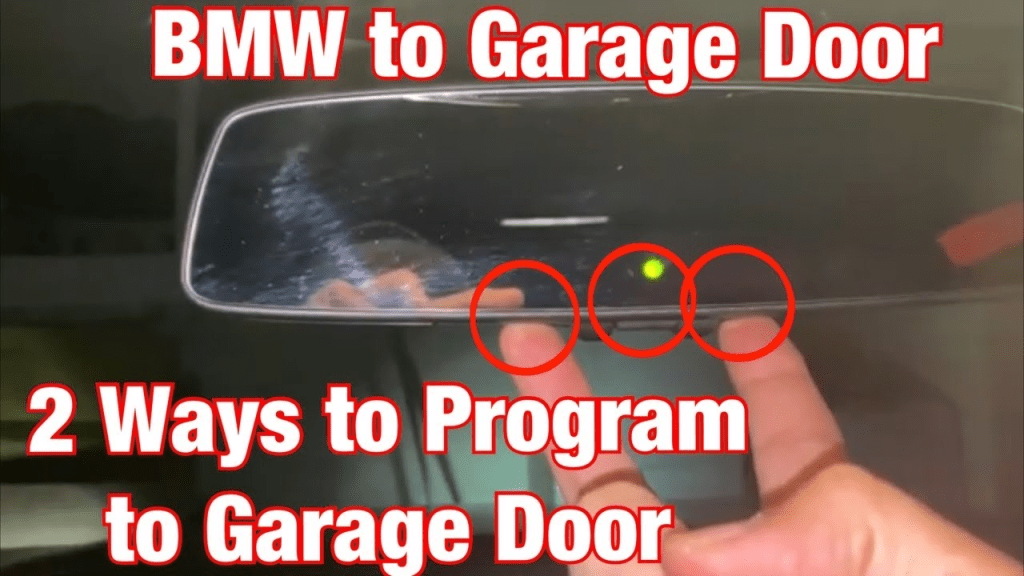
- In the BMW X3, HomeLink buttons are typically on the overhead console near the rearview mirror.
- Identify the three buttons, which can be programmed for multiple devices.
Step 2: Clear Previous Programming (If Necessary)
- Press and hold the two outer HomeLink buttons for 20 seconds until the indicator light begins flashing.
- This ensures no previous device settings interfere with programming.
Step 3: Prepare Your Garage Door Opener
- Ensure the garage door opener is powered on.
- Locate the Learn or Program button on the opener motor. It is usually a small, colored button.
Step 4: Program Your BMW X3
- Press and hold the desired HomeLink button in your BMW X3.
- Press the Learn button on the garage door opener motor.
- Continue holding the HomeLink button until the indicator light blinks rapidly or stays solid.
- Release both buttons. Your BMW X3 is now paired with the garage door opener.
Step 5: Test the Connection
- Press the programmed HomeLink button to open and close your garage door.
- Repeat steps for additional vehicles or multiple garage doors if needed.
Tips for Successful Programming
- Stay close to the opener: Programming usually requires the car within 1–3 feet of the garage door opener.
- Replace weak batteries: Both in remotes and in the vehicle if HomeLink is unresponsive.
- Consult your BMW X3 owner’s manual: For model-specific guidance and troubleshooting.
Comparison: BMW HomeLink vs Universal Vehicle Systems
| Feature | BMW HomeLink | Universal Vehicle Remote |
|---|---|---|
| Location | Overhead console | Various |
| Number of Devices | Up to 3 | Up to 3 |
| Ease of Use | High | Medium |
Common Problems and Solutions
- Garage door does not respond: Reprogram the HomeLink button and check power to the opener.
- Multiple vehicles conflict: Ensure each vehicle is programmed separately.
- Indicator light does not blink: Hold buttons longer or reset the HomeLink system and try again.
FAQ Section
Q1: Can all BMW X3 models connect to a garage door opener?
Most BMW X3 vehicles produced after 2000 support HomeLink integration, but always check your specific model’s manual.
Q2: How long does programming take?
Typically, 5–10 minutes per device.
Q3: Can I clear a single programmed button without affecting others?
Yes, you can clear individual buttons through the HomeLink menu in your BMW X3, avoiding a full reset.
Q4: Will this work with all garage door openers?
HomeLink is compatible with most major brands, but some older dip-switch-based openers may require additional steps.
Q5: Can I program multiple garage doors in one vehicle?
Yes, BMW X3 supports up to 3 HomeLink buttons, each programmed for a different opener.
Q6: What if my BMW X3 HomeLink doesn’t respond?
Ensure the vehicle is within range, the opener is powered, and try reprogramming from scratch.
Benefits of Connecting BMW X3 To Your Garage Door Opener
- Hands-free operation: Convenience at home and while leaving.
- Enhanced security: Only your vehicle can operate the garage.
- Reduced clutter: No need for separate remote controls.
Pro Tip: Maintain a record of all programmed vehicles and garage doors to prevent confusion and maintain security.
Conclusion
Knowing how to connect BMW X3 to garage door opener simplifies your daily routine, improves security, and reduces clutter. By following this step-by-step guide, you can enjoy seamless garage access from your BMW X3.
Share this guide with friends or family who own BMWs — it’s a simple upgrade that makes home life more convenient and secure.

Leave a Reply