If you’re trying to figure out how to erase garage door opener in Honda Odyssey, you may be dealing with a sold vehicle, a lost remote, or simply wanting to reset your HomeLink system for security. Many Honda owners face the same issue, especially when buying a used Odyssey where codes weren’t cleared by the previous owner. This guide explains the full reset process in easy, beginner-friendly steps so you can secure your garage and your vehicle confidently.
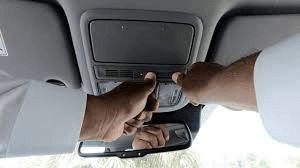
How To Erase Garage Door Opener in Honda Odyssey (Full Guide)
Honda Odyssey models use HomeLink, an integrated universal remote system found on the overhead console. Erasing the existing garage codes is simple and takes less than 30 seconds.
Below is a complete guide for all Odyssey model years—from older mid-2000s models to the newest 2025 edition.
Read too: Door and Garage Door Companies: Choosing the Right Partner for Your Needs
How To Erase Garage Door Opener in Honda Odyssey (HomeLink Reset Method)
This is the standard way to clear all programmed garage door buttons in your Odyssey.
Step-by-Step Instructions
Step 1: Turn on the Vehicle Ignition
The vehicle must be in ACC or ON mode.
(HomeLink won’t reset without power.)
Step 2: Press and Hold Buttons 1 & 3 on the HomeLink Panel
On the Honda Odyssey, the HomeLink buttons are located on the overhead console, usually near the dome lights.
- Locate Button 1 (left button)
- Locate Button 3 (right button)
- Press both buttons simultaneously
- Hold for 10–20 seconds
➡ The HomeLink indicator light will begin flashing rapidly.
Once flashing quickly, the memory is cleared.
Step 3: Test All Buttons to Confirm Reset
After the light flashes:
- Press each button individually
- The indicator should flash slowly, meaning no code is stored
If any button still activates your garage door, repeat the process and hold buttons longer (up to 25 seconds).
What Actually Gets Erased?
When you erase the HomeLink memory:
- All programmed garage door openers
- All gated community access remotes
- All radio frequency (RF) receiver codes
Note:
This process clears only the codes stored in the car—
It does not erase codes stored in your garage door opener’s motor unit.
Why You Should Erase HomeLink in Your Honda Odyssey
Statistics from the U.S. Department of Justice state that nearly 10% of home break-ins involve access through the garage. If your vehicle contains a programmed opener, it becomes a potential security risk.
Common reasons to erase HomeLink codes:
- Selling your Odyssey
- Buying a used Odyssey from another owner
- Lost garage remotes
- Changing homes
- Removing access for previous tenants
- Safety precaution after a break-in
- Upgrading to a new garage system (Chamberlain, LiftMaster, Genie, etc.)
Resetting the codes protects your family and prevents unauthorized garage entry.
Difference Between Erasing HomeLink vs. Clearing Garage Door Opener Memory
Many people confuse these two actions, so here’s a clear comparison:
| Action | What It Resets | Where It Happens |
|---|---|---|
| Erase HomeLink (in Odyssey) | Clears codes stored in your vehicle | In your Honda |
| Erase Garage Opener Memory | Clears all remotes/keypads connected to your garage | In the garage opener unit |
If you only erase HomeLink, your remotes and keypad at home will still work.
If you erase the opener itself, you must reprogram every remote including HomeLink.
For more context about garage door opener technologies, you can refer to the authoritative HomeLink page on Wikipedia.org.
How To Erase and Reprogram HomeLink (If You Want to Add a New Garage Door)
You might want to erase and then add a new garage opener to your Honda Odyssey. Here’s the full workflow.
How To Reprogram Garage Door Opener in Honda Odyssey After Erasing
Step 1: Clear Existing Codes
Use the Button 1 & 3 method above.
Step 2: Hold the Button You Want to Program
Choose button 1, 2, or 3.
- Press and hold the selected button
- The indicator light will blink slowly
Step 3: Hold Your Garage Door Remote Close to the HomeLink Panel
Distance should be:
- 1–3 inches away for best signal
- Press and hold your remote’s button
Keep holding until:
- The HomeLink indicator changes from slow blinking → rapid flashing
This means the frequency is learned.
Step 4: Sync With Garage Opener (Smart/Learn Button Step)
For rolling-code openers (most units after 1997):
- Go to your garage door opener motor
- Press the Learn Button (color varies: yellow, purple, red, orange)
- You have 30 seconds to return to your car
- Press and hold the HomeLink button for 2 seconds
- Release
- Press again for 2 seconds
The garage door should move, confirming sync.
People Also Ask (PAA) Questions Answered
Why won’t my Honda Odyssey HomeLink erase?
Common causes:
- Buttons not held long enough
- Trying to erase while engine is off
- Weak vehicle battery
- Faulty HomeLink module
- HomeLink version mismatch with opener
Fix:
Try holding buttons for a full 25 seconds with the ignition ON.
Does erasing HomeLink remove my garage door remotes?
No.
It only removes codes stored in the car.
Your home remotes and keypad still work.
Can I erase just one HomeLink button instead of all?
No.
Honda’s HomeLink system erases all three buttons at once.
Do I need to reprogram HomeLink after battery replacement?
Usually no.
HomeLink retains memory even when the car battery is disconnected, thanks to non-volatile storage.
Does Honda Odyssey support rolling-code garage openers?
Yes.
All model years from 2008+ fully support rolling-code systems like LiftMaster Security+ 2.0, Genie Intellicode, and Chamberlain.
How long does it take to erase HomeLink in an Odyssey?
Usually 10–20 seconds, depending on model year.
Troubleshooting Guide (Quick Fix Chart)
| Issue | Possible Cause | Solution |
|---|---|---|
| Light doesn’t flash during erase | Buttons not held long enough | Hold for 20 seconds |
| HomeLink won’t learn remote | Weak remote battery | Replace battery |
| Garage door won’t sync after erase | Rolling-code opener requires Learn Button | Complete Learn Button step |
| HomeLink doesn’t activate garage | Using wrong button | Test each button |
| No power to HomeLink | Ignition OFF | Set ignition to ACC/ON |
Pros & Cons of Erasing HomeLink in Honda Odyssey
Pros
- Protects your home from unauthorized entry
- Removes old/unknown codes
- Essential when selling or buying a vehicle
- Fixes many pairing issues
Cons
- You must reprogram opener afterward
- Can be confusing for first-time users
- Older models may take longer due to button sensitivity
FAQ (Frequently Asked Questions)
Q1: Will erasing HomeLink delete my car settings?
No.
It only clears garage and gate remote codes.
Q2: Do all Honda Odyssey model years use the same erase method?
Almost all do.
The Button 1 & 3 method works for 2005–2025 models.
Q3: Can I erase HomeLink without the garage door remote?
Yes.
Erasing does not require the remote—only programming does.
Q4: Can a thief use my Odyssey to open my garage after I erase HomeLink?
No.
Erasing clears all stored signals, making the car safe.
Q5: Does erasing HomeLink affect newer smart openers like myQ?
No.
myQ works via Wi-Fi; HomeLink is RF-based.
Q6: Should I erase HomeLink before selling my Odyssey?
Absolutely.
It’s one of the most important safety steps when transferring ownership.
Conclusion
Resetting or erasing your garage door opener settings in a Honda Odyssey is fast, safe, and essential for protecting your home. Whether you’re troubleshooting, selling your vehicle, or updating your garage system, clearing the HomeLink memory ensures that only you control your garage access.



Leave a Reply