If you’re trying to program a new remote or troubleshoot your opener, you’ll need to know how to find the learn button on garage door opener. Many homeowners struggle because every model places the button differently. Don’t worry — this guide explains everything step-by-step in the simplest way possible.
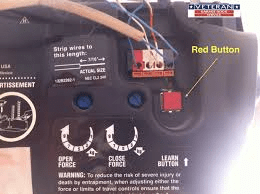
How To Find Learn Button On Garage Door Opener
Finding the Learn button is easier when you know where to look and what colors or labels to expect. Below, you’ll learn how to identify it on the most common garage door opener brands and how the button actually works.
Read too: Door and Garage Door Companies: Choosing the Right Partner for Your Needs
What Is a Learn Button and Why Is It Important?
The Learn button allows you to pair remotes, keypads, and smart controllers with your garage door opener.
Some key functions include:
- Programming a new remote control
- Resetting existing remotes
- Clearing old codes for safety
- Setting up wireless keypads
- Connecting smart home devices
In most openers, the Learn button connects directly to the receiver logic board — the part responsible for recognizing encrypted remote signals. According to industry data, more than 70% of modern garage door openers rely on rolling-code security systems, which require the Learn button during setup.
For basic reference on remote controls and receiver systems, you can read more at Wikipedia’s “Remote Control” page.
How To Find the Learn Button on Different Garage Door Opener Brands
Different manufacturers use different locations and colors. Here’s how to find it on the most popular systems.
1. LiftMaster / Chamberlain / Craftsman
These three brands are part of the same family and share similar designs.
Where to Look
- On the back panel of the motor unit
- Under the light cover
- Near the antenna wire
What It Looks Like
- Small square or circular button
- Often beside an LED indicator
- Common colors: yellow, purple, red/orange, or green
Color Meaning Table
| Button Color | Technology / Year | Notes |
|---|---|---|
| Yellow | 2011+ Security+ 2.0 | Most common on newer models |
| Purple | 2001–2011 | Uses rolling code |
| Red/Orange | 1997–2005 | Basic Security+ |
| Green | 1993–1997 | Early rolling code |
2. Genie
Genie uses a slightly different design.
Where to Look
- Behind the light lens
- Near the wiring terminals
- On the back of the motor unit
What It Looks Like
- Usually square and black, labeled “Learn” or “Set”
Some Genie models use a “Program” button instead of “Learn.”
Pressing the button once usually makes an LED blink, signaling programming mode.
3. Overhead Door
Overhead Door is manufactured by the same parent company as Genie.
Where to Look
- Under the bottom panel
- On the motor’s right side
Identification
- Label may show “Learn Code”
- LED flashes red when activated
4. Linear / Moore-O-Matic
Where to Look
- On the back of the opener body
- Near terminal screws
Appearance
- Typically a small white or black button
- Sometimes recessed (requires pen tip)
5. Ryobi or Newer Smart Openers
Where to Look
- On the touchscreen interface
- In the settings menu
- Or a labeled button on the side panel
Smart openers often replace physical Learn buttons with digital setup options.
Step-by-Step: How to Locate Your Learn Button
Even without knowing the brand, you can use this general guide.
Step 1 — Check the Back Panel
Look for a small button near the hanging antenna wire.
90% of openers place it here.
Step 2 — Remove or Open the Light Cover
Many models hide the Learn button inside the light housing.
Slide or unclip the cover gently.
Step 3 — Search for Labels
Look for markings like:
- Learn
- Set
- Program
- Learn Code
These labels are usually printed on a small PCB or sticker.
Step 4 — Identify By Light Indicators
A Learn button is almost always next to a small LED light.
LED Clues:
- Steady light → waiting for command
- Blinking light → programming mode
- Flashing rapidly → remote successfully paired
Step 5 — Consult the Model Number
If you still can’t find it, look for the model sticker on the motor housing.
Search the model online or check the manual for exact Learn button placement.
Why Doesn’t Your Garage Door Opener Have a Learn Button?
Some older openers (pre-1993) use DIP switches instead of Learn buttons.
Signs You Have a DIP-Switch System:
- Panel with small ON/OFF switches
- No visible Learn or Program button
- Remote has matching DIP switches inside
If your opener uses DIP switches, the only way to program a new remote is by matching the switch pattern manually.
How to Use the Learn Button (Programming Steps)
Once you find the Learn button, here’s how to use it.
Programming a Remote (Universal Steps)
- Press the Learn button
- LED turns on or blinks.
- Press and hold the remote button
- Usually for 2–3 seconds.
- Wait for confirmation
- LED stops flashing
- Or the opener clicks once
- Or the light blinks
Your remote is now linked.
Clearing All Remote Codes (Security Reset)
Useful if you lost a remote or moved into a new home.
- Press and hold the Learn button for 6–10 seconds
- LED turns off
- All remotes become unpaired
- Reprogram only the remotes you want to use
Programming a Keypad Using the Learn Button
- Press the Learn button
- Within 30 seconds, go to keypad
- Enter your PIN
- Press Enter
- LED flashes — done!
People Also Ask (Covered Through H2 Sections)
Below are extended explanations for common user questions, matching search intent.
FAQ Section (H2)
1. What color is the Learn button on LiftMaster?
LiftMaster Learn buttons come in yellow, purple, red/orange, or green. The color indicates the technology generation. Newer models usually use yellow.
2. Why can’t I find my Learn button?
You may not see it because:
- It’s behind the light cover
- It’s inside a small compartment
- Your opener uses DIP switches instead
- It’s labeled “Set” or “Program” instead of “Learn”
Removing the light lens usually solves the problem.
3. How do I reset my garage door opener without the Learn button?
If there’s no Learn button, your opener likely uses DIP switches. To reset:
- Match the DIP switch pattern on your remote to the opener
- Or replace the receiver system with a modern kit
4. Is the Learn button the same as the reset button?
Not exactly. The Learn button is used to program devices.
However, holding it for 6–10 seconds performs a factory reset for most openers.
5. Where is the Learn button on a Craftsman opener?
Craftsman openers typically place the Learn button:
- Under the light cover
- On the back panel
- Near the antenna wire
Colors follow LiftMaster/Chamberlain standards.
6. Can I program multiple remotes with one Learn button?
Yes. You can program as many remotes as your opener supports — typically 4 to 6 remotes per unit.
Conclusion
Finding the Learn button becomes simple when you know what to look for — its color, location, and labels. Once you find it, you can easily program remotes, keypads, and smart devices safely. If this guide helped you, feel free to share it on your social media so others can solve the same issue quickly!



Leave a Reply