Forgetting a garage remote or wanting to let someone in while you’re away is a common frustration. If you’re searching for how to open a garage door with a smartphone, the good news is that modern technology makes this easier and safer than ever. In this guide, you’ll learn exact methods, setup steps, pros and cons, and security tips—even if you’re a complete beginner.
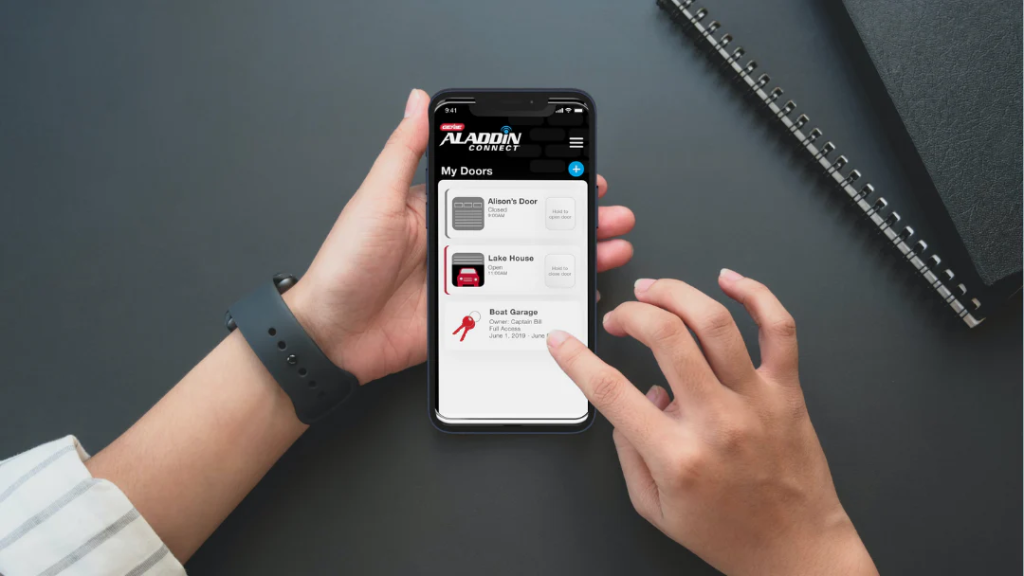
How To Open A Garage Door With A Smartphone: The Big Picture
Opening a garage door with your phone means connecting your garage door opener to the internet and controlling it through a secure mobile app.
Read too: The Complete Guide to Tighten Chain On Garage Door Opener for Smooth Operation
In Simple Terms
Your smartphone becomes:
- A remote control
- A status monitor
- A security device
You can open, close, and check your garage door from almost anywhere.
What You Need to Open a Garage Door With a Smartphone
Before getting started, make sure you have the basics.
Required Items
- A garage door opener (most modern ones are compatible)
- A Wi-Fi connection in the garage
- A smartphone (iOS or Android)
- Either:
- A built-in smart opener or
- A Wi-Fi smart garage door controller
📌 You do not always need to replace your entire opener.
Method 1: Use a Smart Garage Door Opener (Built-In Wi-Fi)
Many newer garage door openers come with built-in Wi-Fi connectivity.
How It Works
- The opener connects directly to your home Wi-Fi
- You install the manufacturer’s app
- Your phone sends secure commands through the cloud
Step-by-Step Setup
- Download the opener’s official app
- Create a secure account
- Connect the opener to Wi-Fi
- Pair the app with your garage door
- Test open/close from your phone
⏱️ Average setup time: 10–20 minutes
Method 2: Add a Smart Garage Door Controller (Best for Older Openers)
If your opener isn’t “smart,” this is the most popular solution.
What Is a Smart Garage Controller?
It’s a small device that:
- Connects to your existing opener
- Uses Wi-Fi to communicate with your phone
- Includes a door position sensor
Why This Method Is Popular
- Works with most openers
- Lower cost than replacing the opener
- Easy DIY installation
Step-by-Step: How To Install a Smart Garage Door Controller
This method works for most homeowners.
Installation Steps
- Mount the controller near the opener
- Connect control wires to opener terminals
- Attach door sensor to the garage door
- Plug in the controller
- Connect it to Wi-Fi using the app
📌 Most apps guide you visually through setup.
Method 3: Use a Smart Home Hub (Advanced Users)
If you already use smart home systems, this may be ideal.
How It Works
- Garage controller connects to a smart hub
- Hub integrates with your phone and automation routines
- Allows voice commands and scheduling
Example Uses
- Auto-close garage at night
- Open garage when arriving home
- Receive alerts if door is left open
⚠️ This method requires more setup and compatibility checks.
Is It Safe to Open a Garage Door With a Smartphone?
Security is a top concern—and rightly so.
Safety Advantages Over Traditional Remotes
- Encrypted connections
- Real-time alerts
- Ability to revoke access instantly
- Activity logs
Unlike lost remotes, phone access can be disabled immediately.
Key Security Features You Should Enable
To stay safe, always activate these options:
Must-Have Security Settings
- Two-factor authentication (2FA)
- App passcode or biometric lock
- Auto-close timers
- Push notifications for door activity
📌 These features reduce unauthorized access risks.
Common Problems and How to Fix Them
Even smart systems can have issues.
Problem: Garage Won’t Open From Phone
Fixes
- Check Wi-Fi signal in garage
- Restart controller
- Update app firmware
Problem: App Says Door Is Open When It’s Closed
Fix
- Re-align door position sensor
Problem: Delayed Response
Fix
- Improve Wi-Fi coverage
- Reduce network congestion
Pros and Cons of Opening a Garage Door With a Smartphone
Advantages
- No remote required
- Control from anywhere
- Increased security
- Guest access sharing
Disadvantages
- Requires internet
- Dependent on phone battery
- Initial setup time
For most homeowners, the benefits clearly outweigh the drawbacks.
Real-World Use Cases
Smart garage access is more than convenience.
Practical Examples
- Letting in a delivery while away
- Opening garage for family members
- Checking door status while traveling
- Closing garage remotely if forgotten
Many users report reduced stress knowing they can check anytime.
How Much Does It Cost?
Typical Price Range
- Smart controller: $30–$80
- Smart opener (new): $150–$300
- Monthly fees: Usually $0
This makes smart garage access one of the most affordable home automation upgrades.
Do You Need Professional Installation?
In most cases, no.
DIY vs Professional
- DIY: 30–60 minutes, basic tools
- Professional: Faster, higher cost
If you’re comfortable following app instructions, DIY is usually enough.
Can Multiple Phones Control One Garage Door?
Yes—and this is one of the biggest advantages.
Multi-User Access
- Add family members
- Set time-limited guest access
- Revoke access instantly
Perfect for households and short-term visitors.
What Happens If the Internet Goes Down?
This is a common concern.
Good News
- Wall buttons still work
- Physical remotes still work
- Only smartphone control is affected
Your garage door will not stop functioning.
Understanding Smart Garage Technology (Background)
Smart garage systems are part of the broader home automation ecosystem, which uses internet-connected devices to control household functions remotely. For a general explanation of how smart home and automation technology works, see this authoritative reference on Wikipedia:
👉 https://en.wikipedia.org/wiki/Home_automation
FAQ: How To Open A Garage Door With A Smartphone
Can I open my garage door from anywhere with my phone?
Yes, as long as your opener and phone both have internet access.
Do I need to replace my garage door opener?
No. Many systems work with existing openers using add-on controllers.
Is smartphone garage control safe?
Yes, when using encrypted apps and security features like 2FA.
What if my phone battery dies?
You can still use wall buttons or traditional remotes.
Can I share access with family members?
Yes. Most apps allow multiple users and guest access.
Conclusion
Learning how to open a garage door with a smartphone gives you greater convenience, security, and peace of mind. Whether you upgrade to a smart opener or add a simple Wi-Fi controller, the process is easier and more affordable than most people expect.
If this guide helped you, share it on social media so others can enjoy smarter, safer garage access with their smartphones.

Leave a Reply