If you’re wondering how to pair Honda CRV with garage door opener, you’re seeking convenience and modern automation. Integrating your Honda CRV with your garage system allows hands-free operation, eliminating the need for extra remotes while enhancing home security.
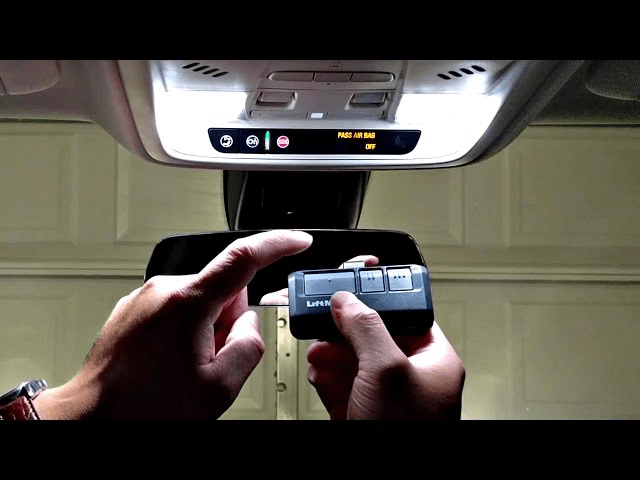
This guide will walk you step-by-step through programming your CRV, troubleshooting common issues, and tips to ensure safe and reliable garage operation.
Read too: The Complete Guide to Tighten Chain On Garage Door Opener for Smooth Operation
Understanding Honda CRV Garage Integration
Most modern Honda CRVs come equipped with HomeLink, a built-in system that allows your vehicle to communicate with garage door openers via radio signals.
Benefits of pairing CRV with garage opener:
- Hands-free access from inside your vehicle
- No additional remote controls needed
- Secure communication with rolling code technology
- Integration with smart home systems
According to Wikipedia Home Automation, pairing vehicles with home automation devices enhances convenience, safety, and energy efficiency.
Step-By-Step Guide: Pairing Honda CRV With Garage Door Opener
Step 1: Prepare Your Garage Door Opener
- Locate the “Learn” or “Program” button on your garage door opener motor.
- Ensure the garage door is fully closed.
- Clear the area around the garage for safe testing.
Step 2: Prepare Your Honda CRV
- Turn the ignition to the ON position without starting the engine.
- Identify the HomeLink buttons in your CRV, usually on the rearview mirror.
Step 3: Program The Vehicle
- Press and hold the desired HomeLink button until the indicator light begins to blink slowly (around 20 seconds).
- Release the button once the light starts flashing.
Tip: Some CRVs may require holding the vehicle button near the garage opener during programming. Consult the owner’s manual for exact positioning.
Step 4: Pair With Garage Door Opener
- Press the Learn button on the garage opener motor.
- Within 30 seconds, return to your CRV and press the programmed HomeLink button twice for 2 seconds each.
- The garage opener light should flash to confirm successful pairing.
Note: Openers with rolling code may require temporarily disabling the rolling code feature for initial programming.
Step 5: Test The System
- Press the programmed HomeLink button once to open the garage.
- Press again to close the garage.
- Ensure the door responds consistently and without delay.
Tips For Successful Pairing
- Frequency Compatibility: Ensure your garage opener and CRV HomeLink system operate on compatible frequencies (310–390 MHz).
- Clear Previous Pairings: Reset HomeLink buttons if previously linked to another garage.
- Vehicle Software Updates: Make sure your CRV software is up-to-date for compatibility with HomeLink systems.
- Safety First: Do not attempt programming while the vehicle is in motion. Keep children and pets away during setup.
Troubleshooting Common Issues
| Issue | Solution |
|---|---|
| Garage doesn’t respond | Ensure vehicle is in range and batteries are fresh |
| Light flashes rapidly but door doesn’t move | Re-press Learn button on motor and retry |
| Multiple garages nearby | Program intended opener individually |
| Rolling code errors | Temporarily disable rolling code per opener manual |
Advantages Of Pairing Honda CRV With Garage Door Opener
- Convenience: Open and close the garage hands-free.
- Security: Rolling code encryption prevents unauthorized access.
- Integration: Works with smart home systems like MyQ or Alexa.
- Multiple Users: Multiple CRVs or HomeLink-equipped vehicles can be paired.
FAQ
Q1: Can I pair multiple garages to my CRV?
A: Yes, different HomeLink buttons can be programmed for different doors.
Q2: Will pairing erase my existing remotes?
A: No, your original remotes remain functional.
Q3: Does this work with older garage door openers?
A: Some older models may require rolling code adjustments or manual frequency alignment.
Q4: Can programming be done from inside the garage?
A: Yes, but ensure the garage is clear and you are in a safe position.
Q5: How long does the process take?
A: Typically 5–10 minutes if the CRV and opener are compatible.
Q6: Is it safe to leave my CRV paired permanently?
A: Yes, pairing is secure, especially when using rolling code encryption.
Best Practices For Long-Term Use
- Regularly test HomeLink buttons to ensure smooth operation.
- Replace vehicle batteries periodically for reliability.
- Keep manuals handy for troubleshooting.
- Enable alerts if your opener supports smart notifications.
Conclusion
Learning how to pair Honda CRV with garage door opener makes your daily routine easier, safer, and more convenient. Following these steps ensures hands-free, reliable, and secure garage operation. Share this guide with friends or family to help them enjoy the same convenience and peace of mind.
Leave a Reply