If you’re tired of juggling a handheld remote every time you pull into your driveway, you’re probably wondering How To Pair My Garage Door Opener With Car quickly and correctly. The good news? Most modern vehicles with built-in HomeLink or similar systems can sync with your garage door opener in just a few minutes.
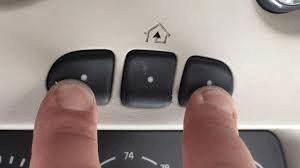
In this complete guide, you’ll learn the exact steps to program your vehicle, how to handle rolling code systems, and what to do if pairing doesn’t work the first time.
Read too: Mastering the Art of Adjusting a Chamberlain Garage Door Opener for Smooth Operation and Safety
How To Pair My Garage Door Opener With Car (Step-by-Step Guide)
Before starting How To Pair My Garage Door Opener With Car, confirm two things:
- Your car has built-in HomeLink or Car2U system.
- Your garage opener uses a compatible frequency (most modern units do).


4
Most vehicles manufactured after 2007 include HomeLink integration.
For background on rolling code technology used in garage openers, see:
https://en.wikipedia.org/wiki/Rolling_code
Step 1: Clear Existing Programming (If Needed)
If your car was previously paired to another garage:
- Turn ignition to “On” (engine off is fine).
- Press and hold the two outer HomeLink buttons.
- Hold for about 10–20 seconds.
- Release when indicator light flashes rapidly.
This resets the system.
Step 2: Pair the Car With the Handheld Remote
- Hold your garage remote 1–3 inches from the car’s HomeLink buttons.
- Press and hold the desired HomeLink button.
- Simultaneously press and hold the remote button.
- Continue holding for 10–30 seconds.
- Watch for indicator light to change from slow blink to rapid blink.
If it flashes rapidly, initial pairing is complete.
Step 3: Program Rolling Code (Most Modern Systems)
Most garage openers today use rolling code security.
How To Complete Rolling Code Sync
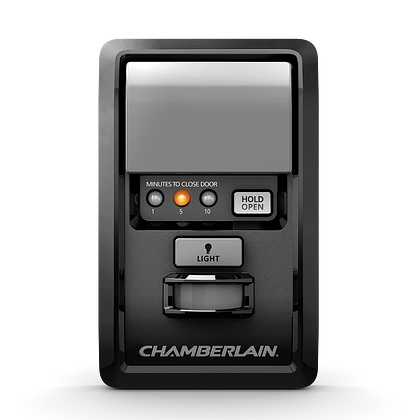
- Go to your garage opener motor unit.
- Press and release the Learn button.
- You now have 30 seconds.
- Return to your car.
- Press and hold programmed HomeLink button for 2 seconds.
- Release.
- Repeat 2–3 times until garage door moves.
Once the door activates, pairing is successful.
How Do I Know If My Opener Uses Rolling Code?
Look for:
- “Security+”
- “Rolling Code”
- Colored Learn button (yellow, purple, red, green)
Openers manufactured after 1996 almost always use rolling code encryption.
Rolling code improves security by changing the access code every time the remote is used.
What If My Car Uses Car2U Instead of HomeLink?
Some GM vehicles use Car2U.
Steps are similar but require different button combinations.
- Press and hold desired Car2U button.
- Hold until LED flashes slowly.
- Press Learn button on opener.
- Return to vehicle.
- Press Car2U button repeatedly until door activates.
Consult your vehicle manual for exact procedure.
How Far Should I Be During Programming?
- During remote pairing: 1–3 inches away.
- During testing: Within 20 feet of garage.
Too much distance can interrupt signal learning.
Common Problems and Solutions
1. Indicator Light Doesn’t Flash Rapidly
- Replace remote battery.
- Ensure remote is functioning properly.
2. Door Doesn’t Respond After Learn Button Step
- Repeat Step 3 within 30 seconds.
- Ensure opener memory isn’t full.
3. LED Bulb Interference
Some LED bulbs cause radio interference. Replace with garage-rated bulbs.
4. Memory Full in Opener
Clear memory by holding Learn button for 6–10 seconds.
How Many Cars Can Pair to One Opener?
Most modern garage openers allow:
- 5–10 remotes
- Multiple vehicles
- Keypad entry systems
If you exceed memory limit, oldest programming may be overwritten.
Safety Considerations
Garage doors typically weigh 150–300 pounds.
Follow these safety tips:
- Keep children clear during testing.
- Never adjust force settings while pairing.
- Use ladder safely when pressing Learn button.
- Ensure door area is free of obstacles.
How Long Does Pairing Take?
- Standard system: 3–5 minutes.
- Rolling code system: 5–10 minutes.
- Troubleshooting: Up to 15 minutes.
Most pairing issues are timing-related.
Benefits of Pairing Garage Door Opener With Car
| Benefit | Explanation |
|---|---|
| Convenience | No handheld remote needed |
| Security | Rolling code encryption |
| Cleaner Interior | Less clutter |
| Multi-user access | Multiple drivers supported |
In-car integration also reduces the risk of leaving remotes visible, which can attract theft.
Can You Pair Without a Remote?
If you don’t have a handheld remote:
- Press Learn button directly.
- Immediately press and hold HomeLink button.
- Wait for confirmation blink.
This works on some models but not all.
How To Reprogram After Power Outage
Most systems retain memory after power outages.
If pairing stops working:
- Test remote first.
- Replace battery.
- Repeat rolling code step.
Troubleshooting Checklist
Before calling a technician:
- Replace remote battery.
- Confirm compatibility.
- Clear car memory.
- Clear opener memory.
- Repeat programming steps slowly.
Over 70% of pairing failures are caused by incorrect timing during the Learn button window.
FAQ – How To Pair My Garage Door Opener With Car
1. Why won’t my car sync with my garage door opener?
Usually due to rolling code timing or weak remote battery.
2. Do I need to reprogram after changing car battery?
Sometimes. Some vehicles lose HomeLink memory after battery replacement.
3. Can I pair multiple buttons to different doors?
Yes. Each button can control a different garage door.
4. What if my opener is very old?
Older dip-switch systems require manual code matching instead of Learn button syncing.
5. Does pairing reduce security?
No. Rolling code systems enhance security by generating new codes each use.
6. How often should I reprogram?
Only when replacing opener, car, or after memory reset.
Conclusion
Now you know exactly How To Pair My Garage Door Opener With Car—from clearing memory to syncing rolling code systems.
With proper setup, you gain:
- Quick access
- Enhanced security
- Cleaner vehicle interior
- Reliable daily convenience
Most pairings take less than 10 minutes when done carefully. If this guide helped you sync your garage door opener, consider sharing it with others who might be troubleshooting the same issue.



Leave a Reply