Modern vehicles offer convenience features that extend far beyond navigation and entertainment. One standout feature of the 2024 GMC Sierra is the integrated HomeLink garage door opener system, which allows drivers to open and close their garage doors directly from their truck’s interior.
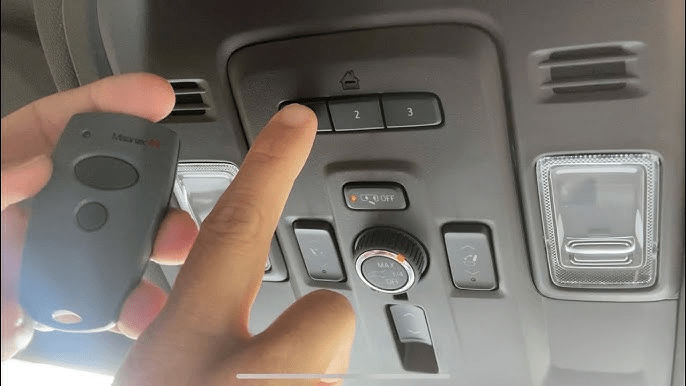
If you’re wondering how to program 2024 GMC Sierra garage door opener, you’ve come to the right place. In this comprehensive guide, we’ll walk you through the entire process—step by step—and help you troubleshoot any issues along the way.
By the end, you’ll be able to operate your garage door effortlessly from the comfort of your Sierra’s cabin, without the need for a separate remote.
Read too: Door and Garage Door Companies: Choosing the Right Partner for Your Needs
Why Use Your GMC Sierra’s Built-in Garage Door Opener?
Integrating your garage door opener with your vehicle offers several benefits:
- Eliminates clutter: No need for extra remotes.
- Convenience: Opens the garage as you approach.
- Security: Controls are built-in, reducing chances of theft or loss.
- Efficiency: Works seamlessly with most garage door systems, including brands like LiftMaster, Genie, Chamberlain, and others.
Before starting the programming process, confirm that your garage door opener is compatible with HomeLink or rolling code systems. Most openers manufactured after 1996 will work just fine.
What You’ll Need Before You Begin
To successfully follow this guide on how to program 2024 GMC Sierra garage door opener, here’s what you’ll need:
- Your 2024 GMC Sierra (powered on but in Park)
- Access to your garage door motor unit
- A ladder to reach the motor if needed
- Your garage door opener remote (optional, depending on system)
- Patience—programming can take a few tries
How To Program 2024 GMC Sierra Garage Door Opener – Full Programming Guide
This section provides detailed steps on how to program 2024 GMC Sierra garage door opener using the HomeLink system embedded in the vehicle.
Step 1: Locate the HomeLink Buttons in Your Sierra
In most 2024 GMC Sierra models, you’ll find the HomeLink buttons:
- On the overhead console, near the rearview mirror
- Labeled as three small, numbered buttons (1, 2, and 3)
These buttons will act as your new garage door remote.
Step 2: Clear Previous Codes (Recommended for First-Time Use)
If your truck is brand-new or recently purchased, you might not need to do this. However, if you’re unsure:
- Press and hold buttons 1 and 3 simultaneously.
- Hold for about 20 seconds until the indicator light begins to flash rapidly.
- This will erase any previous programming, preparing a clean slate.
Step 3: Program the Button to Your Remote (for Fixed Code Systems)
This applies to most older garage door openers that use a fixed code (pre-1996).
- Hold your existing garage door opener remote about 1–3 inches from the HomeLink button panel.
- Press and hold the desired HomeLink button (1, 2, or 3) and the remote button simultaneously.
- Keep holding both buttons until the HomeLink indicator light changes from slow blinking to rapid flashing.
- Release both buttons. The HomeLink button is now programmed.
Test it by pressing the newly programmed button. If the door opens, you’re done!
Step 4: Programming with “Learn” or “Smart” Button (Rolling Code Systems)
Most modern garage door openers (post-1996) use a rolling code system for enhanced security. If your garage door doesn’t respond after Step 3, you’ll need to:
- Go to your garage door opener motor unit (usually mounted on the ceiling).
- Locate the “Learn” button—typically found behind a plastic cover. It might be labeled “Learn,” “Smart,” or “Program.”
- Press the Learn button once (do not hold it).
- You’ll have 30 seconds to return to your vehicle.
- In your Sierra, press and hold the HomeLink button you want to program for 2 seconds, then release.
- Repeat the press/hold/release up to 3 times until the door operates.
✅ Tip: A flashing light on the motor unit or a clicking sound usually confirms the signal is received.
Troubleshooting Common Issues
If your garage door opener doesn’t respond after programming, here are a few troubleshooting tips:
1. Check Compatibility
Not all systems are compatible. Visit www.homelink.com and use their compatibility tool with your opener brand and year.
2. Reset and Retry
Sometimes signals cross. Repeat the clearing process and restart the steps carefully.
3. Weak Remote Battery
If using a remote for the programming step, ensure the battery is strong.
4. Blocked Signal
Ensure nothing is obstructing the remote or motor sensor during setup.
How Many Garage Doors Can You Program?
The 2024 GMC Sierra’s HomeLink system supports up to three garage door openers or RF-controlled devices. You can assign:
- Button 1 for your home garage
- Button 2 for a gate or second garage
- Button 3 for lights or a third door
To program more than one device, repeat the above steps using a different HomeLink button.
Can I Use My Sierra to Control Gates or Lights?
Yes! The HomeLink system isn’t limited to garage doors. You can also program it to:
- Open community gates
- Activate home lighting systems
- Operate automatic driveway gates
The process is largely the same—just use the original remote for the device and program it as described above.
What If I Sell My Truck?
If you’re trading or selling your 2024 Sierra, be sure to erase all programmed HomeLink buttons:
- Hold buttons 1 and 3 until the light flashes rapidly (around 20 seconds).
- This clears all data, ensuring your home remains secure.
Maintenance Tips for Long-Term Success
✅ Regularly Test the Buttons
Press the button every few months to make sure it’s still responsive. If not, try reprogramming.
✅ Keep Your Garage Opener Firmware Updated
Modern garage door systems may receive firmware updates. Check with your manufacturer if a compatibility issue arises.
✅ Replace Remote Batteries (If Applicable)
If using a remote during the setup process, a weak battery can prevent successful programming.
Benefits of Using Your 2024 GMC Sierra’s Integrated Opener
Using your truck’s integrated system offers more than just convenience. Here are a few long-term advantages:
- Reduces dashboard clutter
- Prevents theft of separate remotes
- Faster response time than external remotes
- Seamless experience as you arrive or leave home
- Safer entry and exit, especially at night
Frequently Asked Questions (FAQ)
❓Can I reprogram a button to control a new garage?
Yes. Just follow the same programming steps using the same button. The old code will be replaced.
❓What if I move to a new home?
You can clear old data and program your new garage door using the same method.
❓Will it work with a Genie or LiftMaster opener?
Yes, the GMC HomeLink system is compatible with most major brands including Genie, LiftMaster, Chamberlain, and more.
Final Thoughts on How To Program 2024 GMC Sierra Garage Door Opener
Programming your garage door opener in the 2024 GMC Sierra is a simple yet powerful feature that adds convenience and peace of mind to your daily routine. Whether you’re setting it up for the first time or switching to a new home, this guide on how to program 2024 GMC Sierra garage door opener has provided everything you need to know.
If you encounter issues, don’t hesitate to consult your owner’s manual or visit the HomeLink website for model-specific help. And remember—this feature not only saves time but also enhances safety and streamlines your daily life.



Leave a Reply