When it comes to garage door openers, Genie is a trusted name known for its reliability and user-friendly features. One of the most popular models in their lineup is the Genie Model 7055 Garage Door Opener, which is equipped with smart technology and advanced features designed to make your life easier. However, in order to use the opener effectively, you must first program it to sync with your remotes, keypads, or other devices.
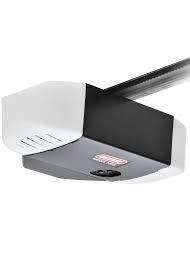
In this article, we’ll walk you through the process of how to program a Genie Model 7055 Garage Door Opener. Whether you’re a first-time user or you need to reprogram a remote, this guide will provide clear, easy-to-follow steps to get your garage door opener working in no time.
Why Should You Program a Genie Model 7055 Garage Door Opener?
Programming a Genie Model 7055 Garage Door Opener is necessary to link the opener to your remote controls, keypads, and smart devices. By completing the programming, you’ll be able to control your garage door from the comfort of your car or home. Additionally, programming your opener adds an extra layer of security and convenience, ensuring your garage door operates smoothly and efficiently.
Read too: Mastering the Art of Adjusting a Chamberlain Garage Door Opener for Smooth Operation and Safety
What You’ll Need to Program a Genie Model 7055 Garage Door Opener
Before you get started, make sure you have everything you need:
- Genie Model 7055 Garage Door Opener – Ensure your opener is installed properly and powered on.
- Genie Remote Control – This can be a new remote or one that you need to reprogram.
- Keypad (if applicable) – You may want to program a keypad for convenient access to your garage.
- Step Ladder – This may be necessary to reach the opener if it’s mounted on the ceiling.
How To Program A Genie Model 7055 Garage Door Opener: Step-by-Step Instructions
Follow the detailed steps below to program your Genie Model 7055 Garage Door Opener with remotes or a keypad. The process is relatively simple and can be completed in just a few minutes.
Step 1: Locate the “Learn” Button on the Genie Opener
The first step in programming your Genie Model 7055 Garage Door Opener is locating the “Learn” button on the opener’s motor unit. The “Learn” button is typically located on the back of the motor unit, near the antenna. It may be labeled as “Learn” or simply have a small square button.
Once you’ve located the button, you’re ready to start programming.
Step 2: Enter Programming Mode
To start the programming process, press and release the “Learn” button. You should see the indicator light next to the button blink or stay on. This indicates that the opener is now in programming mode.
Once the light begins blinking, you have approximately 30 seconds to program the remote or keypad. It’s important to act quickly, as the opener will automatically exit programming mode after 30 seconds.
Step 3: Program the Remote Control
Now that your opener is in programming mode, you can sync your remote with the garage door opener. Follow these steps:
- Press the Button on Your Remote: Take the remote control you want to program and press and hold the button you’d like to use to open or close your garage door.
- Wait for the Light to Blink: Hold the button down for about 3-5 seconds. When the opener’s indicator light blinks or turns off, this indicates that the programming was successful.
- Test the Remote: Once you’ve completed the programming, test the remote by pressing the button. The garage door should open or close based on its current position. If the door responds, the remote is successfully programmed.
Step 4: Program a Keypad (Optional)
If you’d like to program a wireless keypad to your Genie Model 7055 Garage Door Opener, follow these steps:
- Enter the Desired Code: On the keypad, enter a 4-digit code of your choice. This code will be used to control the door.
- Press the “Enter” Button: After entering the code, press and hold the “Enter” button for about 3-5 seconds. The indicator light on the opener should blink, signaling that the keypad has been programmed successfully.
- Test the Keypad: Try entering your 4-digit code and press “Enter.” Your garage door should open or close in response. If it works, the keypad is programmed successfully.
Troubleshooting Common Issues When Programming Your Genie Model 7055 Garage Door Opener
While programming your Genie Model 7055 Garage Door Opener is usually a smooth process, some common issues may arise. Here are a few tips for troubleshooting:
Issue 1: Remote Not Responding
If the remote control doesn’t work after programming, try the following:
- Check the Battery: Ensure the remote has a fresh battery. A dead battery can prevent the remote from sending a signal to the opener.
- Reprogram the Remote: If the remote is not responding, repeat the programming process. Make sure you’re pressing the button on the remote and the “Learn” button on the opener correctly.
- Ensure the Opener Is In Programming Mode: Make sure that the opener’s indicator light is blinking or staying on. If not, press the “Learn” button again to enter programming mode.
Issue 2: Opener Doesn’t Respond to Remote
If the opener isn’t responding to the remote, check the following:
- Antenna Placement: Make sure the opener’s antenna is properly extended. A blocked or bent antenna can interfere with the signal.
- Clear Obstructions: Ensure there are no physical obstructions between the opener and the remote control that may block the signal.
Issue 3: Keypad Not Working
If your keypad isn’t working after programming, follow these steps:
- Check the Code: Ensure that the code you entered into the keypad is correct. If you’ve forgotten the code, you may need to reprogram the keypad.
- Test the Keypad Range: Move closer to the opener to ensure you’re within the effective range of the keypad.
- Replace the Keypad Battery: A dead battery in the keypad can prevent it from transmitting the code. Replace the battery and try again.
How To Program A Genie Model 7055 Garage Door Opener with Multiple Remotes
If you want to program multiple remotes to control your garage door opener, the process is the same as programming a single remote. Genie openers, including the Model 7055, can store multiple remote codes, so you can sync several remotes to a single opener.
Simply repeat the programming steps for each additional remote, and test each remote individually to ensure they are working properly.
Why Regular Programming and Maintenance Matter
Regularly programming and maintaining your Genie Model 7055 Garage Door Opener ensures that your garage door operates smoothly and securely. Over time, remotes may lose their connection with the opener, or new devices may need to be added. Keeping your opener’s remote devices synced ensures that you can always control your garage door with ease.
Final Thoughts
Learning how to program a Genie Model 7055 Garage Door Opener is an essential skill for homeowners. Whether you’re setting up a new remote, reprogramming a keypad, or troubleshooting an issue, this guide has provided you with all the information you need to get your garage door opener up and running. The process is simple, fast, and user-friendly, allowing you to enjoy the convenience and security that Genie garage door openers offer.
By following the clear steps provided here, you’ll have your garage door opener programmed in no time, and you can begin using your remote and keypad with ease.



Leave a Reply