Locked out of your garage because the keypad stopped working? Or maybe you just installed a new one and need clear instructions. If you’re searching for How To Program A Sears Garage Door Opener Keypad, you’re in the right place.
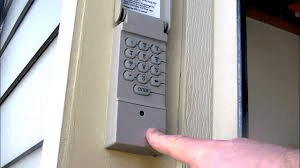
Most Sears (Craftsman-compatible) garage door keypads can be programmed in just a few minutes—without calling a technician. In this complete guide, you’ll learn step-by-step setup instructions, how to reset your keypad, fix common problems, and ensure your system stays secure.
Read too: Why Your Liftmaster Garage Door Won’t Stay Closed and How to Fix It? Troubleshooting Tips
How To Program A Sears Garage Door Opener Keypad (Quick Overview)


4
Before diving deep, here’s the simplified process for How To Program A Sears Garage Door Opener Keypad:
- Locate the Learn button on the motor unit.
- Press and release the Learn button.
- Within 30 seconds, enter a 4-digit PIN on the keypad.
- Press Enter.
- Wait for the opener light to blink.
If the light flashes or you hear a click, programming was successful.
Now let’s go step-by-step with more detail.
Step-by-Step: Programming Your Sears Garage Door Keypad
Step 1: Locate the Motor Unit
The motor unit is mounted on the ceiling of your garage.
To access it safely:
- Use a stable ladder.
- Ensure the garage door is fully closed.
- Turn on garage lighting for visibility.
Look for a button labeled “Learn.”
Common Learn button colors:
- Red
- Yellow
- Purple
- Orange
- Green
Step 2: Press the Learn Button
- Press and release the Learn button.
- A small LED light next to it will turn on.
- You now have 30 seconds to program the keypad.
Timing is important. If more than 30 seconds pass, you must press Learn again.
Step 3: Enter Your 4-Digit PIN
On the outside keypad:
- Enter your desired 4-digit PIN.
- Press the Enter button.
- Wait for confirmation.
The garage light should blink once or twice.
Test your new PIN immediately to confirm operation.
How Rolling Code Technology Works
Most Sears openers manufactured after 1996 use rolling code technology.
That means:
- The security code changes every time you use it.
- Hackers cannot reuse intercepted signals.
- Each transmission is encrypted.
For background on rolling code systems, see:
https://en.wikipedia.org/wiki/Rolling_code
Rolling code systems are significantly more secure than older fixed-code systems.
How To Reset A Sears Garage Door Opener Keypad
If your keypad isn’t responding, you may need to reset it.
To Clear All Codes:
- Press and hold the Learn button for 6–10 seconds.
- The LED will turn off.
- All remotes and keypads are erased.
You must then reprogram all devices.
How Long Does Programming Take?
Typical time required:
- 3–5 minutes total
- No tools required
- No wiring involved
If it takes longer than 10 minutes, troubleshooting is needed.
Common Reasons the Keypad Won’t Program
If you followed the steps and it didn’t work, check these issues:
1. Dead Battery
Most keypads use a 9V battery.
Replace the battery if:
- The keypad backlight is dim.
- Buttons feel unresponsive.
- Programming fails repeatedly.
2. Standing Too Far From Motor Unit
When programming, stay within:
- 3–5 feet of the motor unit
Signal strength matters during setup.
3. Memory Is Full
Most Sears units can store:
- 5–10 remotes and keypads
Clear memory and reprogram if needed.
4. Interference From Electronics
LED bulbs and Wi-Fi routers sometimes interfere with signals.
Try:
- Temporarily turning off garage LED lighting
- Programming during daylight hours
Choosing a Secure PIN
Security matters.
Avoid using:
- 1234
- 0000
- Birth years
- Street numbers
Choose a PIN that:
- Is random
- Isn’t easily guessed
- Isn’t reused elsewhere
Change your PIN once per year for added protection.
Comparing Keypad vs Remote Access
| Feature | Keypad | Remote |
|---|---|---|
| Requires battery | Yes | Yes |
| PIN protection | Yes | No |
| Portable | No | Yes |
| Risk if lost | Low | Higher |
Many homeowners use both for convenience.
When Should You Replace Instead of Reprogram?
Consider replacing the keypad if:
- Buttons are physically worn
- Water damage is visible
- Battery compartment is corroded
- The unit is over 15 years old
Replacement keypads typically cost:
- $25–$60 depending on model
Maintenance Tips for Long-Term Reliability
To keep your Sears keypad working properly:
- Replace battery every 12 months
- Keep keypad covered from heavy rain
- Clean buttons gently with dry cloth
- Test operation monthly
Regular testing prevents surprises.
FAQ: How To Program A Sears Garage Door Opener Keypad
1. Why won’t my keypad connect to the opener?
Possible reasons include a dead battery, expired Learn window, or full memory.
2. How many keypads can I program?
Most units support multiple keypads, but check your model’s capacity.
3. Do I lose programming after a power outage?
No. Most modern openers retain stored codes.
4. What if I forgot my PIN?
Clear all codes using the Learn button and create a new PIN.
5. Can I program the keypad without a ladder?
No. You must access the motor unit’s Learn button.
6. Is Sears keypad compatible with Craftsman?
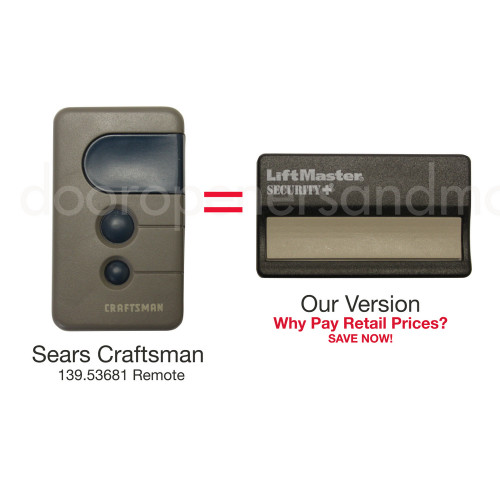
Yes. Most Sears and Craftsman systems are cross-compatible.
Final Thoughts
Learning How To Program A Sears Garage Door Opener Keypad is simpler than most homeowners expect. With just a few minutes, a fresh battery, and access to the Learn button, you can restore secure entry to your garage.
Rolling code technology provides strong security, and regular maintenance ensures long-term reliability.
If this guide helped you successfully program your keypad, share it on social media to help others fix their garage access quickly and confidently.



Leave a Reply