Chamberlain garage door openers are widely known for their durability and smooth operation. However, like any mechanical system, they may encounter issues over time. One of the most common problems faced by homeowners is a malfunctioning logic board. The logic board is the “brain” of your garage door opener and controls all the key functions, such as remote signal reception and motor operation. If your garage door opener isn’t functioning properly, the issue could likely be with the logic board.
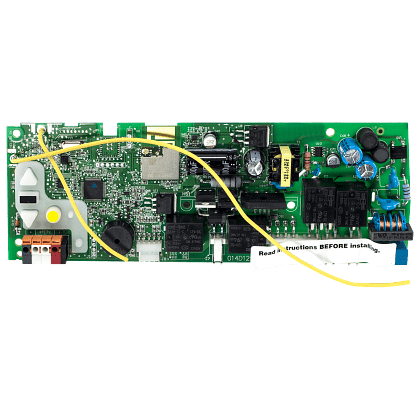
In this guide, we will walk you through how to replace the logic board on a Chamberlain garage door opener. Whether your garage door opener has stopped responding or is acting erratically, replacing the logic board can often resolve these problems. This article covers everything from troubleshooting to the step-by-step process of replacing the logic board, ensuring you have the knowledge to complete the job on your own.
Read too: No Power to Genie Garage Door Opener – Resolving the Issue with Ease: Troubleshooting Guide
What Is a Logic Board and Why Does It Need Replacing?
Before we dive into the process, it’s important to understand the role of the logic board in your Chamberlain garage door opener. The logic board is an electronic circuit board that governs the operations of the opener. It receives signals from remote controls, sensors, and wall consoles, processes them, and sends commands to open or close the garage door.
Over time, the logic board can experience wear and tear, electrical surges, or even physical damage, all of which can lead to malfunctions. Some common signs that your logic board needs to be replaced include:
- The garage door opener won’t respond to the remote or wall console.
- The door opens or closes intermittently.
- The opener is making strange sounds or behaving erratically.
- The LED lights on the opener are flashing or not lit at all.
If you’re experiencing any of these symptoms, it might be time to replace the logic board.
Tools You’ll Need for the Job
Replacing the logic board on a Chamberlain garage door opener is a manageable task if you have the right tools. Here’s what you’ll need:
- Screwdriver set: You will need a set of screwdrivers, including Phillips and flat-head types.
- Replacement logic board: Ensure you purchase the correct logic board compatible with your specific Chamberlain model.
- Wire cutters/strippers: To disconnect and reconnect the wiring.
- Multimeter (optional): For testing the existing board before removing it.
- Work gloves: To protect your hands when handling the opener components.
How To Replace Logic Board On Chamberlain Garage Door Opener
Step 1: Unplug the Garage Door Opener
Before doing any work on your Chamberlain garage door opener, safety is the first priority. Disconnect the power supply to prevent any electrical shock or injury. Unplug the unit from the electrical outlet or turn off the circuit breaker that controls the opener. Ensure the power is completely off before proceeding.
Step 2: Remove the Cover of the Garage Door Opener
Using a screwdriver, remove the screws holding the cover in place. Most Chamberlain openers have a plastic or metal cover that needs to be removed to access the internal components. Once the screws are removed, take off the cover carefully, exposing the logic board and other internal parts.
Step 3: Identify the Logic Board
The logic board is typically located near the center of the garage door opener, usually on the front or rear side of the unit. It’s a rectangular-shaped board with various small components, such as capacitors, resistors, and connectors. The logic board may be attached with screws or clips, which need to be removed before proceeding.
Step 4: Disconnect the Wires from the Logic Board
The logic board is connected to various components of the garage door opener, including the motor, sensors, and remote control receiver, via wiring. Take note of how the wires are connected before removing them from the old logic board. Use wire cutters or strippers to carefully disconnect the wires from the logic board.
If your garage door opener has a display or any other connected parts, also make sure to disconnect these carefully before removing the old logic board completely.
Step 5: Remove the Faulty Logic Board
Once all wires are disconnected, remove any screws or fasteners securing the logic board in place. Carefully lift the faulty logic board out of its housing, making sure not to damage any other parts. If the logic board is stuck or difficult to remove, gently wiggle it free, but be careful not to apply too much force.
Step 6: Install the New Logic Board
Now it’s time to install the new logic board. Align the new logic board into the same position as the old one and secure it with screws or fasteners. Once the board is in place, reconnect the wires according to the labels or your notes from Step 4. Be sure to reconnect each wire to the correct terminal.
Step 7: Test the New Logic Board
Before reassembling the opener, it’s essential to test the new logic board. Plug the garage door opener back into the power source or turn on the circuit breaker. Using your remote control or wall console, check if the garage door opens and closes properly. Also, test all other functions, such as the safety sensors and the remote signal, to ensure everything is working correctly.
If the garage door opener functions as expected, you can proceed to the next step. If not, double-check all connections and ensure the logic board is properly installed.
Step 8: Reassemble the Garage Door Opener
Once you’ve verified that the new logic board is functioning correctly, reattach the cover of the garage door opener using the screws you removed earlier. Ensure that the cover is securely in place before moving on to the final step.
Step 9: Final Test
After the opener is reassembled, conduct one last test. Open and close the garage door a few times to make sure everything works smoothly. If the door opens and closes properly, the logic board replacement is complete.
Tips for Maintaining Your Garage Door Opener
To ensure the longevity of your Chamberlain garage door opener and its logic board, consider the following maintenance tips:
- Regular inspections: Periodically check the opener for signs of wear and tear, particularly the logic board and wiring.
- Clean the opener: Dust and dirt can accumulate over time, affecting the performance of the opener. Clean the internal components (including the logic board) with a dry cloth.
- Lubricate moving parts: Regularly lubricate the door’s moving parts, such as the tracks, rollers, and hinges, to reduce strain on the opener.
- Check for obstructions: Ensure that there are no objects blocking the sensors or tracks that could interfere with the garage door’s operation.
Conclusion
Replacing the logic board on your Chamberlain garage door opener may seem intimidating at first, but with the right tools and some patience, it’s a task that can be done by most homeowners. By following the steps outlined above, you can restore your garage door opener to full functionality. Always remember to exercise caution and take your time to ensure the job is done correctly. If you’re still having trouble after replacing the logic board, it might be worth calling a professional for further assistance.


Leave a Reply