For many homeowners, forgetting to close the garage door or needing to open it remotely can be stressful. That’s why learning How To Use MyQ App To Open Garage Door is becoming essential in modern smart homes. This guide walks you through everything—from setup to daily use—so you can control your garage door confidently, safely, and conveniently from your smartphone.
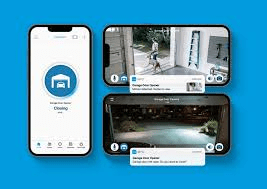
What Is the MyQ App and How Does It Work?
The myQ app is a smart garage control application developed by Chamberlain Group, designed to let homeowners monitor and control compatible garage door openers remotely.
Read too: Door and Garage Door Companies: Choosing the Right Partner for Your Needs
How MyQ Works (Simple Explanation)
- The garage opener connects to Wi-Fi (directly or via a hub)
- The myQ app communicates through secure cloud servers
- Commands are sent from your phone to open or close the door
- You receive real-time status and alerts
This system removes the need for traditional remotes when you’re away from home.
What You Need Before Using MyQ App to Open Garage Door
Before you start, make sure you have the following:
Required Items Checklist
- Compatible garage door opener (myQ-enabled or add-on hub)
- Stable Wi-Fi connection (2.4 GHz recommended)
- Smartphone (iOS or Android)
- myQ app installed
- Garage door safety sensors properly aligned
According to smart home adoption studies, over 57% of US homeowners now use at least one connected home device—garage access being one of the fastest-growing categories.
How To Set Up MyQ App for the First Time (Step-by-Step)
Step 1: Install the MyQ App
Download the official myQ app from:
- Apple App Store
- Google Play Store
Create an account using a valid email address and strong password.
Step 2: Prepare Your Garage Opener
- Ensure the garage door is fully closed
- Stand within 3–6 feet of the opener
- Confirm the safety sensors show solid lights
Tip: Perform setup in a quiet environment, temperature 22–28°C, to avoid interference.
Step 3: Connect MyQ to Wi-Fi
- Open the myQ app
- Tap Add Device
- Select Garage Door Opener
- Follow on-screen instructions to connect to Wi-Fi
This process usually takes 2–5 minutes.
Step 4: Pair the Garage Door Opener
- Press the Learn button on your garage opener
- Confirm pairing in the app
- Wait for confirmation message
Once paired, your garage door will appear on the dashboard.
How To Use MyQ App To Open Garage Door Daily
Opening the Garage Door
- Open the myQ app
- Select your garage door
- Tap Open
- Wait for confirmation
You’ll see the door status change from Closed → Opening → Open.
Closing the Garage Door
- Tap Close
- Watch live status updates
- Receive confirmation notification
This is especially useful when you’re away and want peace of mind.
MyQ App Features That Improve Daily Convenience
🔔 Real-Time Alerts
- Door opened
- Door closed
- Door left open for a set time
⏰ Scheduling
- Automatically close garage at night
- Set routines for weekdays or weekends
👨👩👧👦 Guest Access
- Share access with family
- Control who can open the garage
- Revoke access anytime
📊 Activity History
- View logs of opens and closes
- Useful for deliveries or security checks
Is MyQ App Secure to Use?
Security is a major concern for smart garage systems.
MyQ Security Measures
- Encrypted communication
- Secure cloud authentication
- Mandatory account login
- Optional two-step verification
Unlike older remotes that can be lost or copied, app-based access provides greater control and accountability.
For background on garage automation concepts, see the general explanation on Wikipedia:
https://en.wikipedia.org/wiki/Garage_door_opener
Common Problems When Using MyQ App (And How to Fix Them)
❌ MyQ App Not Connecting
Possible causes:
- Weak Wi-Fi signal
- Wrong network (5 GHz instead of 2.4 GHz)
- Router firewall blocking connection
Fix: Move router closer or add a Wi-Fi extender.
❌ Garage Door Won’t Open
Check:
- Safety sensors alignment
- Door is not locked manually
- No obstruction detected
❌ Delayed Notifications
- Enable background app refresh
- Allow notifications in phone settings
- Update the app to latest version
MyQ App vs Traditional Garage Remote (Comparison)
| Feature | MyQ App | Traditional Remote |
|---|---|---|
| Remote access | ✅ Yes | ❌ No |
| Activity history | ✅ Yes | ❌ No |
| Guest control | ✅ Yes | ❌ No |
| Internet required | ✅ Yes | ❌ No |
| Security level | High | Medium |
Best Practices for Using MyQ App Safely
- Use a strong, unique password
- Enable phone lock (PIN or biometric)
- Do not share login credentials
- Check door status before bedtime
- Keep app and firmware updated
These habits significantly reduce security risks.
FAQ: How To Use MyQ App To Open Garage Door
❓ Can I use MyQ app without Wi-Fi?
No. Internet access is required to send commands and receive status updates.
❓ Is the MyQ app free?
Yes, basic garage door control is free. Some integrations may require subscriptions.
❓ Can multiple phones control one garage door?
Yes. You can invite multiple users with controlled access levels.
❓ What happens if power goes out?
The garage door won’t respond remotely, but manual operation still works.
❓ Is MyQ compatible with all garage doors?
No. Compatibility depends on opener brand and model. Older systems may require a hub.
Conclusion
Learning How To Use MyQ App To Open Garage Door gives homeowners unmatched convenience, security, and peace of mind. From remote access and real-time alerts to activity tracking and guest sharing, myQ transforms how you interact with your garage.
If this guide helped you, share it on social media with friends or family who want a smarter, safer home experience. A simple share could save someone from a forgotten open garage door today. 🚪📱


Leave a Reply