The world of smart home technology has transformed the way we interact with everyday devices, and one of the most convenient innovations has been the ability to control garage doors from your smartphone. If you’re a Chamberlain garage door opener owner, you might be asking, “Can I open my Chamberlain garage door with my phone?” The good news is yes, you absolutely can!
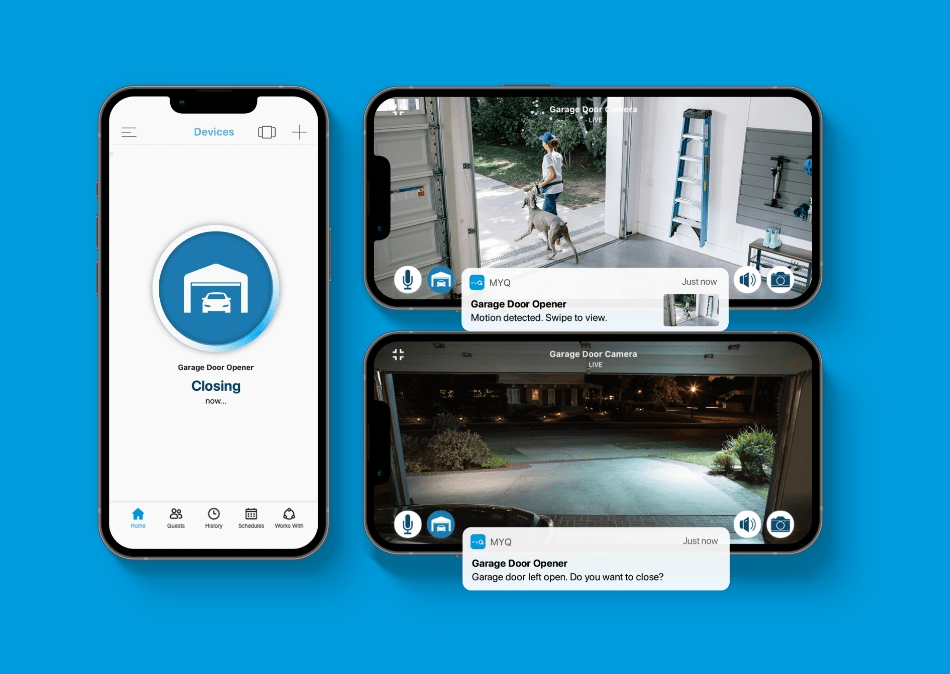
In this article, we’ll guide you through everything you need to know about opening your Chamberlain garage door using your phone. From app setup to troubleshooting, we’ve got you covered. Whether you’re in your car and want to open your garage door or you’re inside your house looking for convenience, controlling your garage door with your smartphone offers enhanced security and ease of use.
Read too: How To Replace Garage Door Roller Like a Pro? Step-by-Step Guide
How Can I Open My Chamberlain Garage Door With My Phone?
Yes, you can open your Chamberlain garage door with your phone, and it’s easier than you might think. Chamberlain offers a feature called MyQ, which is a smart garage door opener system designed to connect your garage door opener to your smartphone, giving you remote control. This allows you to open, close, or check the status of your garage door from anywhere, at any time, as long as you have an internet connection.
What is Chamberlain MyQ?
Chamberlain MyQ is a technology that enables smart control of your garage door opener through your smartphone. MyQ is compatible with most Chamberlain garage door openers, allowing users to manage their garage doors from a mobile app, eliminating the need for traditional remote controls.
Using the MyQ app, you can operate your garage door with your phone, check whether it’s open or closed, and even receive alerts whenever your garage door is used. Whether you’re coming home with a carload of groceries or checking from your office, the MyQ system provides seamless control of your garage door.
How to Set Up MyQ to Control Your Chamberlain Garage Door
Before you can open your Chamberlain garage door with your phone, you’ll need to set up the MyQ system. Here’s a step-by-step guide to get you started:
1. Check Compatibility
Ensure your Chamberlain garage door opener is compatible with MyQ technology. Most Chamberlain models manufactured after 1998 are compatible with MyQ. You can also check your garage door opener’s manual or visit Chamberlain’s website to confirm compatibility.
2. Download the MyQ App
The MyQ app is available for both iOS and Android devices. Simply go to the App Store or Google Play Store, search for “MyQ,” and download the app to your smartphone.
3. Create a MyQ Account
Once you’ve downloaded the app, you’ll need to create a MyQ account. This will allow you to store your garage door opener information and control the door from your phone.
4. Connect Your MyQ Hub (If Necessary)
If your garage door opener doesn’t have MyQ built-in, you’ll need to purchase a MyQ Smart Hub. This device connects to your garage door opener and links it to your Wi-Fi network. The hub plugs into your garage’s power outlet and communicates with your garage door opener.
5. Pair the App with Your Garage Door Opener
Follow the on-screen instructions in the MyQ app to pair it with your garage door opener. You may need to press a button on your opener to sync it with the app. If you have trouble, check the instructions provided with your opener or the MyQ app for troubleshooting tips.
6. Test the Connection
Once everything is set up, test the connection by opening and closing your garage door through the MyQ app. If it works, congratulations—you’re all set to control your Chamberlain garage door with your phone!
Benefits of Opening Your Chamberlain Garage Door With Your Phone
Controlling your Chamberlain garage door with your smartphone offers several advantages that go beyond just the convenience of not needing a physical remote. Here are some key benefits:
1. Remote Access
One of the biggest perks is the ability to open and close your garage door from anywhere. If you’re on vacation, at work, or simply away from home, you can still monitor and operate your garage door with your phone. This remote access also allows you to let someone into your garage without needing to provide them with a physical remote.
2. Security and Alerts
With the MyQ app, you can receive real-time alerts about the status of your garage door. If someone opens or closes your garage door, you’ll be notified, which can help you monitor suspicious activity. This added layer of security is great for peace of mind, especially if you’re not home often.
3. Energy Efficiency
If you’re running late for work or an appointment, you can remotely close the garage door without having to go back home. This prevents energy waste and ensures that your garage is secure.
4. Easy Integration with Other Smart Devices
MyQ is compatible with other smart home systems, such as Amazon Alexa, Google Assistant, and IFTTT. This means you can set up voice control for your garage door or create automated actions based on certain triggers. For example, you could set your garage door to open automatically when you arrive home.
Common Issues When Using the MyQ App
While the MyQ system offers great convenience, there may be occasional issues that arise. Here are a few common problems and how to solve them:
1. Wi-Fi Connectivity Problems
If your garage door opener is having trouble connecting to the app, the issue could be related to your Wi-Fi signal. Ensure your Wi-Fi network is stable and has a strong signal where your garage door opener is located. You can also check the settings in the MyQ app to make sure it’s connected to the correct Wi-Fi network.
2. App Not Responding
If the MyQ app isn’t responding or if the garage door isn’t opening or closing, try restarting the app or your smartphone. If this doesn’t help, try resetting your MyQ hub or re-pairing the app with your garage door opener.
3. Battery or Power Issues
If you’re using a MyQ hub that’s connected to your garage door opener, make sure the hub is plugged in and powered on. If the batteries are low or the hub is disconnected, it might not work properly.
4. Failed Firmware Updates
Sometimes, firmware updates may not install correctly. If you’re having trouble with updates, check the MyQ app or the manufacturer’s website for troubleshooting steps. Updating the firmware can often resolve issues and improve the performance of your garage door opener.
Is There a Monthly Fee for Using MyQ?
While the basic functionality of MyQ is free, such as controlling your garage door and receiving alerts, there may be some premium features that require a subscription. For example, if you want to integrate MyQ with other smart home devices, such as Amazon Alexa or Google Assistant, or if you want to access additional features like scheduling and remote access without limitations, you may need to purchase a subscription. The subscription costs can vary, so it’s best to check the MyQ app for the latest pricing details.
Alternatives to Chamberlain’s MyQ for Smartphone Control
While MyQ is a popular choice, there are other solutions if you want to control your garage door with your phone. Some third-party companies offer universal smart garage door openers that are compatible with various brands, including Chamberlain. These systems also offer remote access and smart features similar to MyQ. Some alternatives include:
- Garadget: A smart garage door opener that allows remote access via your smartphone.
- Nexx Garage: Another smart solution for controlling garage doors with your phone.
These alternatives may offer additional features or compatibility with other smart devices, so it’s worth researching if you’re looking for something specific.
Conclusion
To answer the question, “Can I open my Chamberlain garage door with my phone?”—yes, you can! With the MyQ system, you can easily control your Chamberlain garage door from anywhere using your smartphone. Whether you need to open or close your garage door remotely or simply check its status, the MyQ app provides you with the ultimate convenience and peace of mind. Setting up MyQ is simple, and once installed, it offers a host of benefits like increased security, remote access, and the ability to integrate with other smart home devices.



Leave a Reply