Many homeowners want to control their garage door using their phone, especially when they’re away from home. This leads to a common question: Is There A Garage Door Opener App For Android?
The good news is yes, but the right solution depends on your garage door opener, Wi-Fi setup, and security needs.
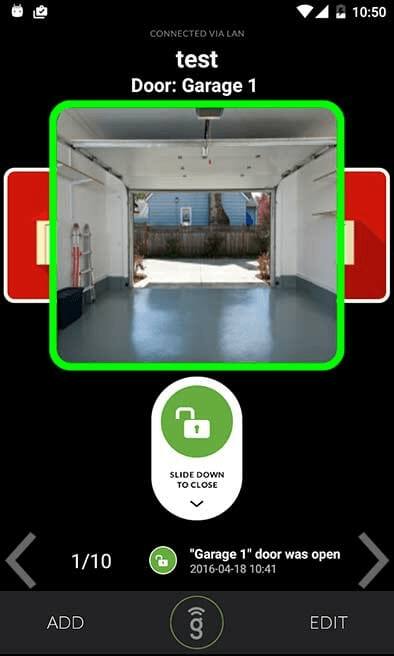
Is There A Garage Door Opener App For Android?
Yes, there are several garage door opener apps available for Android, but they usually work in combination with compatible hardware rather than as standalone apps.
Read too: Door and Garage Door Companies: Choosing the Right Partner for Your Needs
In most cases, the app connects to:
- A smart garage door opener
- A Wi-Fi garage controller
- A smart home hub
Without compatible hardware, an Android app alone cannot physically open or close a garage door.
How Do Android Garage Door Opener Apps Work?
Android garage door opener apps act as remote control interfaces that communicate with your garage system over the internet.
Basic Workflow
- The garage opener connects to Wi-Fi
- The Android app sends a command via cloud servers
- The opener receives the signal
- The motor opens or closes the door
This process is similar to how other smart home devices operate, as explained in
👉 https://en.wikipedia.org/wiki/Home_automation
Do All Garage Door Openers Support Android Apps?
No. Not all garage door openers are app-compatible.
Compatibility Depends On:
- Manufacturer support
- Opener model year
- Built-in Wi-Fi or add-on controller
- Firmware and security standards
Older garage door openers often require retrofit smart controllers to work with Android apps.
Best Garage Door Opener Apps for Android (Popular Options)
Below are well-known solutions commonly used in the US market.
1. myQ App
- Works with Chamberlain & LiftMaster systems
- Real-time door status alerts
- Scheduling and guest access
Pros: Reliable, widely supported
Cons: Some features require subscription
2. NEXX Garage
- Compatible with many existing openers
- Voice control support
- Easy Android setup
Pros: Budget-friendly
Cons: Dependent on Wi-Fi quality
3. Tailwind iQ3
- Automatic open/close via vehicle sensors
- Strong focus on security
- No subscription fees
Pros: Advanced automation
Cons: Higher upfront cost
4. Meross Garage Opener
- Simple Android app
- Local Wi-Fi control
- Affordable option
Pros: Easy for beginners
Cons: Limited automation features
Can You Open a Garage Door Using Only an Android Phone?
No—an Android phone alone cannot open a garage door.
You still need:
- A physical garage opener
- A smart controller connected to it
The phone acts as the command device, not the motor.
Step-by-Step: How to Set Up a Garage Door Opener App on Android
Step 1: Check Opener Compatibility
Look up your opener model on the manufacturer’s website.
Step 2: Install Smart Controller (If Needed)
Most retrofit devices connect using:
- 2 low-voltage wires
- Door position sensor
Step 3: Connect to Wi-Fi
- Use a 2.4 GHz Wi-Fi network
- Ensure signal strength above −65 dBm
Step 4: Install Android App
Download from Google Play Store.
Step 5: Pair and Test
- Follow in-app instructions
- Test open/close while standing near the door
Security Considerations for Android Garage Door Apps
Security is a top concern when controlling entry points remotely.
Best Practices
- Enable two-factor authentication
- Use strong, unique passwords
- Avoid public Wi-Fi when controlling doors
- Enable activity notifications
Modern apps use AES-256 encryption, similar to online banking standards.
Advantages vs Disadvantages of Android Garage Door Apps
Advantages
- Remote access from anywhere
- Real-time alerts
- Guest access control
- Integration with smart homes
Disadvantages
- Requires internet connection
- Potential subscription fees
- Setup complexity for older openers
Are Garage Door Opener Apps Safe to Use?
Yes—when properly configured.
Most reputable apps:
- Use encrypted cloud communication
- Require account authentication
- Log every open/close event
Risk usually comes from poor password management, not the technology itself.
Common Problems and How to Fix Them
| Problem | Likely Cause | Solution |
|---|---|---|
| App not responding | Weak Wi-Fi | Move router closer |
| Door opens slowly | Signal delay | Check firmware |
| App shows wrong status | Sensor misaligned | Recalibrate sensor |
| App offline | Server issue | Restart controller |
FAQ: Android Garage Door Opener Apps
Is there a garage door opener app for Android that works without Wi-Fi?
No. Most apps require Wi-Fi or mobile data. Without internet, remote control is not possible.
Can I control multiple garage doors with one Android app?
Yes. Many apps support multiple doors under one account, ideal for multi-car garages.
Do Android garage door opener apps cost money?
Many apps are free, but some advanced features may require a monthly or yearly subscription.
Can Android garage door apps work with Google Assistant?
Yes. Many systems support voice control through Google Assistant when properly configured.
What happens if my phone battery dies?
The garage door will still work using wall buttons or traditional remotes.
Conclusion
So, is there a garage door opener app for Android?
Absolutely—but it works best with the right hardware and secure setup.
Android garage door apps offer convenience, safety, and peace of mind, especially for busy homeowners. When installed correctly, they become a reliable part of a modern smart home.
If this guide helped you, share it on social media or with friends who are upgrading their home technology—it might save them time, money, and frustration.



Leave a Reply