If you’ve ever driven away wondering whether you closed the garage door, you’re not alone. Many homeowners now ask the same question: Is There A Garage Door Opener App For iPhone? The good news is yes—modern technology makes it possible to open, close, and monitor your garage door directly from your iPhone. This guide explains how these apps work, which options are available, and how to choose the right solution for your home.
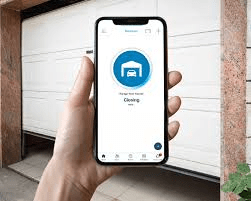
Is There A Garage Door Opener App For iPhone? (Short Answer)
Yes. There are garage door opener apps designed specifically for iPhone, but they work in combination with compatible smart garage door openers or add-on controllers. Your iPhone acts as the control interface, while the hardware installed in your garage does the actual opening and closing.
Read too: The Complete Guide to Tighten Chain On Garage Door Opener for Smooth Operation
How Garage Door Opener Apps for iPhone Work
A garage door opener app connects your phone to your garage system using the internet.
Basic Components
- iPhone (control device)
- Smart garage door opener or WiFi controller
- Internet connection (WiFi or cellular)
How the Process Works
- You tap “Open” or “Close” in the app
- The app sends a secure signal over the internet
- The controller activates the garage door opener
- Sensors confirm the door’s position
This system works anywhere—as long as your phone and garage have internet access.
Do iPhones Have a Built-In Garage Door Opener App?
No. Apple does not include a native garage door opener app by default.
However, iPhones support:
- Manufacturer-specific garage door apps
- Smart home integrations
- Automation through supported platforms
These apps are downloaded from the App Store and paired with compatible hardware.
Popular Types of Garage Door Opener Apps for iPhone
1. Manufacturer-Specific Apps
Many garage door opener brands provide their own iPhone apps.
Typical features include:
- Open/close control
- Real-time door status
- Activity history
- Guest access
These apps are usually free but require compatible opener models.
2. Universal Smart Garage Controller Apps
Universal controllers work with most existing garage door openers.
Benefits:
- No need to replace your opener
- Works with older systems
- Simple installation
This option is ideal if your current opener isn’t “smart.”
3. Smart Home Ecosystem Apps
Some garage door systems integrate into broader smart home platforms, allowing automation with lights, cameras, or security systems.
Convenience Insight: Many users prefer universal apps because they continue working even if the garage door brand changes.
What Can a Garage Door Opener App for iPhone Do?
Most modern apps offer far more than basic open/close functionality.
Common Features
- Open and close remotely
- Check if the garage door is open or closed
- Receive alerts when the door opens
- Share access with family members
- View activity history
Advanced Features (Model Dependent)
- Auto-close after a set time
- Geo-fencing (open when you arrive)
- Voice assistant integration
- Multi-garage control
Is It Safe to Use a Garage Door Opener App on iPhone?
Yes—when properly set up.
Security Measures Used
- Encrypted communication
- Password protection
- Two-factor authentication (in some apps)
- Device-based authorization
For general background on garage door opener systems and their evolution, see this neutral overview on Wikipedia:
https://en.wikipedia.org/wiki/Garage_door_opener
Security Tip: Never share login credentials, and always enable notifications for unexpected door activity.
What Do You Need to Use a Garage Door Opener App on iPhone?
Minimum Requirements
- iPhone running a supported iOS version
- Compatible garage door opener or smart controller
- Home WiFi connection
- App downloaded from the App Store
Optional But Helpful
- Stable broadband internet
- Strong WiFi signal in the garage
- Updated firmware on the opener
Step-by-Step: How to Set Up a Garage Door Opener App on iPhone
Step 1: Check Opener Compatibility
Confirm whether your garage door opener supports smart connectivity or needs an add-on controller.
Step 2: Install the Hardware
- Connect the smart controller to the opener
- Mount door position sensors
- Plug into power
Step 3: Download the App
- Open the App Store
- Search for the manufacturer’s or controller’s app
- Install it on your iPhone
Step 4: Create an Account
- Register with email and password
- Verify your account
Step 5: Pair the App With the Device
- Follow in-app instructions
- Connect to WiFi
- Test open/close functions
Step 6: Enable Notifications
- Turn on alerts for door activity
- Customize settings as needed
Setup usually takes 15–30 minutes.
Pros and Cons of Using a Garage Door Opener App on iPhone
Advantages
- ✔ Remote access from anywhere
- ✔ No extra remote controls needed
- ✔ Improved security awareness
- ✔ Easy sharing with family
Disadvantages
- ✖ Requires internet connection
- ✖ Initial setup effort
- ✖ May not work during power outages
Understanding both sides helps set realistic expectations.
Common Problems and How to Fix Them
App Not Connecting
- Check WiFi signal strength
- Restart router and controller
- Update the app
Door Status Incorrect
- Reposition door sensor
- Replace sensor battery
Delayed Response
- Check internet speed
- Reduce WiFi interference
Most issues are minor and easily resolved.
Garage Door Opener App vs Traditional Remote
| Feature | iPhone App | Traditional Remote |
|---|---|---|
| Range | Anywhere | Short range |
| Alerts | Yes | No |
| Sharing | Easy | Physical only |
| Internet required | Yes | No |
| Backup use | Limited | Reliable |
Many homeowners use both for redundancy.
Does a Garage Door Opener App Increase Home Value?
Indirectly, yes.
Why Buyers Like Smart Garages
- Modern convenience
- Enhanced security perception
- Smart home compatibility
While it may not drastically raise appraisal value, it improves buyer appeal.
Who Should Use a Garage Door Opener App for iPhone?
This solution is ideal if you:
- Frequently forget to close the garage door
- Travel often
- Share garage access with family or renters
- Want smart home convenience
It may be less useful if you prefer simple, offline systems.
Are Garage Door Opener Apps Free?
- Most apps are free to download
- Hardware purchase is usually required
- Some apps offer optional premium features
There are rarely mandatory monthly fees for basic operation.
Future of Garage Door Opener Apps
Trends suggest:
- Better automation
- Deeper smart home integration
- Enhanced security controls
- Simpler setup
Garage access is becoming part of a fully connected home experience.
FAQ – Is There A Garage Door Opener App For iPhone?
Q1: Is there a garage door opener app for iPhone?
Yes. Many apps allow iPhone users to control garage doors with compatible hardware.
Q2: Can I use an app with an old garage door opener?
Yes, with a universal smart garage controller.
Q3: Do I need WiFi for a garage door opener app?
Yes. WiFi is required at the garage location.
Q4: Is it safe to open my garage door from my phone?
Yes, if you use strong passwords and enable security features.
Q5: What happens if my phone battery dies?
You can still use wall buttons or traditional remotes.
Conclusion
So, is there a garage door opener app for iPhone? Absolutely. With the right hardware and app, your iPhone becomes a powerful tool for controlling, monitoring, and securing your garage door from anywhere. Whether you choose a manufacturer-specific solution or a universal controller, the convenience and peace of mind are hard to ignore. If this guide helped you understand your options, share it on social media so others can discover how easy smart garage control can be.



Leave a Reply