If you own a Genie garage door opener and want to control it from your phone, you’re not alone. Many homeowners ask the same question: Is There An App For Genie Garage Door Opener? With smart home technology becoming the norm, Genie has made it possible to monitor and control compatible garage doors using a mobile app. This guide explains exactly how it works, which Genie models are supported, and how to get started step by step.
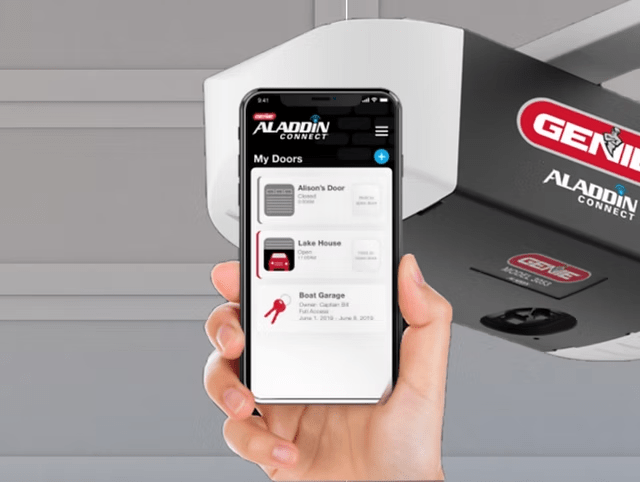
Is There An App For Genie Garage Door Opener? (Short Answer)
Yes. There is an app for Genie garage door openers, and it’s designed to let you open, close, and monitor your garage door from anywhere using your smartphone. However, the app only works with WiFi-enabled Genie openers or Genie openers equipped with a compatible smart controller.
Read too: The Complete Guide to Tighten Chain On Garage Door Opener for Smooth Operation
What Is the Genie Garage Door Opener App?
The official Genie garage door opener app allows remote access and monitoring through the internet.
What the App Does
- Open and close your garage door remotely
- Check whether the door is open or closed
- Receive alerts when the door operates
- Share access with family members
Your phone becomes a smart remote—no extra transmitters required.
How the Genie Garage Door App Works
The app connects your garage door opener to the internet.
System Components
- Genie garage door opener (WiFi-capable or smart-enabled)
- Home WiFi network
- Smartphone (iOS or Android)
- Genie-compatible smart controller (if required)
How It Functions
- You tap a button in the app
- The app sends a secure signal via the internet
- The Genie opener receives the command
- Door sensors confirm the door’s position
This works from anywhere with an internet connection.
Do All Genie Garage Door Openers Support the App?
No. Not all Genie models are app-compatible by default.
Works With
- Newer Genie smart garage door openers
- Genie openers with built-in WiFi
- Older Genie models with a compatible smart add-on
Does NOT Work With
- Very old Genie openers without upgrade options
- Non-electric or discontinued systems
Tip: If your Genie opener doesn’t have WiFi, you can often add smart functionality instead of replacing the entire unit.
What Features Does the Genie Garage Door App Offer?
Core Features
- Remote open and close
- Real-time door status
- Activity notifications
- Secure user access
Advanced Features (Model Dependent)
- Auto-close after a set time
- Multiple garage door control
- Custom alerts and schedules
- Guest access management
These features help improve convenience and peace of mind.
Is the Genie Garage Door App Free?
Yes.
- The app is free to download
- No mandatory monthly subscription for basic use
- Hardware purchase may be required
Optional premium features, if offered, depend on the system configuration.
How Secure Is the Genie Garage Door Opener App?
Security is a top concern for homeowners.
Built-In Security Measures
- Encrypted data transmission
- Secure user authentication
- Controlled device access
For general background on garage door opener technology and how modern systems evolved, see this neutral overview on Wikipedia:
https://en.wikipedia.org/wiki/Garage_door_opener
Best Practices
- Use a strong password
- Enable notifications
- Only grant access to trusted users
Security Insight: App-based control is often safer than traditional remotes that can be lost or stolen.
How to Set Up the Genie Garage Door Opener App (Step-by-Step)
Step 1: Confirm Compatibility
Check your Genie model number to see if it supports smart connectivity or needs an add-on.
Step 2: Prepare Your WiFi
- Ensure stable internet
- Make sure WiFi reaches the garage
Step 3: Download the App
- Open the App Store or Google Play
- Search for the official Genie garage door app
- Install it
Step 4: Create an Account
- Register with email and password
- Verify your account
Step 5: Connect the Opener
- Follow in-app instructions
- Pair the opener with WiFi
- Test door operation
Step 6: Enable Alerts
- Turn on open/close notifications
- Customize alert preferences
Total setup time is usually 15–30 minutes.
Common Problems and How to Fix Them
App Won’t Connect
- Check WiFi signal strength
- Restart router and opener
- Update the app
Door Status Is Incorrect
- Reposition door sensor
- Replace sensor battery
Delayed Response
- Improve WiFi coverage
- Reduce network congestion
Most issues are quick to resolve without professional help.
Genie App vs Traditional Garage Door Remote
| Feature | Genie App | Traditional Remote |
|---|---|---|
| Control range | Anywhere | Short range |
| Alerts | Yes | No |
| Sharing access | Digital | Physical |
| Internet needed | Yes | No |
| Backup reliability | Moderate | High |
Many homeowners use both for maximum reliability.
Can the Genie App Control Multiple Garage Doors?
Yes.
If you have multiple compatible Genie openers:
- You can manage them from one app
- Each door can be named and customized
- Ideal for multi-car households
This eliminates the need for multiple remotes.
Does the Genie Garage Door App Work With Smart Homes?
Some Genie systems integrate with broader smart home setups.
Potential Integrations
- Smart lighting
- Home security systems
- Automation routines
Availability depends on model and configuration.
Is the Genie App Worth Using?
Pros
- ✔ Remote access anywhere
- ✔ Real-time door monitoring
- ✔ Improved security awareness
- ✔ Easy access sharing
Cons
- ✖ Requires internet
- ✖ Initial setup effort
- ✖ Limited usefulness during outages
For most users, the benefits outweigh the drawbacks.
Who Should Use the Genie Garage Door Opener App?
This app is ideal if you:
- Forget to close the garage door
- Travel frequently
- Share garage access with family or renters
- Want smart home convenience
It may be less useful if you prefer offline-only systems.
Does Using the Genie App Increase Home Value?
Indirectly, yes.
Smart garage access:
- Improves buyer appeal
- Signals modern home features
- Enhances perceived security
While it may not significantly raise appraisal value, it helps your home stand out.
Troubleshooting Checklist Before Calling Support
- Check internet connection
- Restart phone and opener
- Update the app
- Re-pair the opener
These steps solve most issues.
FAQ – Is There An App For Genie Garage Door Opener?
Q1: Is there an app for Genie garage door opener?
Yes. Genie offers an app for compatible smart garage door openers.
Q2: Does every Genie opener work with the app?
No. Only WiFi-enabled or upgradeable Genie models are supported.
Q3: Do I need WiFi to use the Genie app?
Yes. WiFi is required at the garage location.
Q4: Is the Genie garage door app secure?
Yes, when you use strong passwords and enable alerts.
Q5: What happens if my phone battery dies?
You can still use wall controls or traditional remotes.
Conclusion
So, is there an app for Genie garage door opener? Yes—and it’s a practical, secure way to control and monitor your garage door from anywhere. Whether your Genie opener already has WiFi or needs a smart upgrade, the app adds convenience, improves security awareness, and fits seamlessly into modern lifestyles. If this guide helped you understand how the Genie garage door app works, share it on social media so other homeowners can make informed decisions too.



Leave a Reply