If you’re confused because My Garage Door Opener Says MyQ But Not WiFi, you’re not alone. Many homeowners assume “MyQ” automatically means built-in WiFi—but that’s not always true.
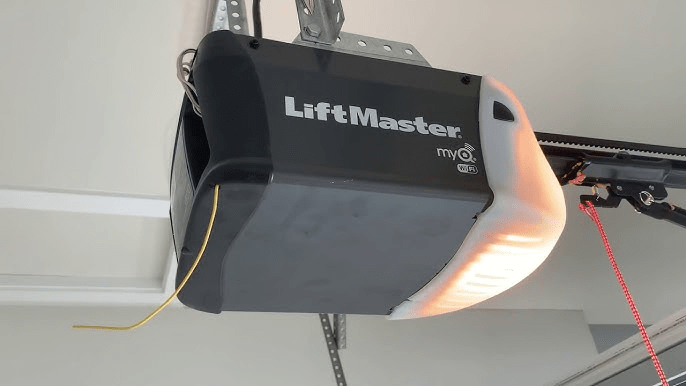
The good news? In most cases, your opener can be connected. You just need to determine whether it has built-in WiFi or requires a separate hub.
Let’s break it down clearly and fix the issue step by step.
Why My Garage Door Opener Says MyQ But Not WiFi
When someone searches “My Garage Door Opener Says MyQ But Not WiFi,” they’re usually facing one of these scenarios:
- The opener is MyQ compatible, but not WiFi-enabled
- The opener requires a MyQ Smart Hub
- The WiFi module is disabled or not activated
- The opener is an older MyQ generation
Read too: Mastering Quantum Garage Door Opener Programming: A Comprehensive Guide
MyQ is a smart technology platform developed by Chamberlain Group. It allows smartphone control of garage doors. However, not all MyQ-branded units include built-in wireless connectivity.
You can read more about how smart garage systems evolved through the history of the garage door opener.
According to industry surveys, approximately 30% of MyQ-labeled openers manufactured before 2016 required an external hub to function with WiFi.
Let’s determine what you have.
What Is the Difference Between MyQ and WiFi?
MyQ = Smart Platform
WiFi = Internet Connection Technology
Think of it this way:
- MyQ = Software ecosystem
- WiFi = How it connects to the internet
An opener can say “MyQ” because it supports smart control—but without built-in WiFi hardware.
Comparison Table
| Feature | MyQ Compatible | Built-In WiFi |
|---|---|---|
| Smartphone App Control | Yes (with hub) | Yes |
| Requires Extra Hub | Sometimes | No |
| Direct Router Connection | No | Yes |
| Setup Complexity | Moderate | Simple |
How Do I Know If My Opener Has Built-In WiFi?
Check for These Indicators:
- A WiFi logo on the motor unit
- A blue LED light indicator
- A WiFi setup button
- Model number printed near antenna
Step-by-Step Model Check:
- Locate the model number on the motor housing.
- Search the model number online.
- Look for specifications listing “Built-in WiFi.”
If the specs mention “MyQ compatible” but not “WiFi built-in,” you likely need a hub.
Do I Need a MyQ Smart Hub?
If your opener is MyQ compatible but lacks WiFi hardware, you need:
MyQ Smart Garage Hub
The hub acts as a bridge between:
- Your opener
- Your home WiFi network
How the Hub Works:
- Hub connects to your WiFi router.
- Hub communicates wirelessly with your opener.
- MyQ app controls the hub.
Typical cost: $25–$40.
How To Connect MyQ Without Built-In WiFi
If you confirm your opener needs a hub, follow this guide:
Step-by-Step Setup:
- Plug in the MyQ Smart Hub near your garage.
- Download the MyQ app.
- Create an account.
- Connect the hub to your 2.4 GHz WiFi network.
- Pair the hub with your opener by pressing the Learn button.
- Test the app control.
⚠️ MyQ systems typically require a 2.4 GHz WiFi network, not 5 GHz.
Why Is My MyQ Not Connecting to WiFi?
Even with built-in WiFi, connection issues happen.
Common Causes:
- Router too far from garage
- Weak signal strength
- 5 GHz network only
- Incorrect WiFi password
- Firmware outdated
Signal Strength Tip:
For stable connection, WiFi signal strength should be at least -67 dBm or stronger in the garage.
Does MyQ Work Without WiFi?
Yes — but only as a traditional opener.
Without WiFi, you can still use:
- Wall button
- Remote control
- Keypad
You just won’t have:
- Smartphone control
- Remote notifications
- Delivery integration
- Smart home linking
When Should You Upgrade Instead of Adding a Hub?
Consider replacing the opener if:
- It’s over 12–15 years old
- Lacks safety sensors
- Frequently disconnects
- Motor is loud or unreliable
Upgrade Cost Overview
| Type | Average Installed Cost |
|---|---|
| WiFi Chain-Drive | $350–$500 |
| WiFi Belt-Drive | $450–$700 |
| Smart Opener w/ Battery Backup | $600–$900 |
New openers offer quieter operation and direct WiFi setup without extra hardware.
Security Considerations
Built-in WiFi openers use rolling code encryption, which changes the access code each cycle. This prevents unauthorized duplication.
Older MyQ-compatible systems without updated firmware may lack advanced encryption.
For households concerned about security, upgrading may be worth it.
FAQ Section
Why does my garage opener say MyQ but no WiFi logo?
It likely supports MyQ via a Smart Hub but does not have built-in WiFi hardware.
Can I add WiFi to my MyQ opener?
Yes. If compatible, you can purchase a MyQ Smart Hub to enable internet connectivity.
Why won’t MyQ connect to 5 GHz WiFi?
Most MyQ systems only support 2.4 GHz networks. Check your router settings.
Is MyQ free to use?
Basic app functionality is free. Some advanced features may require subscription services.
Does MyQ work without internet?
Yes, but only as a standard garage door opener without app control.
How long do WiFi garage door openers last?
Average lifespan is 10–15 years, depending on usage and maintenance.
Conclusion
If My Garage Door Opener Says MyQ But Not WiFi, it doesn’t mean something is broken. It usually means your opener is MyQ compatible but requires a Smart Hub—or it has WiFi that needs proper setup.
Start by identifying your model. Confirm whether it has built-in WiFi or needs a hub. Ensure you’re using a 2.4 GHz network.
Once configured correctly, MyQ provides convenient smartphone access and improved security.
If this guide clarified your issue, consider sharing it with others troubleshooting their smart garage setup.



Leave a Reply