In the realm of garage door convenience, the Clicker garage door keypad stands out as a reliable and user-friendly accessory. With its ability to provide keyless entry, it offers convenience and security to homeowners. However, to fully harness its potential, mastering the art of programming Clicker garage door keypad is essential. In this detailed guide, we’ll walk you through the process, ensuring seamless access to your garage without the need for keys or remotes.
Understanding the Importance of Programming Clicker Garage Door Keypad
The Keyless Advantage
Gone are the days of fumbling for keys or remote controls. With a Clicker garage door keypad, you can enjoy the convenience of keyless entry, allowing you to enter your garage effortlessly with a simple code input.
Programming Clicker Garage Door Keypad: Step-by-Step Guide
Setting Up Your Keypad
Follow these step-by-step instructions to program your Clicker garage door keypad:
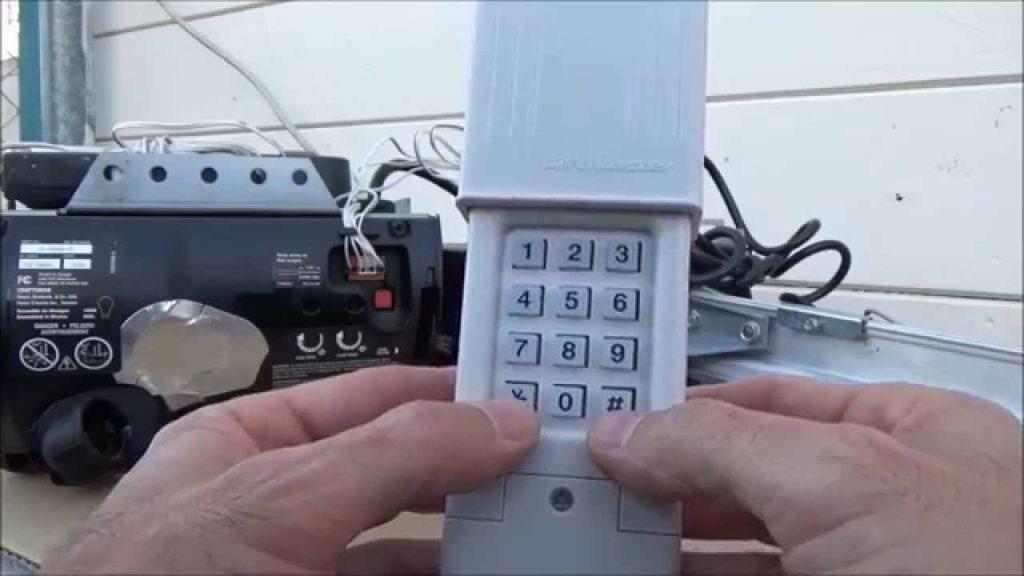
- Locate the “Learn” Button: On your garage door opener motor unit, find the “Learn” button, typically located near the antenna wire.
- Enter Programming Mode: Press and release the “Learn” button. The indicator light will illuminate, indicating that the opener is ready to receive programming signals.
- Enter Your PIN: On the Clicker keypad, enter your desired PIN code using the numbered keys. Choose a memorable code that is easy to recall but difficult for others to guess.
- Send Programming Signal: Press the “Enter” or “Send” button on the Clicker keypad to send the programming signal to the garage door opener. The indicator light on the opener will flash, indicating successful programming.
- Test the Keypad: Enter your newly programmed PIN on the keypad and test the garage door opener to ensure that it responds accordingly.
Read too: Mastering Quantum Garage Door Opener Programming: A Comprehensive Guide
Troubleshooting Tips for Programming Clicker Garage Door Keypad
Addressing Common Issues
If you encounter any difficulties during the programming process, consider the following troubleshooting tips:
- Weak Signal: Ensure that the Clicker keypad is within range of the garage door opener. If the signal is weak, try moving closer to the opener and reprogramming the keypad.
- Incorrect PIN Entry: Double-check the PIN code entered on the keypad to ensure accuracy. If the code is entered incorrectly, the programming process may fail.
Enhancing Security and Convenience
Additional Features
In addition to basic programming, Clicker garage door keypads may offer additional features to enhance security and convenience, such as:
- Temporary PINs: Some models allow you to create temporary PINs for guests or service providers, providing temporary access to your garage.
- Backlit Keypads: Keypads with backlit buttons make it easy to operate the device at night or in low-light conditions, enhancing visibility and usability.
Conclusion
Programming your Clicker garage doors keypad enhances home security and convenience. Follow this guide for seamless keyless entry integration, eliminating the need for keys or remotes. Whether arriving late or welcoming guests, the Clicker keypad offers reliable access with a simple touch. Say goodbye to lost keys and hello to hassle-free entry with Clicker garage door keypad programming.


Leave a Reply