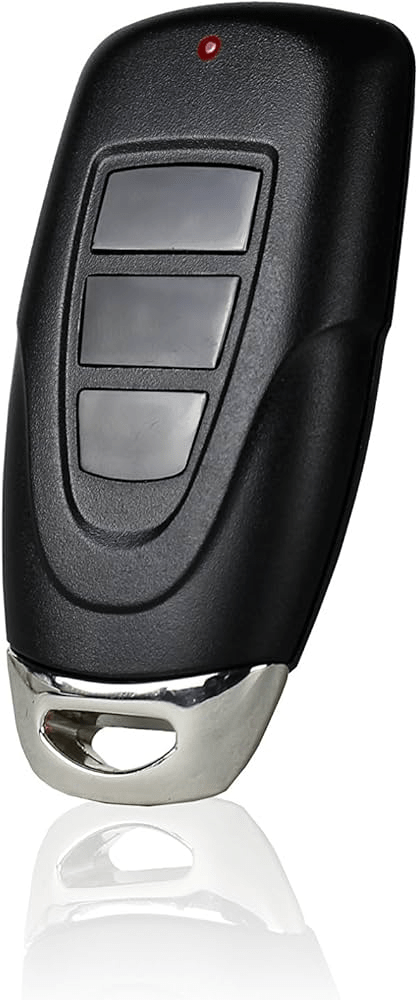
If you’re looking for a compact, multi-door solution, the Skylink Universal 3 Button Keychain Garage Door Opener Remote might be exactly what you need. Many homeowners choose it because it works with multiple brands and fits conveniently on a keychain.
But before buying—or if you’re struggling to program it—you need to understand compatibility, setup steps, and common troubleshooting issues. This complete guide covers everything in simple, practical detail.
Read too: No Power to Genie Garage Door Opener – Resolving the Issue with Ease: Troubleshooting Guide
Skylink Universal 3 Button Keychain Garage Door Opener Remote Explained
The Skylink Universal 3 Button Keychain Garage Door Opener Remote is a small wireless transmitter designed to operate up to three garage door openers or gate systems.
It supports multiple rolling-code and fixed-code technologies used by major brands such as:
- Chamberlain
- LiftMaster
- Craftsman
- Genie
- Overhead Door
According to the general operation principles outlined in Wikipedia – Garage Door Opener, modern garage openers use rolling code encryption to enhance security by changing the access code after every use.
Skylink remotes are built to communicate with these systems across common frequencies like 315 MHz and 390 MHz.
Why Choose a Keychain Garage Door Remote?
Many homeowners prefer keychain remotes because:
✔ Compact and portable
✔ Can control multiple doors
✔ Affordable replacement option
✔ Easy DIY setup
✔ Compatible with older and newer openers
If you own multiple properties or have both a garage and gate, the 3-button feature is particularly useful.
Is the Skylink Universal 3 Button Remote Compatible With My Opener?
Compatibility depends on:
- Learn button color
- Frequency
- Security protocol
Learn Button Color Guide
| Learn Button Color | System Type |
|---|---|
| Yellow | Security+ 2.0 |
| Purple | Security+ |
| Red/Orange | Older rolling code |
| Green | Dip-switch system |
The Skylink remote supports many of these, but always check your opener’s model number first.
How To Program Skylink Universal 3 Button Keychain Garage Door Opener Remote
Programming is straightforward if you follow the correct steps.
Method 1: Programming Using Learn Button (Most Common)
Step 1: Locate Learn Button (1–2 Minutes)
- Climb ladder safely.
- Remove light cover if necessary.
- Find Learn button on motor unit.
Step 2: Press Learn Button
- Press and release Learn button.
- Indicator light will turn on for about 30 seconds.
Step 3: Program the Remote
- Press the desired button on Skylink remote.
- Hold for 2–3 seconds.
- Release when opener light blinks or motor clicks.
Programming complete.
Total time: 3–5 minutes.
Method 2: Programming with Dip Switch System (Older Openers)
If your opener uses dip switches:
- Open remote battery compartment.
- Match dip switch positions with opener receiver.
- Close and test.
This method works for older 1990s models.
How Far Does the Skylink Keychain Remote Work?
Typical range: 50–100 feet
Range may vary based on:
- Interference
- Antenna position
- Battery strength
- Metal obstructions
Extending the antenna wire fully downward improves signal strength.
Battery Replacement Guide
Most Skylink keychain remotes use:
- CR2032 lithium coin battery
Replacement Steps
- Use small screwdriver to open casing.
- Remove old battery.
- Insert new battery (positive side up).
- Close securely.
Battery lifespan: 1–2 years.
Common Problems and Solutions
Remote Not Programming
Possible causes:
✔ Wrong frequency
✔ Incorrect Learn button timing
✔ Dead battery
✔ Incompatible opener
Solution: Reset and try again within 30-second programming window.
Remote Works Intermittently
- Replace battery
- Check interference
- Reposition opener antenna
Remote Programs But Door Doesn’t Move
- Clear opener memory
- Reprogram all remotes
- Confirm rolling code compatibility
Advantages vs Disadvantages of Skylink Universal 3 Button Remote
Advantages
✔ Controls up to three doors
✔ Compact design
✔ Affordable
✔ Works with many brands
✔ Easy installation
Disadvantages
✘ Not compatible with every opener
✘ Shorter range than full-size remotes
✘ Requires manual programming
How Does Skylink Compare to Brand-Specific Remotes?
| Feature | Skylink Universal | Brand Remote |
|---|---|---|
| Compatibility | Multi-brand | Single brand |
| Price | Lower | Higher |
| Setup | Manual pairing | Simple pairing |
| Range | Moderate | Moderate to High |
Universal remotes are ideal for mixed-brand households.
When Should You Replace Instead of Reprogram?
Consider replacing remote if:
✔ Buttons are unresponsive
✔ Case cracked
✔ Corrosion inside battery compartment
✔ Range significantly reduced
Replacement cost typically ranges from $20–$40.
Security Considerations
Modern Skylink remotes support rolling code encryption, which:
- Prevents code grabbing
- Enhances access security
- Meets modern safety standards
Always clear opener memory when replacing remotes.
Installation Safety Tips
⚠ Always use stable ladder
⚠ Avoid touching exposed wiring
⚠ Keep children away during programming
Garage door systems operate under high tension—exercise caution.
FAQ: Skylink Universal 3 Button Keychain Garage Door Opener Remote
1. Can Skylink remote control three different doors?
Yes. Each button can be programmed to a separate opener.
2. Is it compatible with Genie openers?
Many Genie rolling-code models are supported, but verify frequency first.
3. How do I reset the remote?
Remove battery for 30 seconds, then reinstall and reprogram.
4. Why does my remote work only when close?
Likely battery issue or antenna positioning problem.
5. Does it work with smart openers?
Yes, if the opener supports rolling code and standard Learn button pairing.
6. How long does programming take?
Usually under 5 minutes.
Conclusion
The Skylink Universal 3 Button Keychain Garage Door Opener Remote offers a convenient, compact, and cost-effective solution for controlling multiple garage doors or gates.
With simple programming steps and broad compatibility, it’s an excellent replacement option for many homeowners. Just ensure your opener supports the correct frequency and rolling code system before purchasing.
If this guide helped you successfully program your remote, share it on social media to help others simplify their garage access setup.
Leave a Reply