Many homeowners eventually ask “What Are The Buttons On A Garage Door Opener?” after noticing several unfamiliar buttons on the opener unit or remote control. These buttons control different functions, including opening the door, programming remotes, and adjusting safety features.
Understanding what each button does can help you operate your garage door safely and troubleshoot common problems. In this guide, we’ll explain the most common garage door opener buttons and how to use them correctly.
Read too: How To Replace Garage Door Roller Like a Pro? Step-by-Step Guide
What Are The Buttons On A Garage Door Opener?
The answer to What Are The Buttons On A Garage Door Opener depends on the type and brand of opener, but most garage door openers include several standard buttons.
Common Garage Door Opener Buttons
| Button Name | Function |
|---|---|
| Open/Close button | Opens or closes the garage door |
| Learn button | Programs remote controls |
| Light button | Turns the garage light on/off |
| Lock button | Disables remote access |
| Up/Down limit buttons | Adjusts door travel distance |
These buttons may appear on:
- wall-mounted control panels
- handheld remote controls
- the opener motor unit itself
Garage door openers are mechanical systems designed to automate door movement using motors, sensors, and remote controls. To learn more about how these systems work, see:
https://en.wikipedia.org/wiki/Garage_door_opener
The Open/Close Button
The open/close button is the most recognizable button on a garage door opener.
What It Does
Pressing this button performs three functions:
- opens the garage door
- stops the door mid-movement
- closes the garage door
How It Works
The opener motor receives the signal and activates a chain, belt, or screw drive system to move the door.
Most remotes feature a single large button dedicated to this function.
The Learn Button
One of the most important buttons on the opener unit is the Learn button.
Purpose of the Learn Button
This button allows you to:
- program new remote controls
- sync wireless keypads
- connect smart home systems
Typical Learn Button Colors
| Color | Brand Examples |
|---|---|
| Yellow | LiftMaster |
| Purple | Chamberlain |
| Red/Orange | Older models |
| Green | Genie models |
The button color sometimes indicates the radio frequency used by the opener.
The Light Button
Many garage door opener control panels include a light button.
What the Light Button Does
- turns the opener light on
- turns the opener light off
- activates temporary lighting in the garage
Lights often turn on automatically when the door opens.
Typical Light Duration
Most opener lights stay on for 3–5 minutes before turning off automatically.
The Lock Button
The lock button is an important security feature.
What Lock Mode Does
When activated, lock mode:
- disables remote controls
- prevents wireless entry
- only allows wall control operation
This feature is helpful when:
- you are away for extended periods
- you want additional security
- you suspect remote interference
Up and Down Limit Buttons
Garage door openers must know when the door is fully open or closed.
This is controlled by limit adjustment buttons.
What Limit Buttons Do
- set maximum open height
- control closing position
- prevent door damage
Example Limit Settings
| Setting | Function |
|---|---|
| Up limit | Stops door at full open position |
| Down limit | Stops door at floor level |
Incorrect settings can cause doors to stop too early or reverse unexpectedly.
Why Garage Door Openers Have Multiple Buttons
Modern garage door systems offer more features than older models.
Reasons for Multiple Buttons
- improved security
- remote programming
- lighting control
- travel adjustments
Many modern openers also integrate with smart home systems and smartphone apps.
Wall Control Panel Buttons
Wall-mounted garage door control panels usually include additional buttons.
Typical Wall Panel Features
- open/close control
- light switch
- lock function
- vacation mode
Some newer panels also include:
- motion sensors
- temperature displays
- Wi-Fi connectivity
Remote Control Buttons
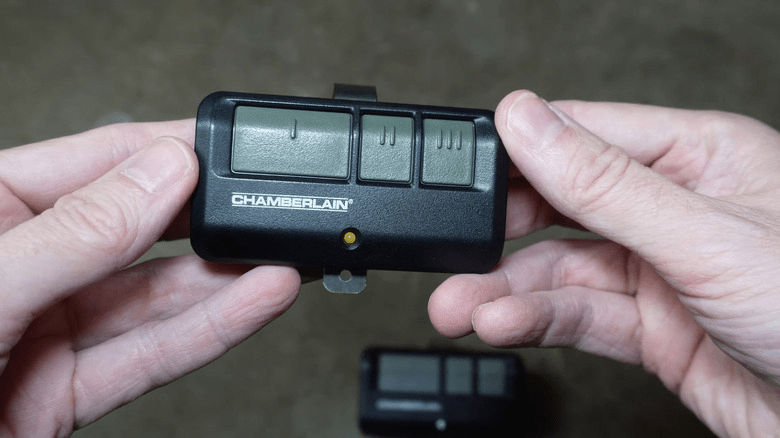
Handheld garage remotes often include multiple buttons.
Common Remote Button Layout
| Button | Purpose |
|---|---|
| Button 1 | main garage door |
| Button 2 | second garage door |
| Button 3 | gate or lighting |
| Button 4 | additional opener |
This allows one remote to control several doors.
Step-by-Step: How to Program a Garage Door Opener Button
If you need to program a new remote, follow these steps.
Step 1: Locate the Learn Button
Find the Learn button on the motor unit, usually near the antenna wire.
Step 2: Press the Learn Button
Press and release the button.
An indicator light will turn on for about 30 seconds.
Step 3: Press the Remote Button
Press the button you want to program on the remote.
Step 4: Wait for Confirmation
The opener light will blink or you may hear a click.
This confirms successful programming.
Step 5: Test the Remote
Press the remote button again to ensure the garage door opens or closes properly.
Common Garage Door Button Problems
Sometimes opener buttons may stop working.
Common Issues
- dead remote batteries
- lost programming
- wiring problems in wall controls
- damaged circuit boards
Regular maintenance can help prevent these problems.
Advantages vs Disadvantages of Multi-Button Openers
Advantages
- greater functionality
- improved security features
- control multiple doors
- convenient lighting control
Disadvantages
- more complicated setup
- potential programming confusion
- extra troubleshooting steps
Despite these drawbacks, modern openers are much more convenient than older systems.
Safety Tips When Using Garage Door Opener Buttons
Garage doors are large moving objects, so safety is important.
Safety Guidelines
- never stand under a moving door
- keep remote controls away from children
- test safety sensors monthly
- ensure the door reverses if obstructed
Proper safety practices prevent accidents and damage.
FAQ – What Are The Buttons On A Garage Door Opener
What does the Learn button do on a garage door opener?
The Learn button programs remote controls, wireless keypads, and other accessories.
Why does my garage door opener have multiple remote buttons?
Multiple buttons allow one remote to control several garage doors or gates.
What is the lock button on the wall control?
The lock button disables remote signals to prevent unauthorized access.
Why does my garage light turn on automatically?
Most openers activate lights automatically when the door opens for safety and visibility.
What happens if the limit buttons are set incorrectly?
The garage door may stop too early, not close fully, or reverse unexpectedly.
Can I reset my garage door opener buttons?
Yes. Most openers allow you to reset all remotes by holding the Learn button for several seconds.
Conclusion
Understanding What Are The Buttons On A Garage Door Opener helps homeowners use their garage systems safely and efficiently.
Most garage door openers include buttons for opening and closing the door, programming remotes, controlling lights, and activating security features. Knowing how each button works makes troubleshooting easier and improves overall garage door performance.
If this guide helped you understand garage door opener controls, consider sharing it on social media so other homeowners can learn how their garage door system works.



Leave a Reply