Many homeowners ask “What Are The Buttons On Chamberlain Garage Door Opener?” when they notice several buttons on the wall panel, remote control, or opener motor unit. These buttons control essential functions like opening the door, programming remotes, activating lights, and enabling security features.
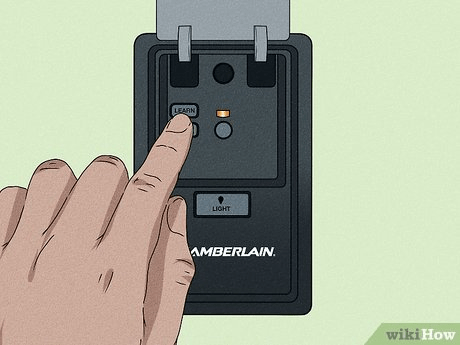
Understanding what each button does can make operating your garage door easier and safer. In this guide, we’ll explain every common button found on a Chamberlain garage door opener and how to use them effectively.
Read too: How To Replace Garage Door Roller Like a Pro? Step-by-Step Guide
What Are The Buttons On Chamberlain Garage Door Opener?
The question What Are The Buttons On Chamberlain Garage Door Opener usually refers to the control buttons located on the wall panel, remote control, and the opener motor unit.
Most Chamberlain systems include several key buttons that control different functions.
Common Chamberlain Opener Buttons
| Button | Function |
|---|---|
| Open/Close button | Opens or closes the garage door |
| Learn button | Programs remotes and keypads |
| Light button | Turns garage light on or off |
| Lock button | Disables remote control access |
| Up/Down adjustment buttons | Controls door travel limits |
These buttons allow homeowners to control their garage door safely and conveniently.
Garage door openers are automated systems that use motors, sensors, and remote controls to open and close doors efficiently. For a technical overview, see:
https://en.wikipedia.org/wiki/Garage_door_opener
The Open/Close Button
The open/close button is the most frequently used button on a Chamberlain garage door opener.
What This Button Does
Pressing the button will:
- open the garage door
- stop the door if it is moving
- close the door
This button is usually the largest button on the wall control panel.
On remotes, it may be labeled with a simple icon.
The Learn Button
One of the most important buttons on Chamberlain openers is the Learn button.
Purpose of the Learn Button
The Learn button is used to:
- program remote controls
- connect wireless keypads
- pair smart garage devices
Typical Learn Button Colors
| Color | Frequency Type |
|---|---|
| Yellow | Security+ 2.0 |
| Purple | Older Security+ |
| Red/Orange | Legacy systems |
| Green | Older models |
The Learn button is usually located on the back or side of the motor unit.
The Light Button
Most Chamberlain wall control panels include a light button.
Light Button Functions
- manually turn garage lights on
- manually turn garage lights off
- activate temporary lighting
Many openers automatically turn the light on when the door opens.
Typical Lighting Duration
Most systems keep the light on for 4 to 5 minutes before turning off automatically.
The Lock Button (Vacation Mode)
The lock button, sometimes called vacation mode, is designed for added security.
What Happens When Lock Mode Is Enabled
- remote controls stop working
- wireless signals are ignored
- only the wall panel can open the door
When to Use Lock Mode
- when traveling
- when leaving home for long periods
- when security is a concern
Lock mode helps prevent unauthorized access.
Up and Down Travel Adjustment Buttons
Garage door openers must know exactly how far the door should move.
Chamberlain systems use travel limit adjustment buttons for this.
Functions of Travel Adjustment Buttons
- set maximum open height
- control closing position
- prevent the door from hitting the floor too hard
Example Travel Settings
| Adjustment | Function |
|---|---|
| Up travel | controls maximum door height |
| Down travel | controls closing distance |
Improper settings can cause the door to stop early or reverse.
Remote Control Buttons
Chamberlain garage door remotes usually include multiple buttons.
Typical Remote Layout
| Button | Use |
|---|---|
| Button 1 | main garage door |
| Button 2 | second garage door |
| Button 3 | gate or lighting |
| Button 4 | additional device |
This allows one remote to operate multiple garage doors.
Wall Control Panel Features
Modern Chamberlain wall panels often include additional controls.
Advanced Panel Functions
- motion-activated lighting
- timer-to-close settings
- lock mode activation
- smart home connectivity
Some panels include digital displays and status indicators.
Step-by-Step: How to Program a Chamberlain Remote Button
If you need to program a new remote, follow these steps.
Step 1: Locate the Learn Button
Find the Learn button on the opener motor unit.
It is typically near the antenna wire.
Step 2: Press the Learn Button
Press and release the Learn button.
An indicator light will turn on for 30 seconds.
Step 3: Press the Remote Button
Press the button on the remote you want to program.
Step 4: Wait for Confirmation
The opener light will blink or you may hear a click.
This confirms successful programming.
Step 5: Test the Remote
Press the remote button again to confirm the garage door opens or closes.
Common Problems With Chamberlain Buttons
Sometimes buttons stop working due to simple issues.
Common Causes
- remote battery failure
- lost programming
- damaged wiring
- sensor misalignment
Routine maintenance usually solves these problems.
Advantages vs Disadvantages of Chamberlain Control Systems
Advantages
- reliable operation
- multiple security features
- simple programming process
- compatibility with smart home systems
Disadvantages
- confusing button functions for beginners
- occasional reprogramming required
- wireless interference in rare cases
Despite these minor drawbacks, Chamberlain openers are among the most popular systems in the United States.
Safety Tips When Using Chamberlain Garage Door Buttons
Garage doors are large mechanical systems and require safe operation.
Safety Guidelines
- never stand under a moving door
- keep remotes away from children
- test the auto-reverse feature monthly
- inspect safety sensors regularly
Proper safety checks prevent accidents and equipment damage.
FAQ – What Are The Buttons On Chamberlain Garage Door Opener
What does the Learn button do on a Chamberlain opener?
The Learn button allows you to program remotes, wireless keypads, and other accessories.
Why does my Chamberlain opener have multiple remote buttons?
Multiple buttons allow one remote to control several garage doors or devices.
What is the lock button on the wall control?
The lock button disables remote access and activates security mode.
Why does my garage light turn on automatically?
Chamberlain openers often activate lights automatically when the door opens for safety.
How do I reset my Chamberlain garage door opener?
Hold the Learn button for about 6–10 seconds until the LED turns off to clear programmed remotes.
Can I connect a Chamberlain opener to a smartphone?
Yes. Many Chamberlain openers support myQ smart garage technology, allowing control from a mobile app.
Conclusion
Understanding What Are The Buttons On Chamberlain Garage Door Opener helps homeowners operate their garage systems safely and efficiently.
Most Chamberlain openers include buttons for opening and closing the door, programming remotes, controlling lighting, and activating security features. Once you understand what each button does, using your garage door opener becomes simple and convenient.
If this guide helped you understand Chamberlain garage door controls, consider sharing it on social media so other homeowners can learn how to use their garage door openers more effectively.



Leave a Reply