Many homeowners press the main button on their garage opener without ever wondering what are the other buttons on garage door opener and what they actually do. If you’ve noticed extra buttons on your wall control panel or remote and aren’t sure how to use them, you’re not alone.
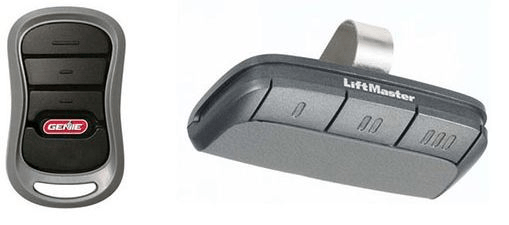
These additional buttons often control security features, lighting, programming modes, and smart integrations. Understanding them can improve convenience, safety, and even home security.
Read too: How To Replace Garage Door Roller Like a Pro? Step-by-Step Guide
In this guide, we’ll explain exactly what those extra buttons do and how to use them effectively.
What Are The Other Buttons On Garage Door Opener?
When people ask what are the other buttons on garage door opener, they’re usually referring to the secondary buttons on the wall-mounted control panel or handheld remote.
Besides the main open/close button, most modern garage door systems include several additional controls such as:
- Light button
- Lock button
- Learn/Program button
- Vacation mode button
- Motion sensor controls
- Smart connectivity buttons
These features are designed to improve security, automation, and ease of use.
According to the Door & Access Systems Manufacturers Association (DASMA), over 70% of garage doors in the United States now use automatic openers, and most modern units include multiple control buttons for advanced features.
Let’s break down what each button actually does.
The Light Button: Turning Garage Lights On or Off
One of the most common extra buttons on a garage door opener is the light button.
What the Light Button Does
The light button allows you to manually turn on or off the garage door opener’s built-in lights without opening the garage door.
Normally, these lights automatically turn on when the door opens and stay on for about 4–5 minutes.
Why It’s Useful
Benefits include:
- Provides instant lighting in dark garages
- Helps when working in the garage
- Improves safety when entering at night
Typical Location
You’ll usually find the light button:
- On the wall-mounted control panel
- Occasionally on smart garage apps
The Lock Button: Preventing Remote Access
Another commonly misunderstood control is the lock button, sometimes called vacation lock mode.
What the Lock Button Does
When activated, this button disables all remote controls connected to the garage door opener.
The wall control panel will still work, but remote transmitters will not open the door.
Why This Feature Matters
This prevents unauthorized access if someone steals or copies your remote signal.
Best Situations to Use It
- When you’re away on vacation
- During extended travel
- If you lose your garage remote
Security Benefit
Modern garage door systems use rolling code technology, meaning the signal changes after every use to prevent hacking.
More about how these systems work can be found here:
https://en.wikipedia.org/wiki/Garage_door_opener
The Learn Button: Programming Remotes and Keypads
The learn button is one of the most important buttons on a garage door opener.
However, it is usually located on the motor unit, not the wall control.
What the Learn Button Does
It allows you to:
- Program new remote controls
- Sync wireless keypads
- Connect smart garage hubs
- Reset the system memory
Where to Find It
The learn button is usually located:
- On the motor housing near the antenna wire
- Under a light cover panel
Common colors include:
- Yellow
- Purple
- Red
- Green
These colors indicate the frequency or technology generation used by the opener.
How To Program a Garage Door Remote (Step-by-Step)
If you’re trying to understand the learn button, here’s a simple programming process.
Step 1: Locate the Learn Button
Find the learn button on the opener motor.
Step 2: Press the Learn Button Once
A small LED light will turn on.
You now have 30 seconds to program the remote.
Step 3: Press the Remote Button
Hold the desired remote button for 2–3 seconds.
Step 4: Wait for Confirmation
The garage light will blink or you will hear a click.
This confirms the remote has been successfully paired.
Motion Detection Button or Feature
Many modern garage openers include motion sensors built into the wall control panel.
What It Does
The motion sensor automatically turns on the garage light when movement is detected.
Why It’s Helpful
Benefits include:
- Hands-free lighting
- Improved nighttime safety
- Energy efficiency
For example:
If you walk into the garage carrying groceries, the light turns on automatically.
Smart Garage Control Buttons
Newer garage door openers often include WiFi connectivity or smart home features.
These may include buttons for:
- WiFi setup
- Bluetooth pairing
- Smart assistant connection
With these features, you can control your garage door through a smartphone.
Popular capabilities include:
- Remote opening
- Security alerts
- Scheduled closing
- Delivery access
Comparison of Common Garage Door Opener Buttons
| Button | Function | Where It’s Located | Key Benefit |
|---|---|---|---|
| Main Button | Opens/closes door | Wall control | Basic operation |
| Light Button | Controls garage light | Wall control | Extra lighting |
| Lock Button | Disables remotes | Wall control | Security |
| Learn Button | Programs remotes | Motor unit | Device pairing |
| Motion Sensor | Auto lighting | Wall control | Hands-free use |
Understanding these buttons helps homeowners use their garage door system more effectively.
Why Modern Garage Door Openers Have Multiple Buttons
Garage door systems have evolved dramatically over the last two decades.
Older openers often had only a single open/close button.
Today, manufacturers add more buttons to provide:
Improved Security
Features like remote lock mode and rolling codes prevent unauthorized access.
Smart Home Integration
Many openers now work with:
- Smartphone apps
- Voice assistants
- Smart home hubs
Convenience
Extra controls simplify everyday tasks such as lighting and remote programming.
Common Mistakes When Using Garage Door Opener Buttons
Even though these buttons are helpful, homeowners sometimes misuse them.
Here are common mistakes.
Accidentally Activating Lock Mode
If the lock button is pressed unintentionally, remotes will stop working.
Many people think the opener is broken when it’s actually in lock mode.
Holding the Learn Button Too Long
Pressing and holding the learn button for 6–10 seconds can erase all programmed remotes.
This resets the system.
Ignoring the Motion Sensor
Some homeowners disable motion detection without realizing it improves safety.
How To Identify Your Garage Door Opener Buttons
If you’re unsure what your buttons do, follow these steps.
Step 1: Check the Wall Control Panel
Look for labeled buttons such as:
- Light
- Lock
- Program
Step 2: Inspect the Motor Unit
Open the light cover and locate the learn button.
Step 3: Check the Manufacturer Manual
Brands like LiftMaster, Chamberlain, and Genie include diagrams explaining every control.
Step 4: Test Each Button Safely
Press each button once and observe what happens.
Never hold buttons unless instructed in the manual.
FAQ About Garage Door Opener Buttons
What does the lock button on a garage door opener do?
The lock button disables all remote controls connected to the opener. This prevents unauthorized access and is commonly used when homeowners are away on vacation.
Why does my garage door remote stop working after pressing a button?
You may have accidentally activated lock mode on the wall control panel. Press the lock button again to restore remote functionality.
What is the learn button used for?
The learn button allows you to program new remotes, wireless keypads, and smart garage devices.
Can I reset my garage door opener using the learn button?
Yes. Holding the learn button for about 6–10 seconds clears all stored remote controls and resets the opener.
Do all garage door openers have extra buttons?
Most modern garage door openers include extra buttons for lighting, security, and programming features.
Older models may only have a single open/close button.
Why does my garage light turn on automatically?
Many garage door openers include a motion sensor feature that automatically turns on lights when movement is detected.
Conclusion
Understanding what are the other buttons on garage door opener can help you get far more value from your garage system.
These buttons—such as the light, lock, learn, and motion sensor controls—provide important benefits including improved security, convenience, and smarter home integration.
Instead of ignoring these controls, take a few minutes to explore how your garage opener works. Learning these simple features can make your daily routine easier and safer.
If you found this guide helpful, consider sharing it on social media so other homeowners can better understand the hidden functions of their garage door openers. 🚪



Leave a Reply