Programming your garage door opener to your car can transform your daily routine, offering convenience and security at your fingertips. If you’ve ever wondered how to connect your car’s built-in system to your garage door opener, you’re in the right place. This guide explains how to program your garage door opener in your car step by step, ensuring a hassle-free experience.
Why Program Your Garage Door Opener in Your Car?
Connecting your garage door opener to your car offers several advantages:
- Convenience: Open and close your garage without fumbling for a remote.
- Enhanced Safety: Built-in systems are more secure than standalone remotes, which can be misplaced or stolen.
- Streamlined Lifestyle: Manage multiple garage doors, gates, or even home lighting systems from your car.
What You Need Before Starting
To successfully program your garage door opener in your car, you’ll need:
- A compatible car with a built-in system like HomeLink or Car2U.
- Your garage door remote control.
- Access to the garage door opener motor, typically located in your garage ceiling.
- The car and garage door opener manuals for specific instructions.
Read too: Door and Garage Door Companies: Choosing the Right Partner for Your Needs
Step-by-Step Instructions: How To Program Your Garage Door Opener In Your Car
Follow these steps to program your garage door opener to your car effectively.
Step 1: Check Compatibility
Before proceeding, ensure your car’s built-in system is compatible with your garage door opener. Most modern vehicles and openers are compatible, but some older models may require additional adapters.
Step 2: Locate the Programming Buttons
- In your car: Find the buttons for the built-in system (e.g., HomeLink or Car2U). These are usually on the rearview mirror, overhead console, or visor.
- On the remote: Identify the button you use to operate your garage door.
- On the opener: Locate the “Learn” or “Program” button on your garage door motor unit.
Step 3: Clear Existing Settings (If Necessary)
If the system in your car has been used before, clear the previous programming to ensure a fresh start. For example, on HomeLink systems:
- Turn on your car’s ignition.
- Press and hold the first and third buttons on the system until the indicator light blinks rapidly (about 20 seconds).
Step 4: Start the Programming Process
For HomeLink Systems:
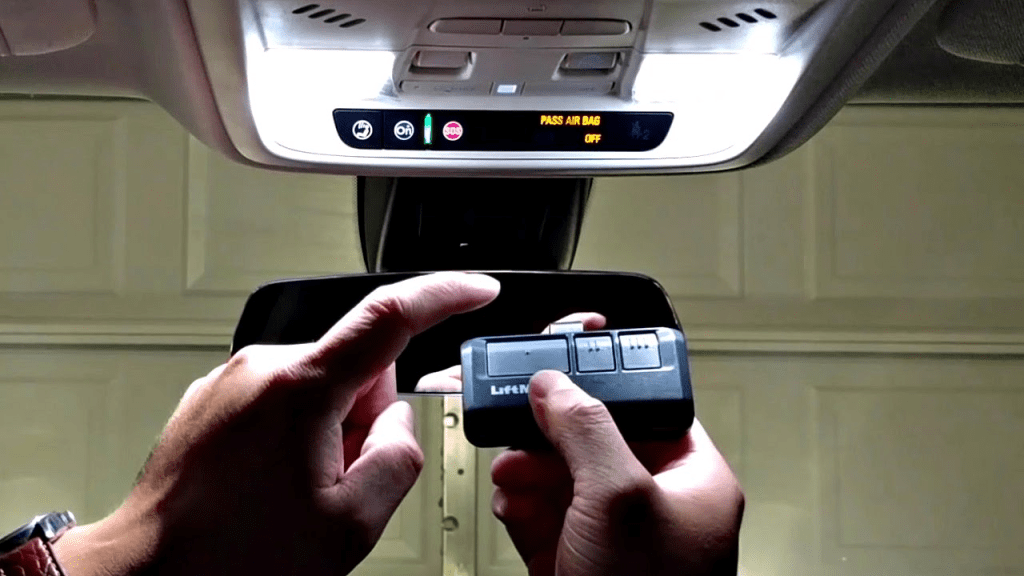
- Position the remote: Hold your garage door remote 1–3 inches away from the HomeLink buttons.
- Simultaneously press buttons: Press and hold the remote’s button and the desired HomeLink button in your car.
- Wait for the indicator light: The HomeLink light will blink slowly at first, then rapidly. Release the buttons when the rapid blinking starts.
For Car2U Systems:
- Press the desired Car2U button and the remote’s button simultaneously.
- Hold both buttons until the Car2U indicator light flashes rapidly.
Step 5: Sync with the Garage Door Opener
To finalize the setup, synchronize the car system with your garage door opener motor:
- Press the “Learn” or “Program” button on the motor unit.
- Return to your car and press the programmed button (HomeLink or Car2U) for 2–3 seconds.
- Repeat if necessary.
Step 6: Test the System
Press the programmed button in your car to ensure the garage door opens and closes. If it doesn’t respond, repeat the process, ensuring proper timing and positioning.
Tips for Successful Programming
- Follow the Manual: Always refer to your car and garage door opener manuals for specific guidance.
- Work Quickly: Timing is essential, especially when syncing with the garage door opener motor.
- Check the Remote: Ensure your garage door remote has fresh batteries and is functional.
Advanced Features of Modern Garage Door Opener Systems
Modern garage door opener systems offer more than just basic programming. Here are some advanced features to consider:
- Rolling Code Technology: This security feature changes the access code with every use, preventing code theft.
- Smart Home Integration: Control your garage door through smartphone apps for added convenience.
- Multiple Device Support: Program your car’s system to operate multiple garage doors or gates.
Troubleshooting Common Issues
The Garage Door Doesn’t Respond
- Solution: Ensure the car system and the opener are within range and compatible. Replace the remote batteries if necessary.
The Indicator Light Doesn’t Blink
- Solution: Clear previous programming and try again. Ensure the remote is close enough to the car’s buttons during setup.
The Door Only Partially Opens
- Solution: Reprogram the system, ensuring proper synchronization with the garage door motor.
How To Program Your Garage Door Opener In Your Car for Multiple Doors
If you have multiple garage doors, you can program different buttons for each:
- Repeat the steps for each garage door opener.
- Use a separate HomeLink or Car2U button for each door.
Frequently Asked Questions
1. Can I program my car to operate a gate?
Yes, the same process applies for gates with compatible systems.
2. Do I need to reprogram the system if I replace the garage door opener?
Yes, you’ll need to clear the old settings and program the new opener.
3. What should I do if my garage door opener doesn’t have a “Learn” button?
Older models may use DIP switches for programming. Consult the manual for specific instructions.
Conclusion
Learning how to program your garage door opener in your car is a straightforward process that enhances your daily convenience and security. By following this guide, you can seamlessly integrate your car’s system with your garage door opener, ensuring effortless access every time. With proper setup and troubleshooting, you’ll enjoy the benefits of modern technology right at your fingertips.



Leave a Reply