How to Reset Craftsman Garage Door Opener 1/2 HP? Garage doors are essential to the convenience and security of your home, and your Craftsman garage door opener 1/2 HP is at the heart of this functionality. However, like all technology, garage door openers may encounter issues or require maintenance over time. One of the most common problems is a need to reset the Craftsman garage door opener to restore its optimal function.
Whether you’re facing difficulties with your remote control, the door opener is not responding, or you simply need to adjust the settings, knowing how to reset Craftsman garage door opener 1/2 HP can save you time and money. In this article, we’ll provide a comprehensive guide to help you reset your Craftsman garage door opener and get it running smoothly again.
Why Would You Need to Reset Your Craftsman Garage Door Opener 1/2 HP?
Before diving into the steps, let’s understand why a reset might be necessary. There are several reasons why your Craftsman garage door opener 1/2 HP might need a reset:
1. Remote Control Issues
If your garage door opener’s remote control has stopped working, or if you’ve recently changed the batteries and it’s still not functioning, resetting the system might be the solution. Sometimes, the remote’s signal needs to be re-synced with the garage door opener.
Read too: Door and Garage Door Companies: Choosing the Right Partner for Your Needs
2. Programming Problems
If you’ve added a new remote or keypad, and the opener is not responding as expected, resetting the opener can help it “learn” new devices and clear any old, incorrect settings.
3. Obstructions or Malfunctions
When your garage door opener starts malfunctioning, resetting it can often help clear any internal software issues or sensor misalignments.
4. To Clear Memory
If you’ve purchased a used Craftsman garage door opener or have moved into a new home, you might need to reset the opener to clear any previous programming or to remove codes from previous owners.
5. Power Surges or Outages
Power surges or outages can disrupt the garage door opener’s settings, causing it to stop working correctly. Resetting it can restore normal function.
Now, let’s go over how to reset your Craftsman garage door opener 1/2 HP effectively.
How to Reset Craftsman Garage Door Opener 1/2 HP: Step-by-Step Instructions
Resetting your Craftsman garage door opener 1/2 HP is a fairly simple process, but it requires a few careful steps to ensure that everything is correctly reset. Here’s how to do it:
Step 1: Disconnect Power from the Opener
The first step in resetting your Craftsman garage door opener is to disconnect the power. This can be done in the following ways:
- Unplug the Opener: Locate the power cord of the garage door opener and unplug it from the electrical outlet.
- Turn Off the Circuit Breaker: Alternatively, you can switch off the circuit breaker that powers your garage door opener. This is especially useful if your opener is hardwired.
Step 2: Locate the “Learn” Button
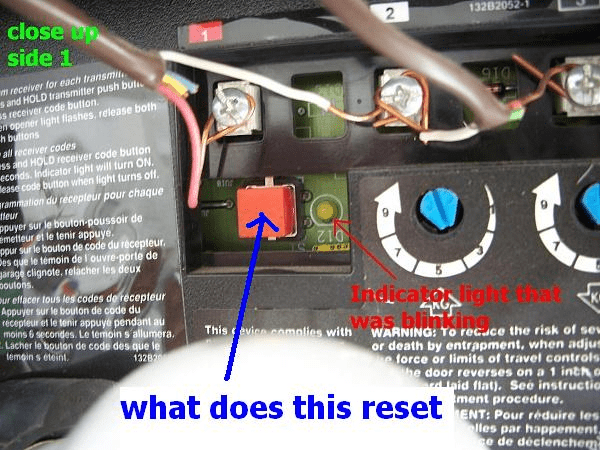
Once the power has been disconnected, the next step is to locate the “Learn” button on the Craftsman garage door opener. This button is essential for resetting the system and is typically found on the back or side of the motor unit. The location may vary depending on the model, but here’s how you can typically find it:
- The “Learn” button is usually near the antenna wire or on the back panel of the opener.
- It may be colored red, yellow, or green, depending on the model.
Step 3: Press and Hold the Learn Button
Once you’ve located the “Learn” button, press and hold it for about 6 seconds. You’ll notice that the indicator light will either begin to blink or turn off. This action clears the current programming and resets the system.
- Blinking Light: If the light starts blinking, it means the opener is in programming mode.
- Solid Light: If the light turns solid, it means that the reset process was successful.
If the light does not come on or blink, try repeating the process and make sure the button is held long enough.
Step 4: Reconnect the Power
After the reset process, it’s time to reconnect the power to the opener. You can do this by plugging it back into the outlet or turning the circuit breaker back on. Once the opener has power, it should be ready to learn new codes.
Step 5: Reprogram the Remote or Keypad
Once you’ve reset the opener, it’s time to reprogram your remote control or keypad. This step is important if you’ve removed previous programming or want to add new remotes to the system.
To reprogram the remote:
- Press the Learn Button Again: Press the “Learn” button on the opener again. The indicator light should blink.
- Press the Button on Your Remote: Within 30 seconds of pressing the Learn button, press and hold the button on your remote control that you want to program. Hold it for a few seconds until the indicator light on the opener turns solid.
- Test the Remote: Press the programmed button on the remote to see if it opens or closes the garage door. If the door responds, the remote has been successfully programmed.
If you’re using a keypad:
- Press the Learn button on the opener.
- Enter the desired code on your keypad within 30 seconds.
- Wait for the light to turn on, signaling that the keypad is programmed.
Step 6: Test the Garage Door Opener
Finally, test the garage door opener to ensure it functions properly after the reset. Check for smooth operation, proper response from the remote, and ensure the safety sensors are working correctly.
Troubleshooting Tips for Craftsman Garage Door Opener 1/2 HP Reset
If you encounter any issues while resetting your Craftsman garage door opener 1/2 HP, try these troubleshooting tips:
1. No Response from Remote Control
If the garage door opener does not respond to the remote control after a reset:
- Check Batteries: Ensure that the batteries in the remote are fresh and properly installed.
- Reprogram the Remote: Follow the reprogramming steps above, ensuring the remote is within range of the opener.
2. Opener Light Does Not Blink
If the indicator light on the opener does not blink or turn off after pressing the “Learn” button:
- Try Holding the Button Longer: Some models require you to hold the Learn button for longer than 6 seconds.
- Ensure Proper Power Supply: Make sure the opener is properly connected to the power source.
3. Door Not Opening or Closing Correctly
If the garage door doesn’t respond properly to the opener after resetting:
- Check for Obstructions: Make sure there are no obstructions in the garage door’s path.
- Inspect the Sensors: Verify that the safety sensors are aligned and clean.
- Check for Force Adjustment: You may need to adjust the force settings on the opener if the door is not moving properly.
Conclusion: How to Reset Craftsman Garage Door Opener 1/2 HP
Resetting your Craftsman garage door opener 1/2 HP is a simple process that can solve a wide range of issues, from remote control malfunctions to power surges. By following the steps outlined in this guide, you can easily reset your garage door opener and restore its functionality. Whether you’re reprogramming remotes, fixing software glitches, or simply clearing memory, a reset is often the key to resolving problems and ensuring smooth operation.
Remember to regularly test your opener after resetting it and always check for power issues, obstructions, or sensor misalignments. If problems persist, consider consulting a professional technician for further assistance.



Leave a Reply