Programming your car’s garage door opener without a remote might seem challenging, but it’s easier than you think. In today’s world, where convenience is a top priority, being able to open and close your garage door without stepping out of your car can save you time and effort. Whether you’ve lost your garage door opener remote or simply prefer not to rely on one, learning how to program car garage door openers without a remote is a skill worth having.
In this article, we will explore the process of programming your car’s garage door opener without needing a remote. We’ll break down the steps, explain the necessary tools, and provide useful troubleshooting tips to ensure you can successfully program your car’s opener to your garage door.
Understanding How Car Garage Door Openers Work
Before diving into the process, it’s essential to understand how car garage door openers typically function. Most modern vehicles come equipped with a built-in garage door opener system, such as HomeLink or Car2U, that allows you to control your garage door directly from your car. These systems work by emitting a signal that communicates with the garage door opener’s motor unit.
While many garage door openers use a remote control to transmit signals, it’s also possible to program these openers without a physical remote. Instead, you can use the buttons installed in your car and sync them directly with the opener system.
If you have lost your garage door opener remote or are simply looking for a more streamlined way to open your garage door, you can still program your car to operate the garage door. Below is a guide to help you through this process.
Read too: Door and Garage Door Companies: Choosing the Right Partner for Your Needs
How To Program Car Garage Door Opener Without A Remote: Step-by-Step Instructions
Step 1: Verify Your Garage Door Opener System
Before starting the programming process, you need to ensure that your garage door opener system is compatible with your car’s built-in opener system. In most cases, you’ll need a rolling code opener system, which provides an added layer of security by frequently changing the access code. Older garage door systems may not work with newer car garage door openers, so it’s important to confirm compatibility beforehand.
If your car features HomeLink or a similar system, it’s designed to work with most garage door opener brands. Refer to the manual of your vehicle or opener to ensure they are compatible.
Step 2: Prepare Your Vehicle and Garage Door Opener
Now that you’ve confirmed compatibility, follow these steps to prepare both your vehicle and your garage door opener:
- Sit in the Car: Sit comfortably in the driver’s seat of your car. Make sure the ignition is in the “on” position, but your engine doesn’t need to be running.
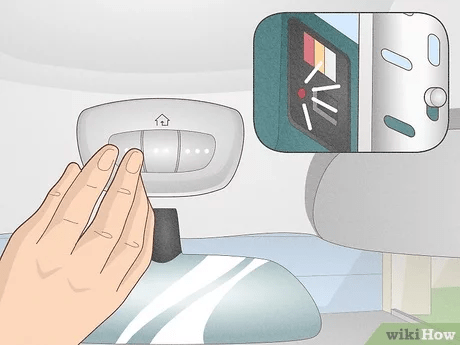
- Locate Your Car’s Garage Door Opener Button: Depending on the make and model of your car, the garage door opener button may be on the rearview mirror, the overhead console, or the sun visor. These buttons are often labeled with a house or garage door symbol.
- Find the “Learn” or “Program” Button on Your Garage Door Opener: Head to your garage and locate the motor unit of your garage door opener, typically mounted near the ceiling. On this unit, you will find a button labeled “Learn” or “Program.” This button is essential for syncing your car to the garage door opener. Keep the garage door opener within reach.
- Clear Previous Codes (Optional): If your vehicle has previously been programmed to operate other garage door openers, you may want to clear those codes before programming the new one. To do this, press and hold the button on your car’s system until the light begins to flash (usually 20 seconds). This will ensure that no conflicting codes remain.
Step 3: Program the Car’s Garage Door Opener Without a Remote
Now that both the car and the garage door opener are prepared, follow these steps to program your vehicle’s garage door opener system without needing a remote:
- Press the “Learn” Button on the Opener: On the motor unit of your garage door opener, press and release the “Learn” or “Program” button. After pressing the button, an indicator light will turn on and remain lit for 30 seconds. During this time, you must program your vehicle to the opener.
- Press and Hold the Button in Your Car: Within 30 seconds, return to your car and press and hold the button you wish to use for the garage door opener. Hold it down for about 20 seconds, or until the light on your vehicle’s button changes from a slow blink to a solid light. This indicates that your car has successfully received the signal from the opener.
- Test the Connection: After completing these steps, test the connection by pressing the programmed button. If successful, your garage door should open or close in response to your car’s signal. If it doesn’t work immediately, repeat the process from Step 2, ensuring you’re following the timing correctly.
Step 4: Finalizing the Programming
After you’ve tested the system and confirmed the door is responding to your car’s signal, you’re good to go! However, it’s important to note that some vehicles may need additional programming steps or may have multiple buttons for different garage doors (for example, if you have more than one garage door or access point).
- Repeat for Multiple Doors (Optional): If you want to program additional buttons for other garage doors, repeat the steps above for each button you want to use. Simply press the “Learn” button on the motor unit and then program the next button in your car.
- Ensure Range and Security: Make sure that your car’s garage door opener system operates at a sufficient range. This means you should be able to open or close the garage door from a reasonable distance (typically within a 100-foot range).
Troubleshooting: What To Do If Programming Doesn’t Work
If you’ve followed the steps above but your car’s garage door opener still doesn’t work, don’t panic. There are several common reasons why programming might fail:
- Incorrect Timing: The most common issue is not completing the steps within the required time limits. Be sure that you press the “Learn” button and then return to the car within 30 seconds. You may need to reset and start over.
- Battery Issues: If the opener’s motor unit has a low battery, it may fail to transmit the signal to your vehicle. Check the opener’s battery and replace it if necessary.
- Interference: Electrical interference from nearby devices (such as wireless routers or other garage openers) can cause issues with programming. Try programming the opener from a different location.
- Consult the Manual: Some vehicles or garage door openers have specific programming requirements. If you’re still having trouble, refer to the owner’s manual for both your vehicle and the opener for further troubleshooting tips.
Conclusion: Enjoy the Convenience of Programming Your Car Garage Door Opener Without a Remote
Learning how to program car garage door openers without a remote is a useful skill that adds both convenience and security to your daily life. Whether you’ve lost your remote, want to streamline your garage access, or prefer a more tech-savvy approach, the steps outlined in this guide will help you get the job done.
By following the instructions above and troubleshooting any issues that arise, you can enjoy the ease of accessing your garage without needing a remote control. Programming your car’s garage door opener is a simple, effective solution to save time and enhance your home’s security.



Leave a Reply